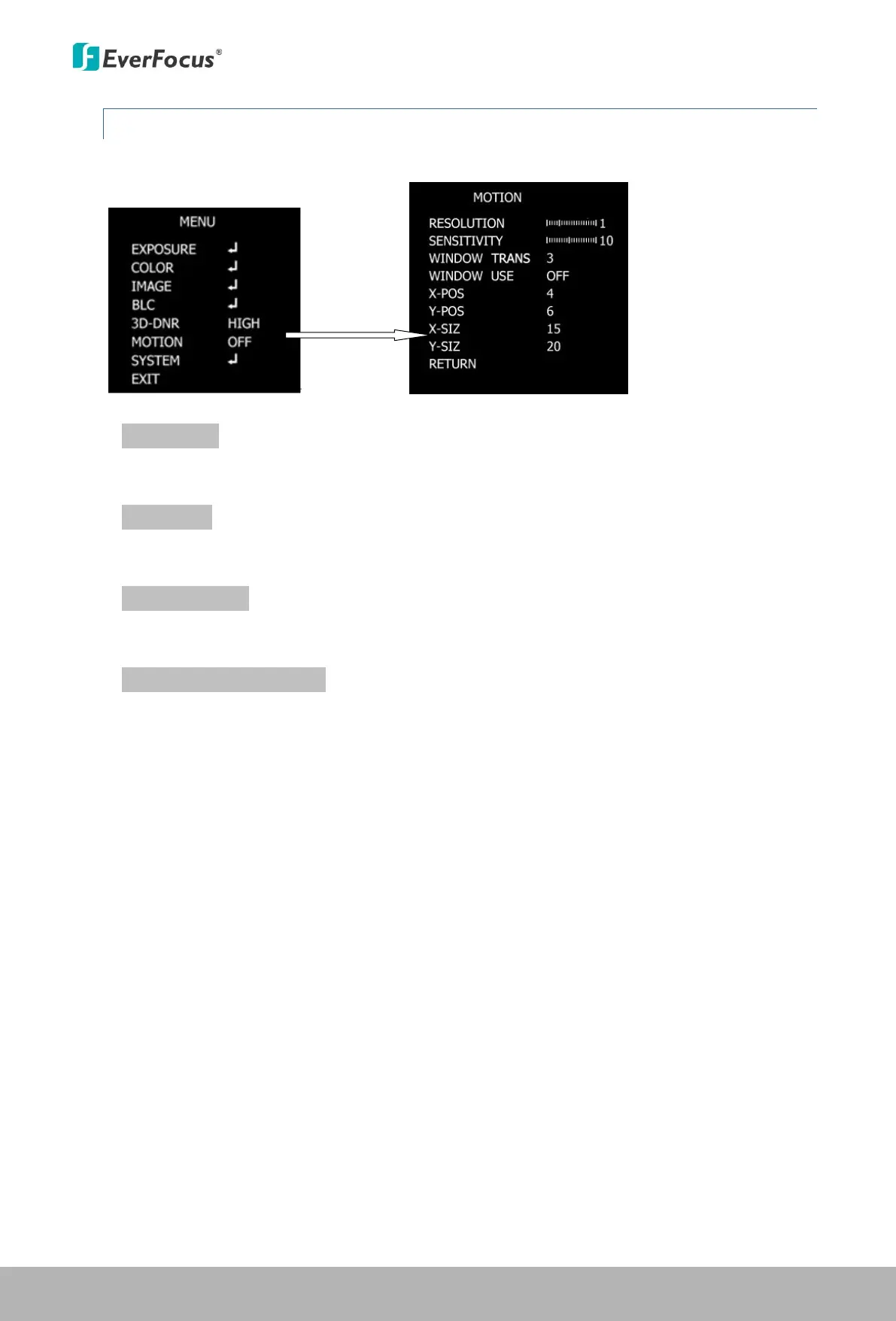
4.1.6 Motion
Press the Enter / Confirm button to enter the submenu.
RESOLUTION
Use the and buttons to increase or decrease the RESOLUTION level from 0 to 4.
SENSITIVITY
Press to set up the sensitivity for the motion detection function.
WINDOW TRANS
Press to select the transparency of motion detect zone.
WINDOW USE, POS and SIZ
Select OFF to disable this function, or select ON to enable and for further setup. After
selecting an area block, enter the BLC POS / SIZ and X / Y setup page, a “POSITION” sign
displayed on the screen. Use the direction buttons to move the area to the desired position.
Press the Enter / Confirm button to confirm the position, a “SIZE” sign displayed on the screen.
Use the direction buttons to adjust the size for the area.
This Manual:http://www.manuallib.com/everfocus/eqh5102-mini-ir-bullet-camera-manual.html


 To Next Page