16
2.10 Client end and playing software
2.10.1 Client end installation & running
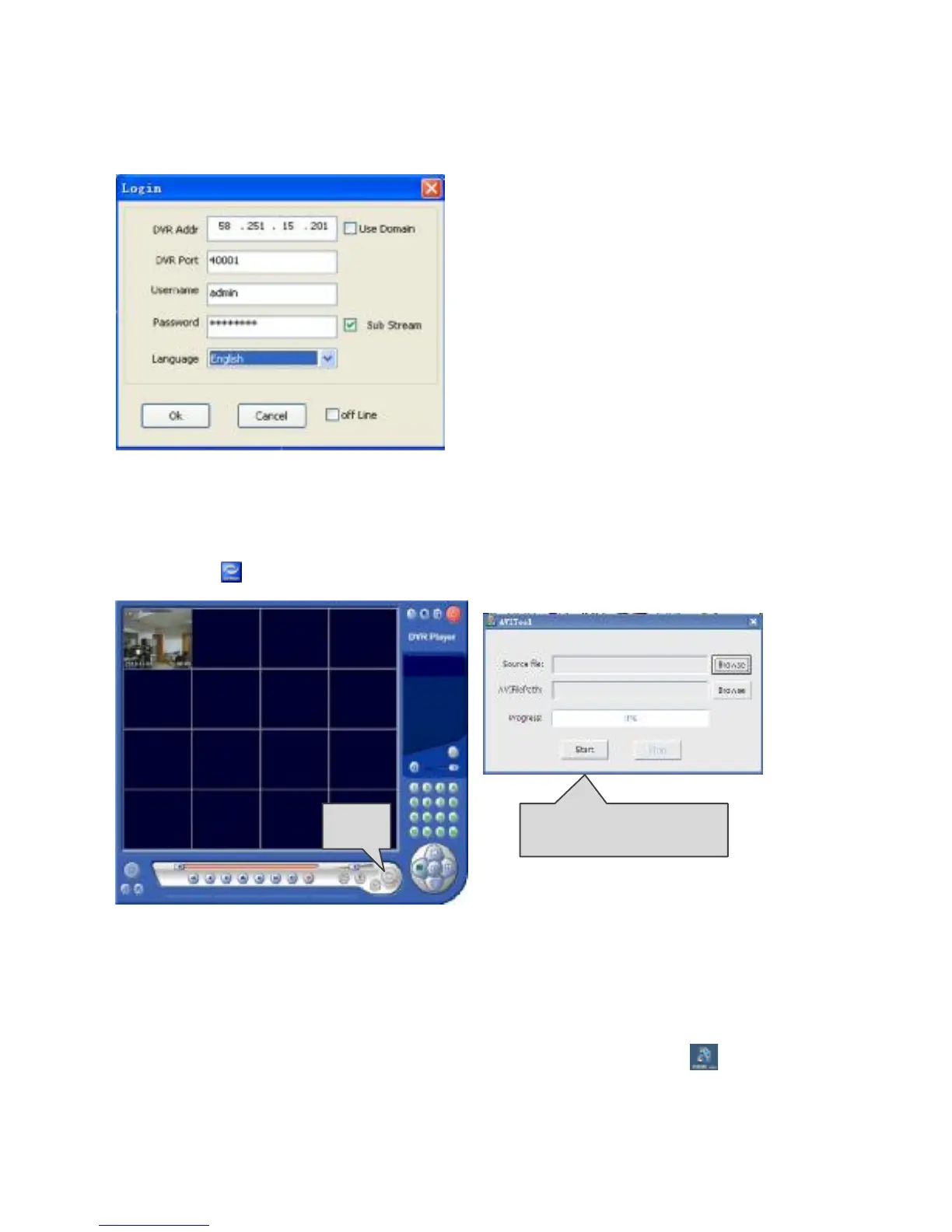
Open the “DVRClient.exe” in the CD, as shown in the following interface:
DVR Addr:IP address assigned to the DVR.
Use Domain:Enable the Domain of the DVR
DVR Port:DVR media port
Username:Default is admin
Sub Stream: When selected, the DVR’s
network will transmit in sub stream;
otherwise, the DVR will transmit in sub
stream.
Off-line:If selected, it can become a player
to play local video files.
2.10.2 Playback software
Since the video is in H.264 format, it will need a special player.Open the player file
"player.exe"( ) in the CD, as shown below:
2.11 Central Management Software (TUTIS CMS)
This system supports connection to DVR through Internet, not through the support of
intermediate server. It is convenient for user’s management.
Software installation: Double click to run CD file “TUTIS CMS. msi”, and finish as
prompted. After successful installation, double click desktop icon and run the
software. As shown in the following picture:
【User name】: Create the user name to login
Open





 To Next Page