5
Ver. 0517
8 USER INSTRUCTIONS
The information in this section of the manual regards the user or other non-specialized personnel (see par. 1.3 in the “Instruction
and Maintenance Manual”).
After the appliance has been installed in accordance with the instructions of section 3 of the “Instruction and Maintenance Manual”,
it is ready for use.
8.1 CONTROLS
According to the models, the appliance is equipped of different types of controls:
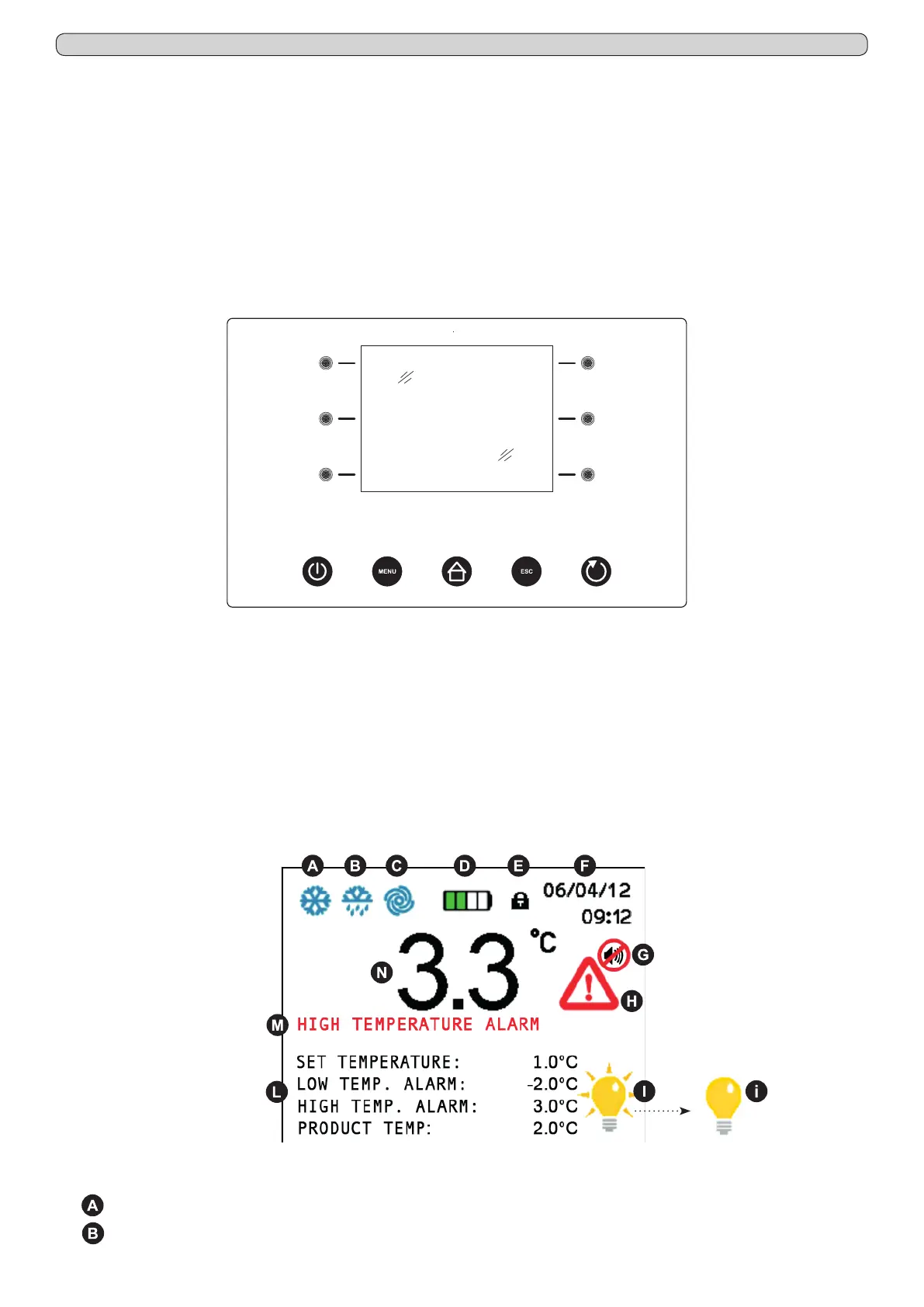
- xPRO control panel (Fig.10)
- Temperature chart recorder (Fig.22)
8.1.1 Description of controls and touch-buttons of the xPRO control panel (Fig.10)
The appliance is equipped with the following controls:
- Display (1). Showing and controlling the temperature and the various machine functioning states
- Capacitive touch-buttons (2), (3), (4), (5), (6), (7). Allow various functions according to the OSD (on screen display) menu
shown on the display
- ON/OFF touch-button (8). Allows the display/appliance switching ON and OFF
- MENU touch-button (9). Allows to enter into the main menu
- HOME touch-button (10). Allows (if back-lightened) to return back to the home (main) screen-shot
- ESC touch-button (11). Allows to return back to the previous menu
- ENTER touch-button (12). Allows to enter/conrm the variations made on the function/menu shown on the display
8.1.2 The display (1) and the functioning indications (Fig.11)
The display shows the below listed icons/indications that, if enlightened, give indications/alert of the running functions:
-
COMPRESSOR: lights steadily when the compressor is running, blinks in case of starting delay or when protection is active
-
DEFROST: lights steadily during defrosting cycle
Fig.10
(1)
(5)
(6)
(2)
(3)
(4) (7)
(8) (9) (10) (11) (12)
Fig.11


 To Next Page