Model 5700MSC
Master Clock System
Page - 4 Revision 1.0
• None – The 5700MSC will not acquire time from any outside source. The time and date must be
manually entered using the front panel in the GENERAL menu. The high frequency stability of
the unit and battery backup will ensure the 5700MSC keeps fairly accurate time.
• SNTP – The 5700MSC can synchronize once daily to time and date from an NTP server.
• 1588 – The 5700MSC can synchronize with a PTP master to determine the time and date.
1.6. CHECKING THE STATUS OF THE UNIT
After the input references are connected and set up, the status of the unit can be checked by pressing
the STATUS button on the front panel. There are several different status screens which can be
selected by using the control knob or the and buttons. The status of the frequency and time
references can be viewed by choosing the Lock status screen and pressing SELECT. Press ESC to
return to the status menu to select another screen for viewing. Any screen name that is highlighted with
a red or yellow background indicates that one of the statuses in that screen is in a fault or warning
condition.
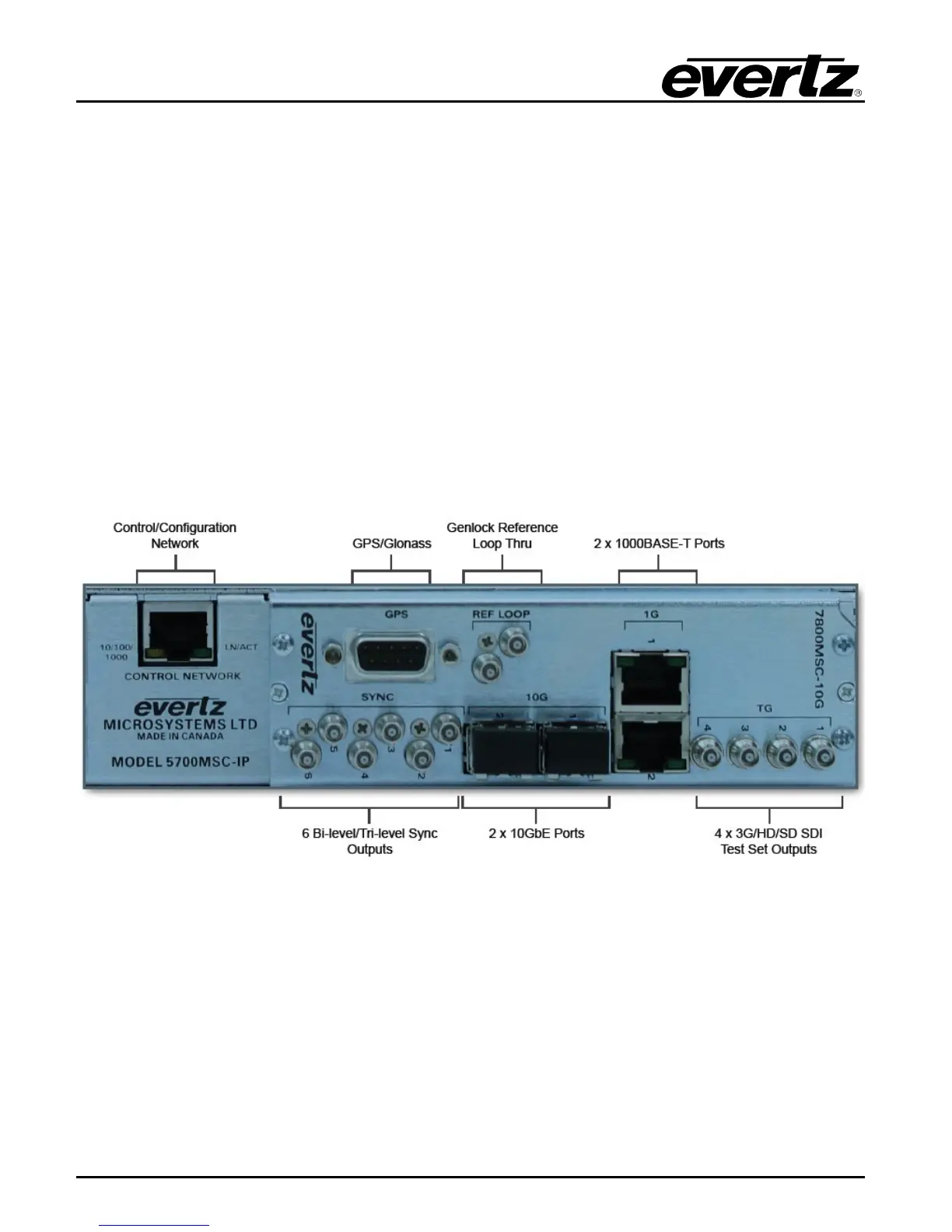
Figure 1-2: 5700MSC Rear Panel View
1.7. WIRING THE OUTPUTS
Most outputs are provided as Mini-BNC connectors and wiring is straightforward. The GigE 1 and GigE
2 ports use a standard RJ-45 connector, and the 10GbE ports require an SFP10G-TR13-A (not
included).


 To Next Page