EasyManua.ls Logo

Everwell DT201D - User Manual

Everwell DT201D
16 pages
Print Icon
To Next Page IconTo Next Page
Loading...
OPERATOR’S
INSTRUCTION
MANUAL
DT201D
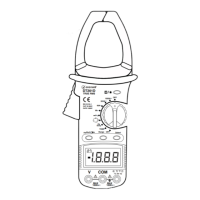
Auto Range Digital Clamp Meter
WARNING
READ AND UNDERSTAND THIS MANUAL
BEFORE USING THE INSTRUMENT.
DT201D
TRUE RMS
EN 61010-1
CAT III 600V
CATII 1000V
OFF
1000A
600A
60A
VA
mV
Hz
Duty
Hz/Duty
TEMP
COM
MAX
1000v
MAX
1000v
V
OFF
Select
Range
1.8.8.8
Question and Answer IconNeed help?

Do you have a question about the Everwell DT201D and is the answer not in the manual?

Overview

The Everwell DT201D is an auto-range digital clamp meter designed for a variety of electrical measurements. This compact, handheld, and battery-operated instrument is capable of performing AC/DC voltage, AC current, resistance, audible continuity, diode, and temperature measurements. It features a 3 5/6 digits, 6000-count LCD display that updates 2 times per second, providing clear and precise readings. The meter is designed to conform to EN61010-1 standards, with an over-voltage category of CAT III 600V and CAT II 1000V, and a pollution degree of 2, ensuring safe operation in various environments.

Function Description:

The core function of the DT201D is its ability to measure electrical parameters without direct contact with the conductor, thanks to its transformer jaws. These jaws allow for the measurement of AC current flowing through a conductor by simply clamping around it. The trigger mechanism facilitates easy opening and closing of the jaws.

Beyond current measurement, the device offers comprehensive voltage measurement capabilities for both AC and DC circuits. Users can select between V (voltage) or mV (millivolt) ranges and choose between AC or DC voltage tests using the "SELECT" key. The meter automatically indicates the polarity of the RED lead connection during DC measurements.

Resistance measurement is another key feature, allowing users to determine the electrical resistance of a component or circuit. The function switch can be set to the appropriate resistance range, and the "SELECT" button is used to choose the resistance measurement mode, indicated by the "MΩ" symbol. For in-circuit resistance measurements, it is crucial to ensure that all power is removed and capacitors are fully discharged to prevent damage to the meter or the circuit under test.

The continuity test function helps identify complete electrical paths. When the resistance in a circuit is below approximately 30Ω, the built-in buzzer will sound, indicating continuity. If the resistance is between 30Ω and 100Ω, the buzzer may or may not sound, and it will not sound if the resistance exceeds 100Ω.

Diode testing allows for the verification of diode functionality by measuring the approximate forward voltage drop. The meter displays "OL" if the connections are reversed, indicating an open circuit.

Temperature measurement is facilitated by a K-type thermocouple, which connects to the input jacks. Users can set the function switch to the "TEMP" position and place the thermocouple sensor on or inside the object to be measured. The display shows the temperature in Celsius (°C), and the "SELECT" button allows for conversion between Fahrenheit and Celsius.

The DT201D also includes capacitance measurement, where test leads are connected across the capacitor. For capacitances above 100uF, it is important to allow at least 5 seconds for readings to stabilize.

Frequency and duty cycle measurements are available. The "Hz/Duty" button allows selection between Hz or DUTY CYCLE measurement. Frequency can also be measured through the clamp for AC current.

Usage Features:

The DT201D is designed for ease of use with several user-friendly features:

  • Auto-Ranging: For AC/DC voltage, AC current, and resistance measurements, the meter automatically selects the appropriate range, simplifying operation. Users can also manually select ranges by pushing the "RANGE" button.
  • True-RMS: The meter provides True-RMS measurements for AC voltage and AC current, ensuring accurate readings for non-sinusoidal waveforms.
  • Data Hold: The "D. Hold" button allows users to freeze the current reading on the LCD, indicated by an "H" symbol. This is useful for recording measurements in difficult-to-view locations.
  • Backlight: Pushing the "D. Hold" button for more than 3 seconds activates the backlight, which automatically turns off after 15 seconds to conserve battery.
  • MAX/MIN Display: The meter can display maximum and minimum readings, which is helpful for monitoring fluctuations over time.
  • Automatic Power-Off (APO): To conserve battery life, the meter automatically turns off after approximately 15 minutes of inactivity. It can be reactivated by rotating the range switch or pressing any button.
  • Low Battery Indication: A low battery symbol appears on the display when the battery needs replacement, ensuring continuous accurate operation.
  • Over-range Indication: The display shows "OL" when the measured value exceeds the selected range.
  • Polarity Indication: For DC measurements, the meter automatically indicates the polarity.

Maintenance Features:

Proper maintenance ensures the longevity and accuracy of the DT201D:

  • Regular Inspection: Before each use, inspect the meter's case for any damage, cracks, or missing plastic, and check the insulation around the connectors. Also, inspect the test leads for damaged insulation or exposed metal and verify their continuity.
  • Cleaning: The surface of the meter should be cleaned with a soft cloth and mild detergent. Abrasive cleaners or solvents should be avoided to prevent corrosion or damage.
  • Battery Replacement: When the low battery indicator appears, the 9V battery (NEOA 1604, 6F22 equivalent) should be replaced immediately. To do this, remove the screws and open the back case. It is recommended to remove the battery if the meter will not be used for an extended period to prevent leakage, which can damage the instrument.
  • Storage: Store the meter in an environment free from high temperatures, humidity, explosive or inflammable materials, and strong magnetic fields.
  • Authorized Servicing: For any internal circuit alterations or repairs, only use the same model number or identical electrical specifications replacement parts. Unauthorized alterations can damage the meter and pose safety risks.
  • Safety Precautions: Always adhere to the safety rules outlined in the manual, such as disconnecting circuit power and discharging high-voltage capacitors before testing resistance, continuity, or diodes. Keep fingers behind the finger guards when using test leads. Do not apply voltage exceeding the meter's rated limits. Ensure the rotary switch is in the correct position before measurement and avoid changing ranges during measurement to prevent damage. Special care should be taken when working with effective voltages over 60V DC or 30V RMS AC due to the risk of electric shock.

Everwell DT201D Specifications

General IconGeneral
TypeDigital Thermometer
Accuracy±0.1°C (±0.2°F)
Resolution0.1°C (0.1°F)
DisplayLCD
Battery1.5V DC (LR41 or SR41)
WaterproofYes