EVGA Z370 MICRO (121-KS-E375)
- 95 -
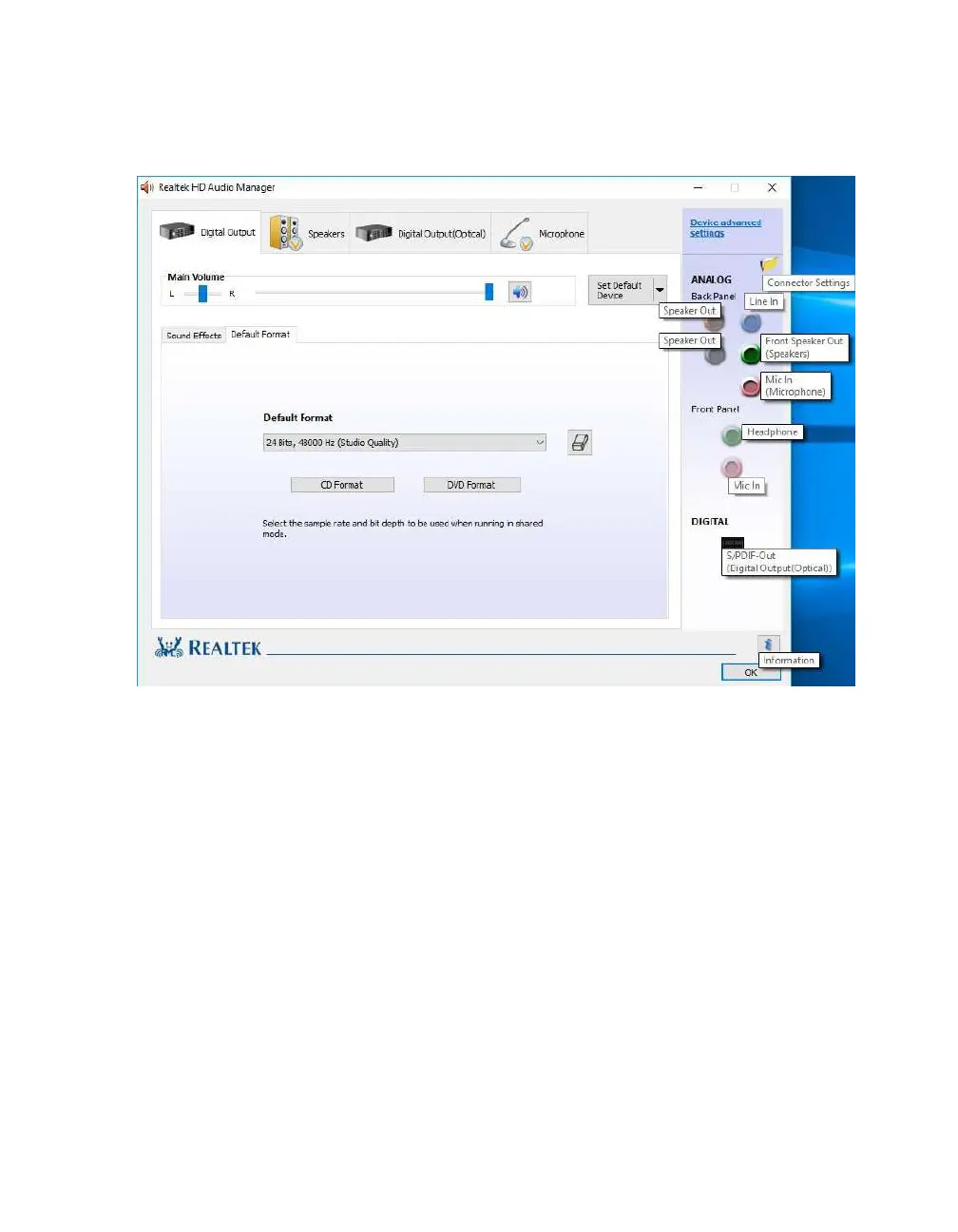
On the right margin, you can see the different ports labeled in the picture above. The
top portion covers the five (5) analog ports on the I/O Hub. The two (2) labeled
“Speaker Out” ports and “Line In” port all use a diffused color to show that a port is
not currently connected; conversely, “Front Speaker Out (Speakers)” and “Mic In
(Microphone)” use a solid color to show that the ports are currently connected. For
locations and a picture of the ports, please see Page 11 component number 25 and Page
13 for the I/O Hub component number 8, respectively.
The center section of the side panel is for Front Panel Audio. Front Panel Audio
ONLY supports 2.0/2.1 speakers, or headphones and a standard microphone. These
are only usable if you are using a front panel connector, such as a 5 ¼ bay device with
audio connectors or the front panel audio pre-attached to your chassis. The Front panel
header can be found in the component legend on Page 11/12 component number 20,
additional port information on Page 18, and a header pinout on Page 42.
The bottom section of the side panel is “DIGITAL.” This represents connections via
optical S/PDIF, typically going to a receiver or TV. For locations and a picture of the
port, please see Page 11 component number 25 and Page 13 for the I/O Hub



 To Next Page