EVGA Z370 MICRO (121-KS-E375)
- 98 -
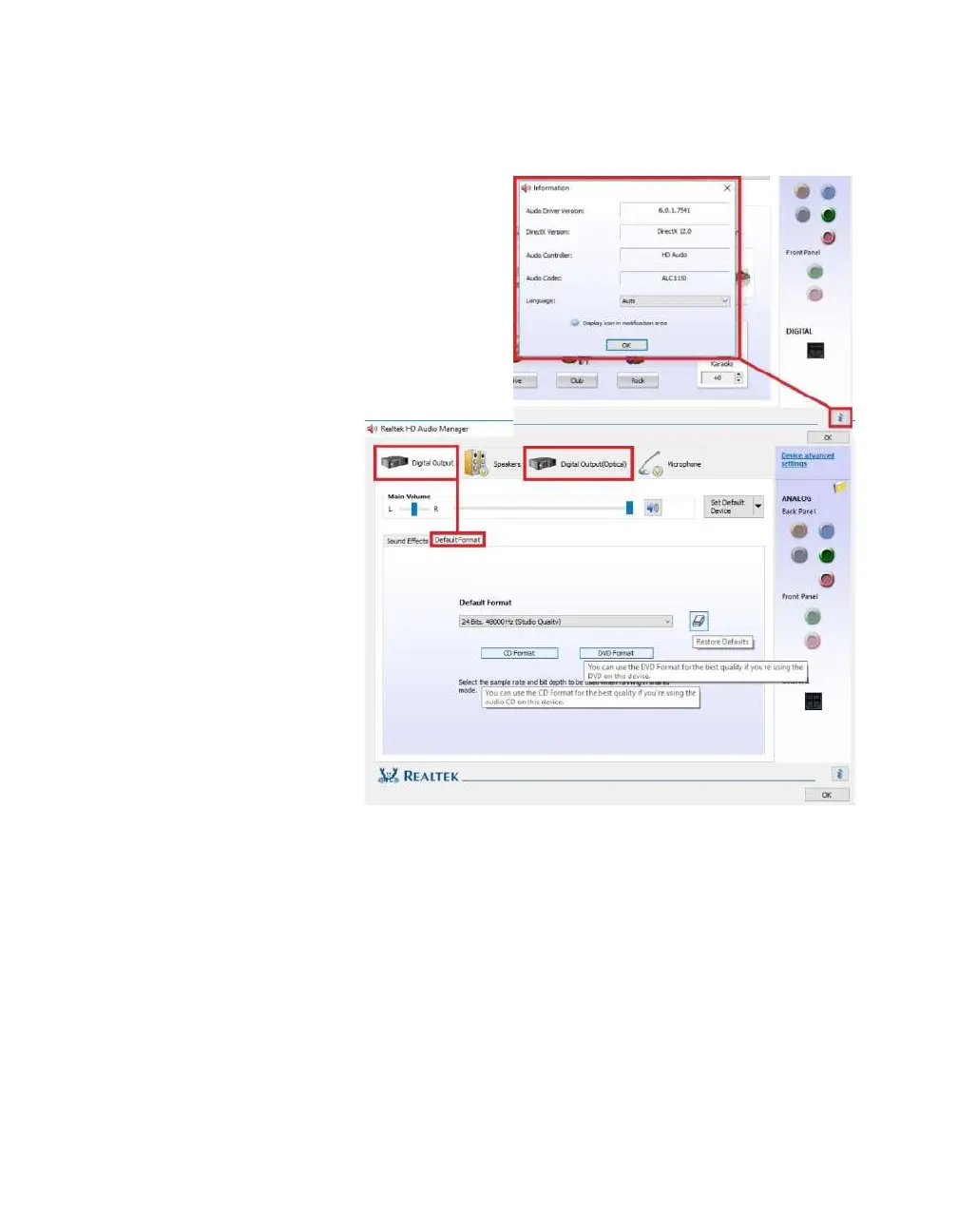
The “i” located at the bottom right of the
Manager is an information button. Clicking
on this will provide DirectX information,
the CODEC and Language selection
options.
The main page defaults to
the first audio device it
detects; device response
time to the controller can
vary, so the order listed
here may not be the order
ALL components are
detected. The Manager
will generally only show
devices detected by the
motherboard. For
purposes of this guide,
speakers, a microphone,
and a TOSLINK digital
audio cable are
connected. As a result,
the Manager detects the Digital Output first. You should also see a “Digital Output
(Optical)” at the top. This shares all the same options as “Digital Output;” the
difference is strictly connection type.
In the “Default Format” section, there are a couple basic selections of “CD Quality”
and “DVD Quality,” which allow you to select optimized presets based on standards of
how the media is recorded and written to a disk for those formats. Use the pulldown
menu if you prefer to set the bit-rate and frequency yourself. All audio devices shown
will have a Default Format section. Adjusting the frequency too low will heavily reduce
audio quality, moving it too high can impact overall performance and cause other
anomalies.



 To Next Page