- 10 -
Daylight Saving Time
Press the ▲▼ button to select Daylight Saving Time and press the ◄► button to
select On or Off. Press the SETUP button to return to the previous menu.
Clock
Press the ▲▼ button to select Clock to display the system time. Press the SETUP
button to return to the previous menu.
Note: This item is only available under signal mode.
¾ Option Setting
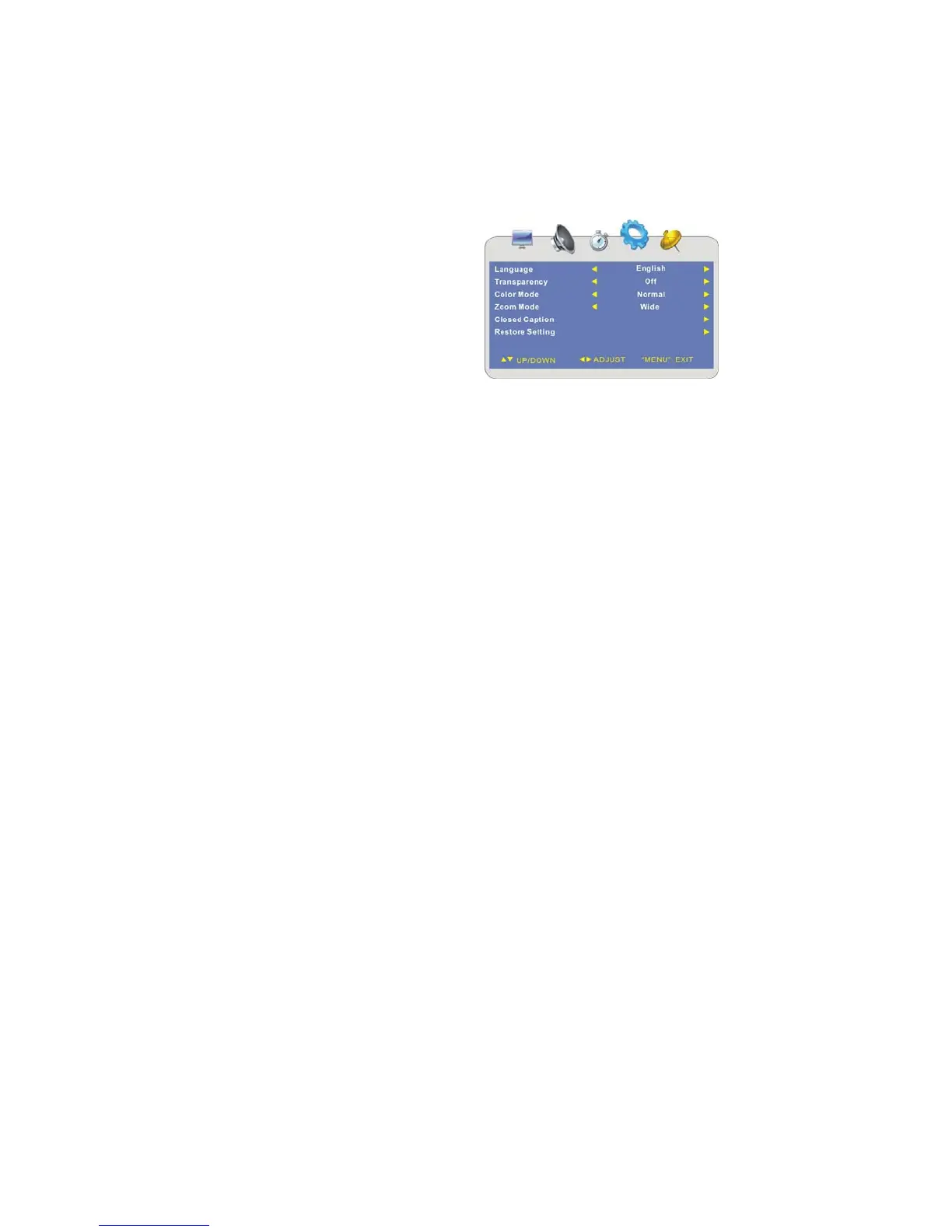
Press the MENU button once to enter the
setup menu. Press the ◄► button to
select OPTION and to enter the menu
shown on the right.
In the menu, press the ▲▼ button to
select the desired item.
Press the MENU button to exit the menu.
Language
Press the ▲▼ button to select Menu Language and press the ◄► button to select the
desired language.
Transparency
Press the ▲▼ button to select Transparency and press the ◄► button to select On or
Off.
Color Mode
Press the ▲▼ button to select Color Mode and press the ◄► button to select Normal,
Warm or Cool.
Zoom Mode
Press the ▲▼ button to select Zoom Mode and press the ◄► button to select Normal
or Wide.



 To Next Page