- 8 -
Doing More
All buttons and controls are described on the board unless otherwise specified.
ATSC SETUP
After connection, press the MENU button to enter the TV SETUP menu, press it again
to exit from the menu.
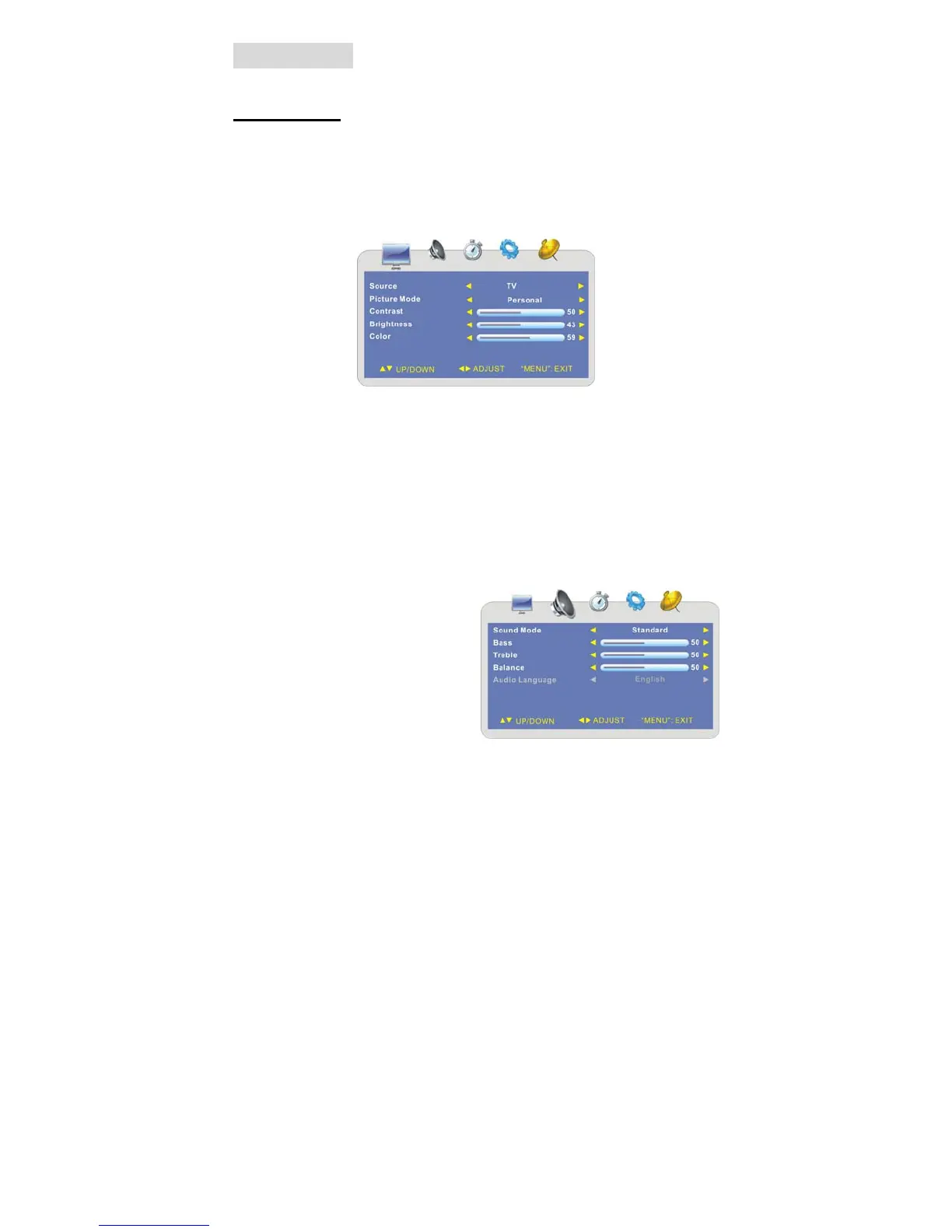
¾ Picture Setting
Press the button to shift among the submenus.
Press thebutton to select the desired item. Press the MENU button to exit the menu.
Source
Press the ▲▼ button to select Source and press the ◄► button to select TV, AV.
Picture Mode
Press the ▲▼ button to select Picture Mode and press the ◄► button to select
Personal, Standard, Dynamic or Soft.
Contrast (Brightness, Color)
Press the ▲▼ button to select Contrast/Brightness/Color) and press the ◄► button
to enter the menu shown on the right. Within the menu, press the ◄► button to adjust
the value. Press the MENU button to return to the previous menu.
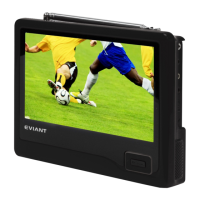
¾ Audio Setting
Press the MENU button once to enter the
setup menu. Press the ◄► button to
select AUDIO and to enter the menu
shown on the right.
In the menu, press the ▲▼ button to
select the desired item. Press the MENU
button to exit the menu.



 To Next Page