- 9 -
Sound Mode
Press the ▲▼ button to select Sound Mode and press the ◄► button to select
Personal, Standard, Music or Movie.
Bass
Press the ▲▼button to select Bass and press the ◄► button to adjust the level.
Balance
Press the ▲▼ button to select Balance and press the ◄► button to adjust the level.
Treble
Press the ▲▼button to select Treble and press the ◄► button to adjust the level.
Press the MENU button to return to the previous menu.
Audio Language
Press the ▲▼ button to select Audio Language and press the ◄► button to select the
desired audio language. Press the MENU button to return to the previous menu.
Note: This item is only available under ATSC signal mode.
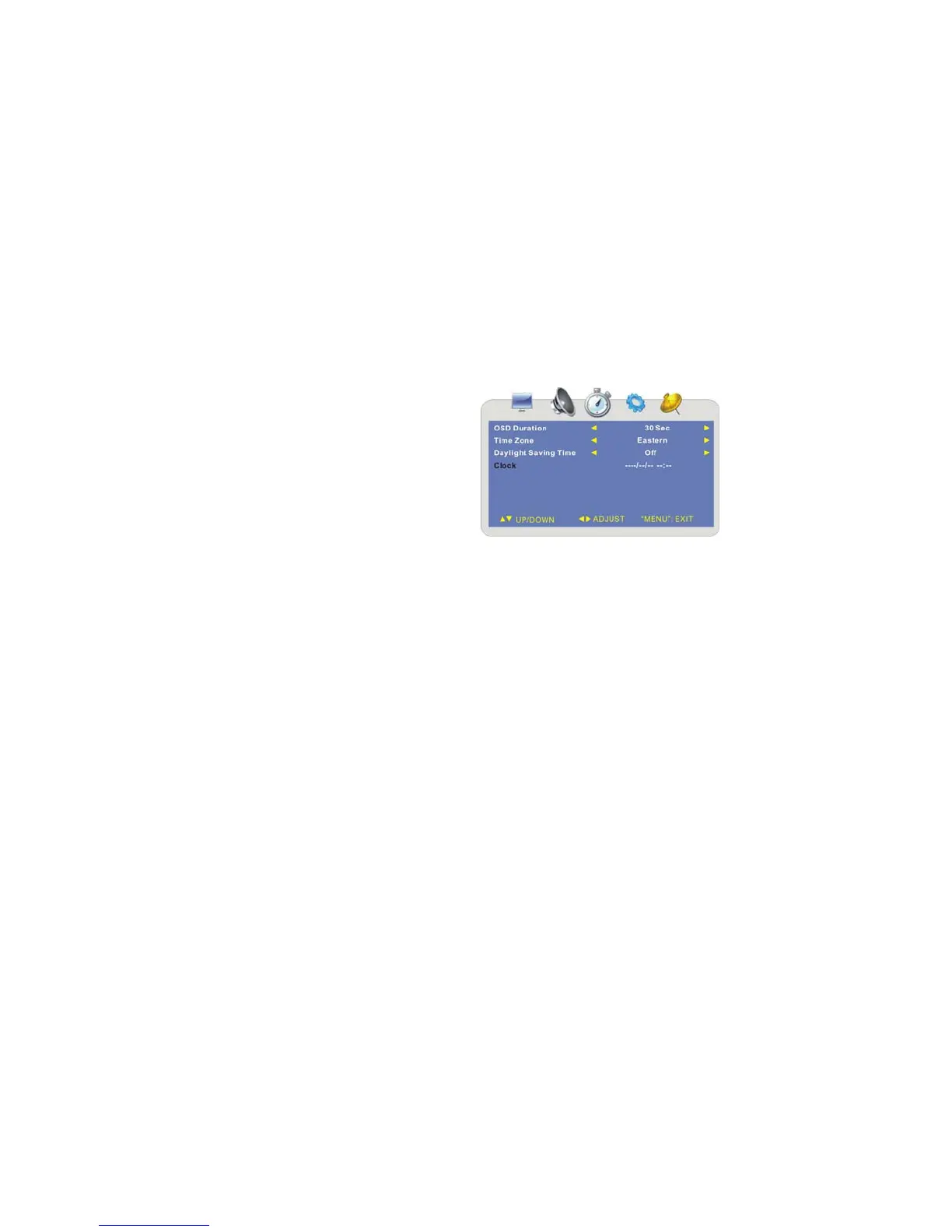
¾ Time Setting
Press the MENU button once to enter the
setup menu. Press the ◄► button to
select TIME and to enter the menu shown
on the right.
In the menu, press the ▲▼ button to
select the desired item.
Press the MENU button to exit the menu.
OSD Duration
Press the ▲▼ button to select OSD Duration and press the ◄► button to select the
desired value of the time the menu will be displayed on the screen.
Time Zone
Press the ▲▼ button to select Time Zone and press the ◄► button to select the
desired time zone.



 To Next Page