® BPM68 ® BPM68
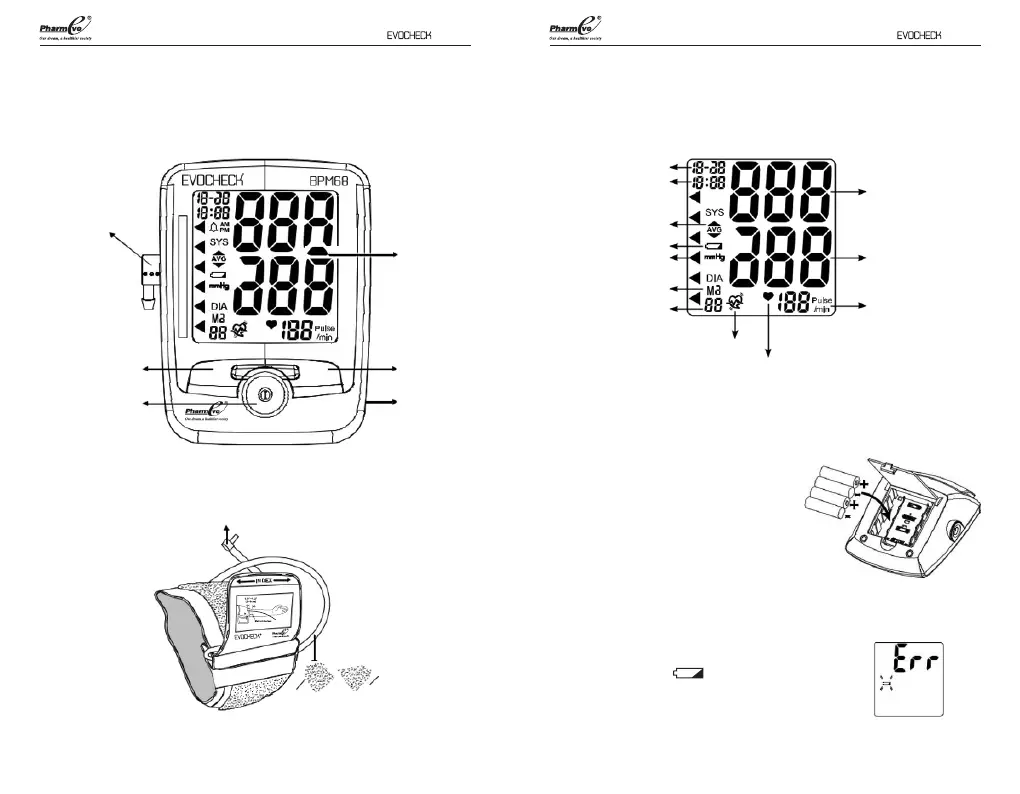
EVOCHECK® BPM68 Overview Overview of Display
Air Socket
(insert Air
connector
plug here)
M1 MEMORY
Recall Button
START/POWER
Button (on/o)
Air Connector Plug
(connects to Air socket)
Air tube
AC Adapter
Port
M2 MEMORY
Recall Button
LCD Display
Date
Time
Systolic Pressure
Diastolic Pressure
Pulse Rate
Heartbeat Symbol
Irregular Heart
Beat Symbol
Average Measurement
Symbol
Low Battery Symbol
WHO indicator
Memory Symbol
Memory Set
76
Battery Installation
1. Press down on latch and lift the cover
on the bottom of the monitor.
2. Insert or replace 4 x 1.5 V AAA alkaline
batteries into the battery compartment,
ensuring to match the indicated polarity
symbols. Always use new batteries.
3. Replace the battery cover.
Low battery warning:
It is necessary to replace the batteries when the
Low Battery symbol “ ” appears on the display,
or when the display does not turn on after the
POWER button is pressed.


 To Next Page