® BPM68 ® BPM68
Setting the Date and Time
It is necessary to set the date and time for the unit every time batteries
are initially installed or replaced.
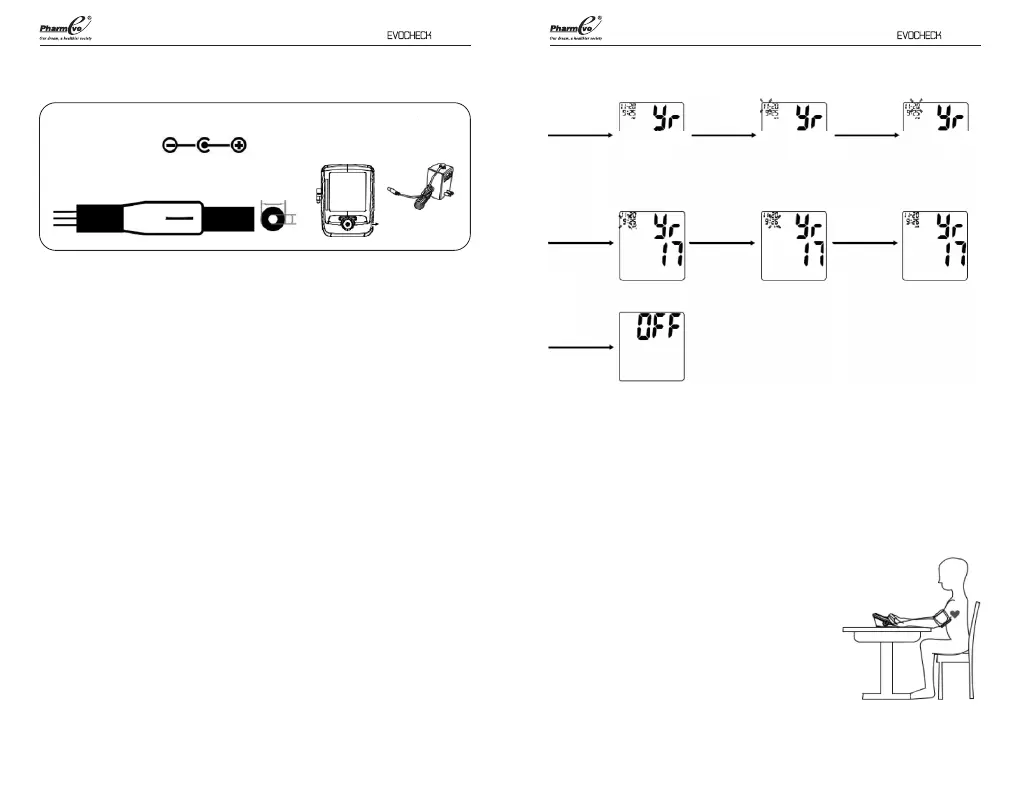
1. Loading 4 AAA alkaline batteries; the year will begin to ash on the
display.
2. Press the “M1” button to proceed the display to the desired year,
press “M2” button to conrm the year.
3. Next, the month will blink. Repeat step 2 to set the month and date,
then hours, then minutes.
4. After setting the minutes, the unit will automatically exit out of the
date/time setting mode and briey show the word OFF before
shutting down.
NOTE: Battery-operated
1. Please properly dispose of the batteries away from small children and heat.
2. It is recommended to remove the batteries if the unit will not be used for an
extended period of time.
3. Batteries must be disposed of in accordance with local environmental and
institutional policies.
AC Power Adapter (not included)
Adapter polarity:
Input: AC 100~240V 60Hz
Output: DC 6V 1.0A
AC Adapter Port
AC Power Adapter
(not included)
Load
Batteries
Press the
“M2” button
Month will
blink
Press the
“M2” button
Date will
blink
Year will
blink
Press the
“M2” button
Press the
“M2” button
Hour will
blink
Press the
“M2” button
Minute
will blink
Press the
“M2” button
Setting
saved
Placement of the Pressure Sleeve (Cu)
It is important to avoid smoking, eating, taking medication, alcohol
consumption or physical activity 30 minutes prior to taking a reading If for
any reason you are unable to use or should not use your left arm, please
modify the instructions for cu application to your right arm. Your
physician can help you identify which arm is best for you to take
measurements from.
1. Remove any constrictive clothing or jewellery that
may interfere with cu placement.
2. Be seated at a table or desk with your feet
at on the oor.
3. The cu should not be plugged into the monitor
until after the cu is applied to your arm.
98


 To Next Page