62
Configuring Evolis Print Center
When first installing the Evolis Print Center, the magnetic encoder functions may need to be configured. The magnetic encoder functions are accessible
from the Evolis Print Center by right clicking on the printer name, then clicking on Properties.
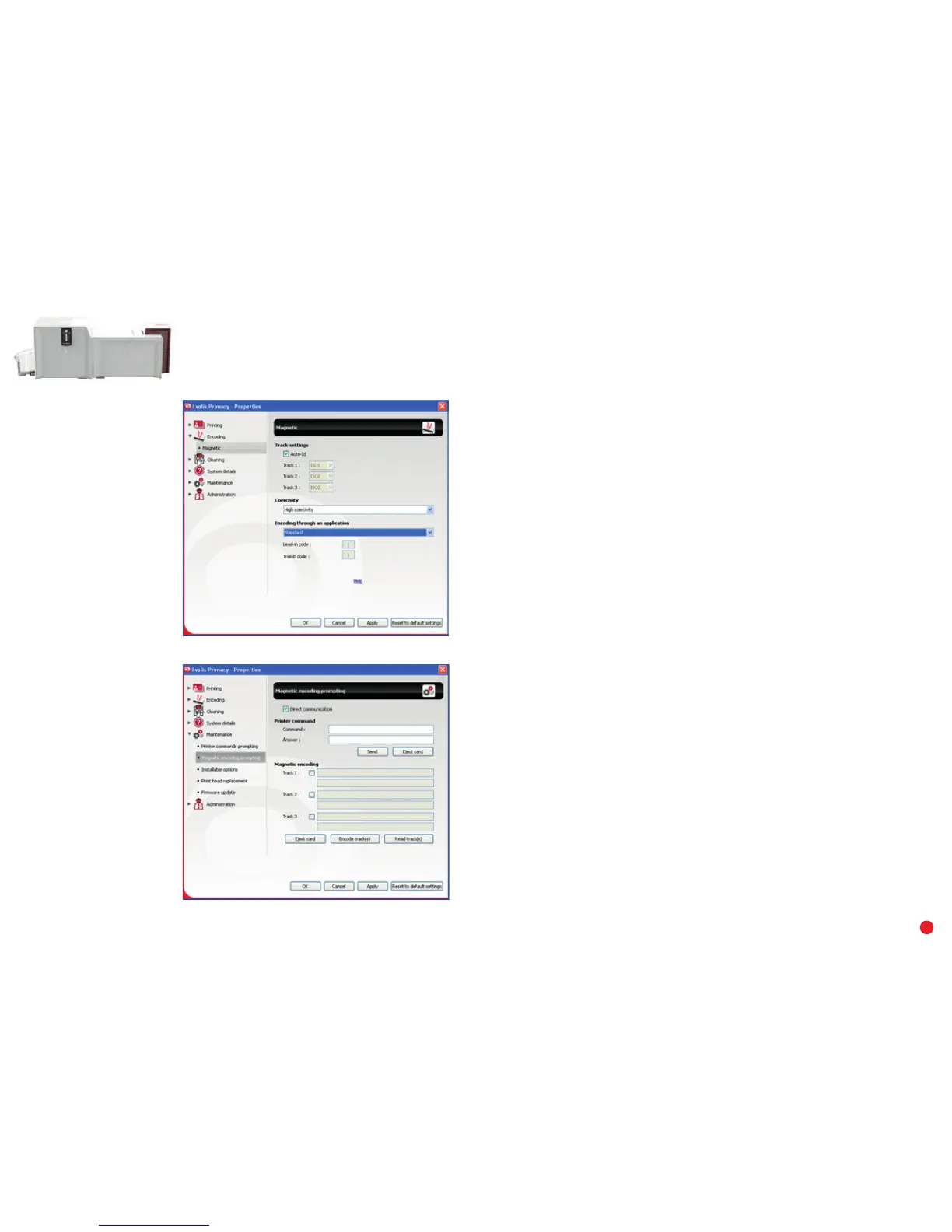
“Magnetic Encoder” dialog box
The Magnetic Encoder dialog box is opened by selecting Encoding then Magnetic.
Configure stripees allows you to select the desired format for each stripe. See the table in
this Appendix for information regarding ISO 7811 standards.
Coercivity sets the magnetic encoding to high (HiCo) or low (LoCo) coercivity.
Encoding via an application allows cards with magnetic stripees to be encoded from Windows
®
applications (such as Word for example). A text field enclosed within “|” and “|” characters
(or some other character which the user can define) will be interpreted as an encoding
command by print driver.
Under Maintenance then Magnetic encoder dialog, Magnetic encoding is used to directly
encode one or more magnetic stripees from this window simply by selecting them and
entering the data to be encoded according to the stripe settings. Click on the Encode stripe(s)
button to run the encoding cycle.



 To Next Page