15
Evolution UC-33 Advanced User Guide
Note: Restoring the Factory presets will erase all UC-33 setups stored to memory.
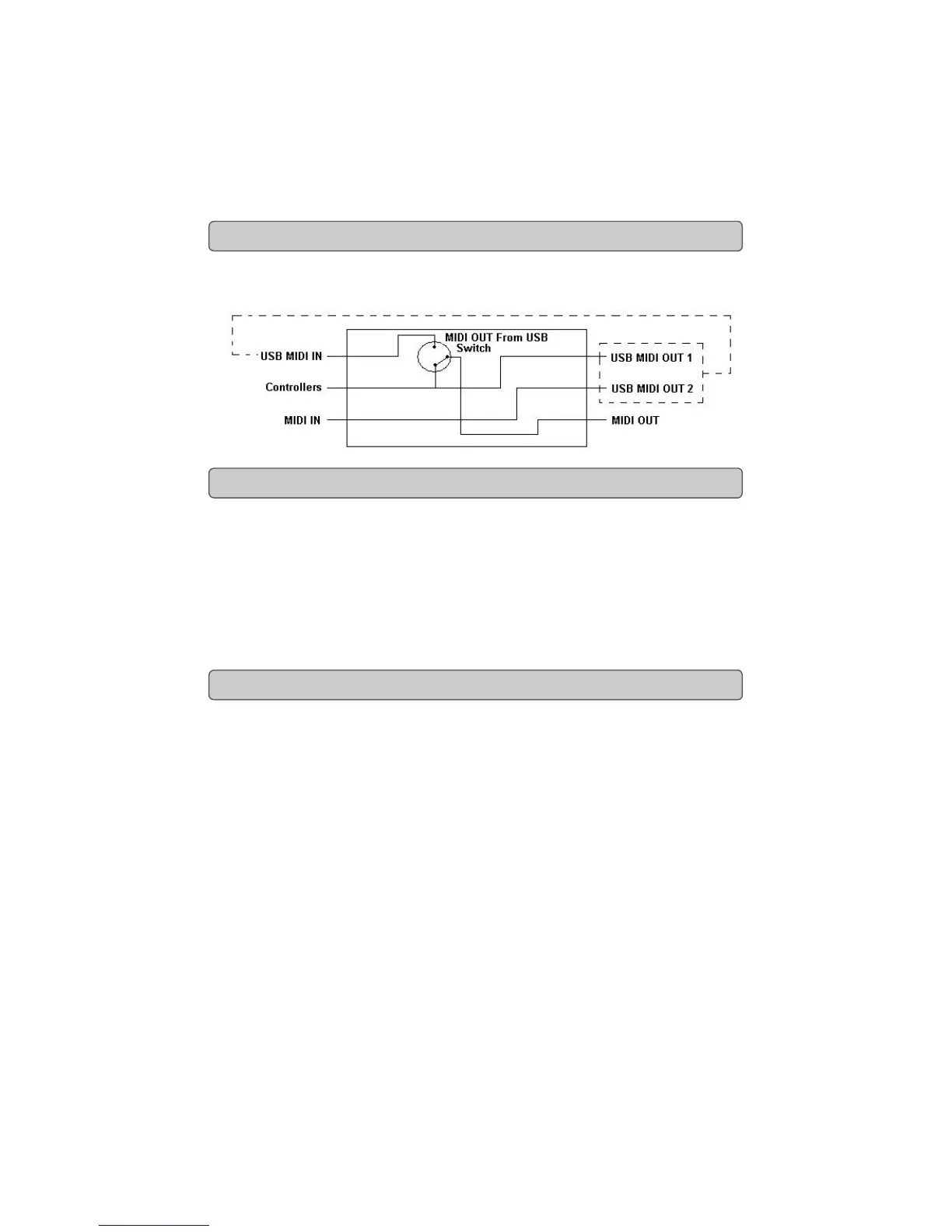
The MIDI IN & MIDI OUT ports have different uses depending on how you intend to
connect and power the UC-33. The diagram below shows the different routing
options.
The MIDI in plug can be used to interface another MIDI device to your PC, via the USB
port. Data received from this device will be transmitted via the UC-33 to the PC. This is
achieved using a second USB MIDI out. So, when you select the MIDI devices section of
your sequencer you will see two UC-33 USB MIDI Ins. The first of these is used to receive
the UC-33 controller data, the second is used to receive data from the other device con-
nected to the UC-33's MIDI IN plug. So, the UC-33 is acting as a MIDI-to- USB interface
for the other MIDI device.
The UC-33 can of course also interface with other MIDI devices. By default (I.e. when you
switch the unit on), all controller data is sent out via the MIDI output as well as the USB
out.
If you want the MIDI output to act like a traditional USB-to-MIDI interface, just press the
two buttons (SELECT and ASSIGN) that activate the MIDI OUT from USB mode.
If you are using a host application which can pick up multiple input drivers, you will be
able to use the UC-33’s MIDI input and the UC-33 surface to record MIDI data and send
the whole lot out of the UC-33’s MIDI output.
Important note: The UC-33 is not a MIDI THRU device and as such, MIDI data received
at the UC-33's MIDI IN plug can never be sent directly to the UC-33's MIDI OUT plug.
However, if the UC-33 is connected via USB to a computer, data received at the MIDI IN
can be transmitted to the MIDI OUT plug, since the data is sent to the computer, and
received back from the computer. MIDI OUT FROM USB mode must be engaged for this
to occur.
MIDI In & MIDI Out Signal Flow Diagram
About The MIDI In Port
About The MIDI Out Port



 To Next Page