70
6) Receiving calls: When the call is answered, this button changes to the Hang up
button.
7) Opening the door lock: Click to open the door lock that is connected to the
outdoor unit.
8)
V
ideo storage: Saving a video
- By pressing the button, you can save the video. (When you set the auto-save
mode, the video will be saved automatically.)
- Max. 80 seconds per video (60s connection + 20s call)
- While saving, the icon below will be displayed and the time remaining will b
e
d
isplayed at the top right.
- To stop saving, touch the icon.
9)
S
aving images: Saving a cutout of an image.
- When you touch the button, you can save images, and the icon below will b
e
d
isplayed during saving.
10)
S
iren: Alarm activation on the outdoor unit.
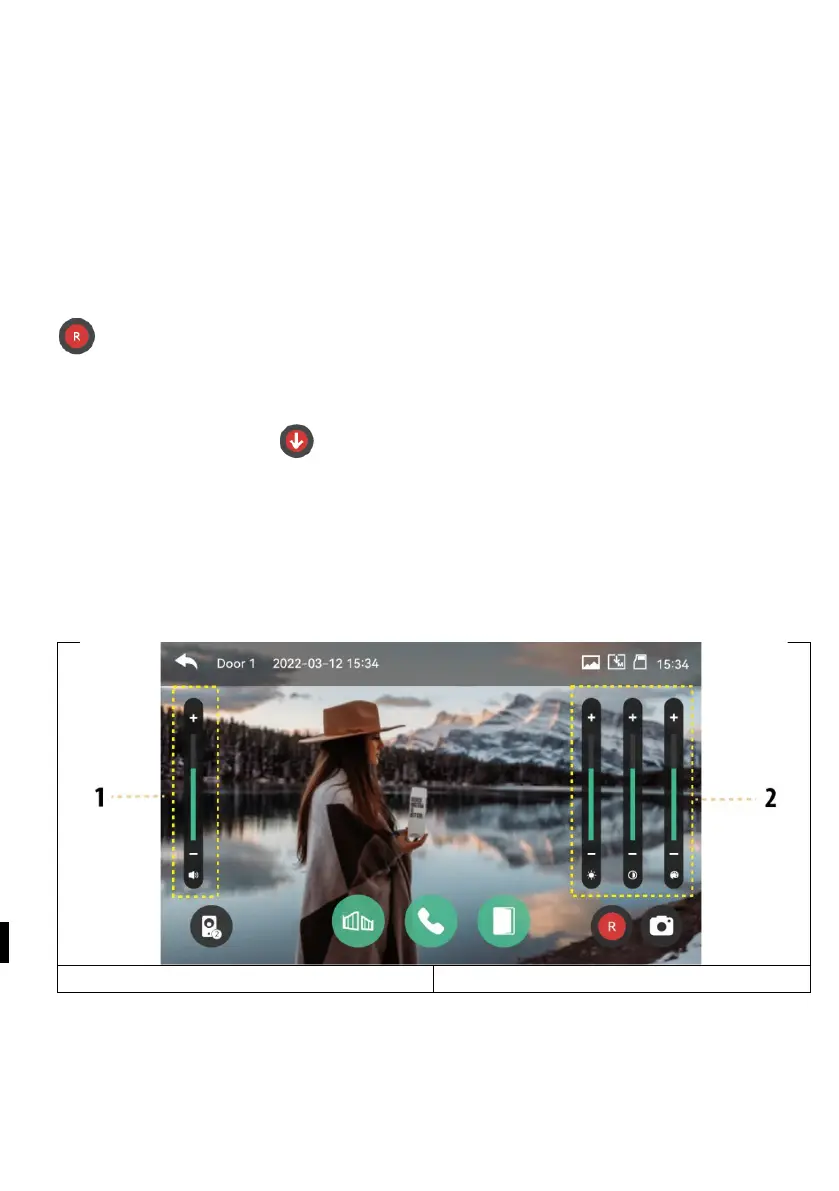
Volume control and picture quality adjustment: Volume and display settings for
outdoor units and cameras (Door1,2, CCTV1,2).
- While watching or talking, you can click on any area of the picture to enter th
e
V
olume/Brightness/Contrast/Chroma settings window as shown below:
2) Brightness, contrast, chromaticity
Summoning a visitor
1 ) When a visitor calls from the entrance, you will hear a call tone (sound) and the
visitor's image will be displayed on the monitor.
- Maximum ringing time 30 seconds.



 To Next Page