69
Remark: Set the date and time before use. If you do not set them, you may
experience problems when saving images and video clips.
MONITOR
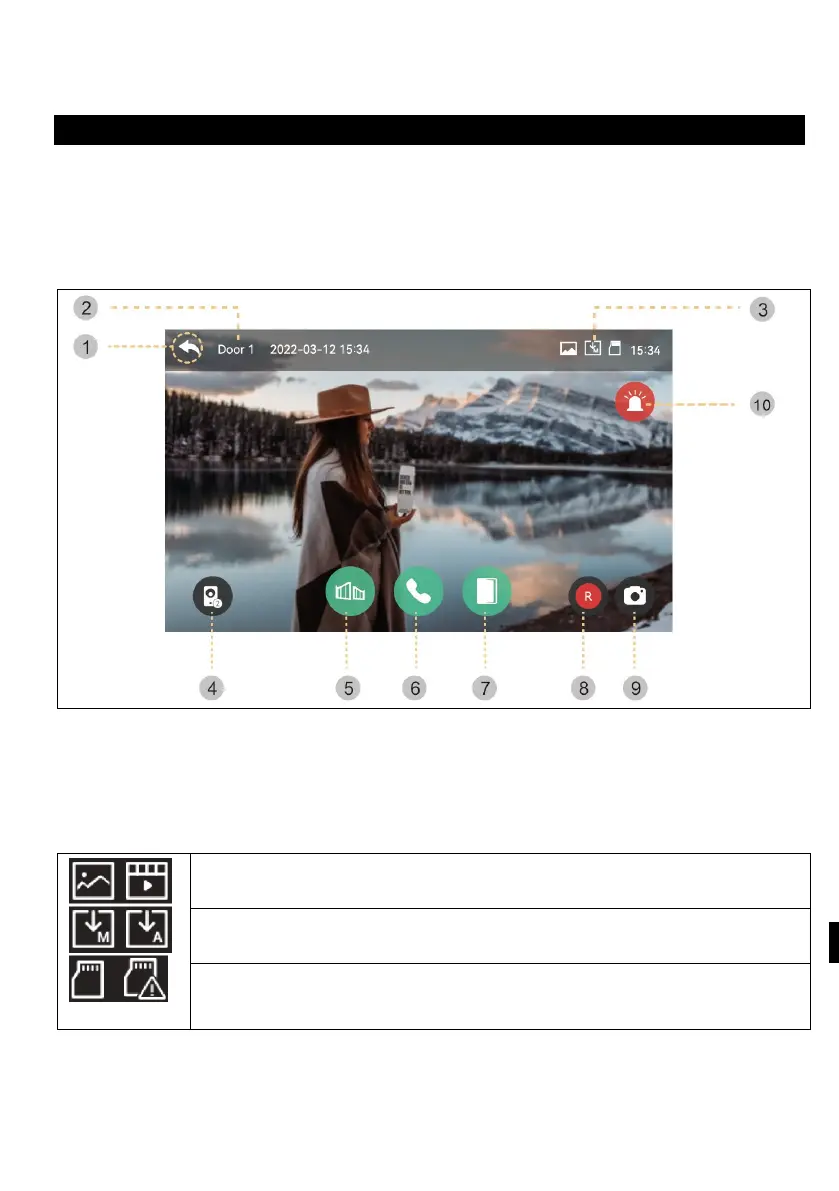
The following screen will appear when you call from the door camera or press the
"Monitor" button.
Max. time: Monitoring (30 s) Call and call (60 s)
If the door unit is not installed, the screen cannot be started.
1) Back: Return to the previous screen
2) Selected outdoor unit: The screen will display the door unit number
3) Saving icons: The icons for motion detection and recording are displayed.
- Icon description:
Storage format: Pictures/videos (in motion detection mode)
Storage mode: MANUAL / AUTO
SD card status: Insert / Full memory
4) Split screen display: Split monitoring of door cameras is available. If only one
camera is installed, the function cannot be used.
5)
O
pening the gate lock: Click to open the gate lock that is connected to th
e
mo
nitor.



 To Next Page