75
1 ) Source & number of files
2 ) Move left/right: Move the previous/next video.
3 ) Play: Play the current video clip. During playback, the icon changes to a pause
button.
4 ) Delete: Delete the currently playing video.
5) Date and time: The actual date and time will be given.
6 ) Video clip time indication: The remaining time will be displayed
Remark: Immediately after inserting the SD card, the loading time depends on th
e
n
umber of videos stored. (Please wait a moment)
SETTINGS
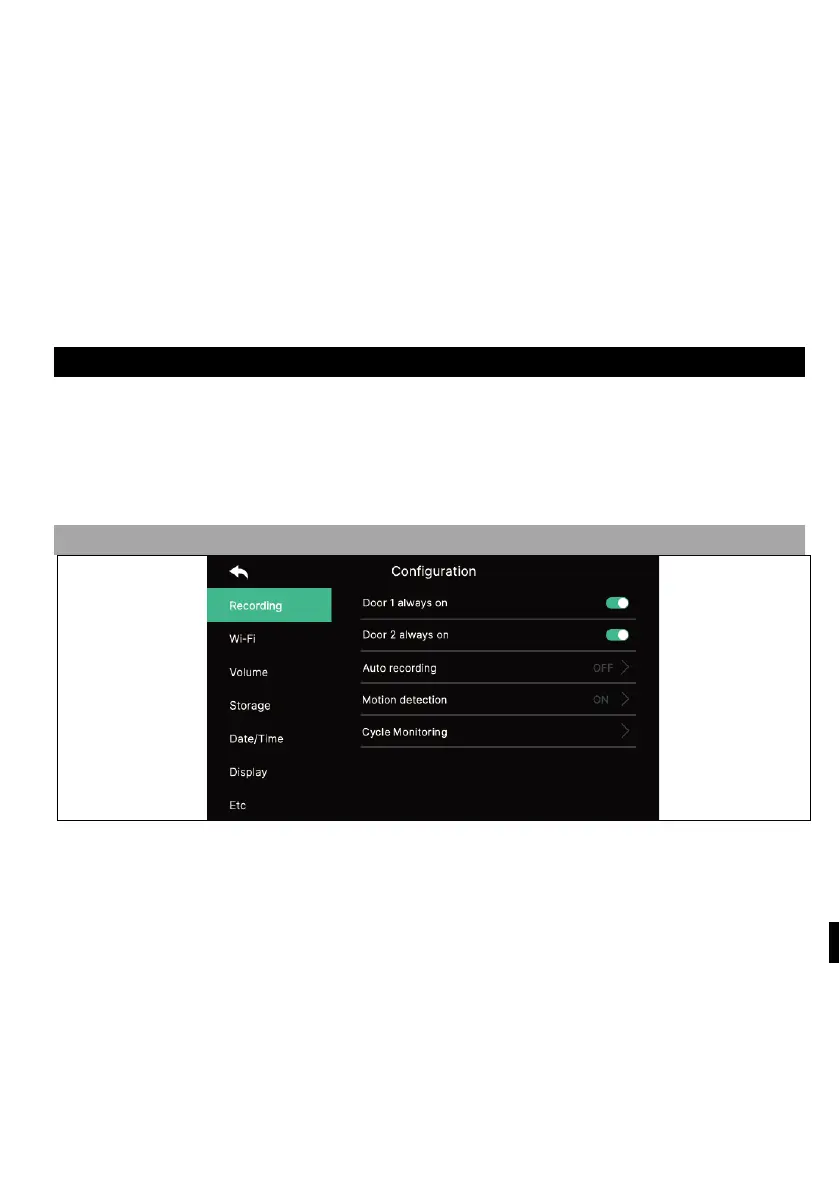
When you press the " Settings " button, the following screen will appear.
- After selecting each item, a settings window will appear on the right.
- If you do not take any action after 30 seconds of entering the Settings menu, it will
return to the main screen.
1) RECORDING
1.
1) Door1/door2 always on
- If the outdoor unit is equipped with a code keypad or RFID module and always
needs power, enable this option.
1.2) Automatic recording
- Setting the auto-save mode. (Select between Photo/Video) However, if there is no
SD card available, the video mode cannot be selected.
- This function is only available if the call comes from the door camera (entrance).
Photos and video clips cannot be saved manually until auto-save is started.
- Select OFF to turn off the auto-save function.



 To Next Page