76
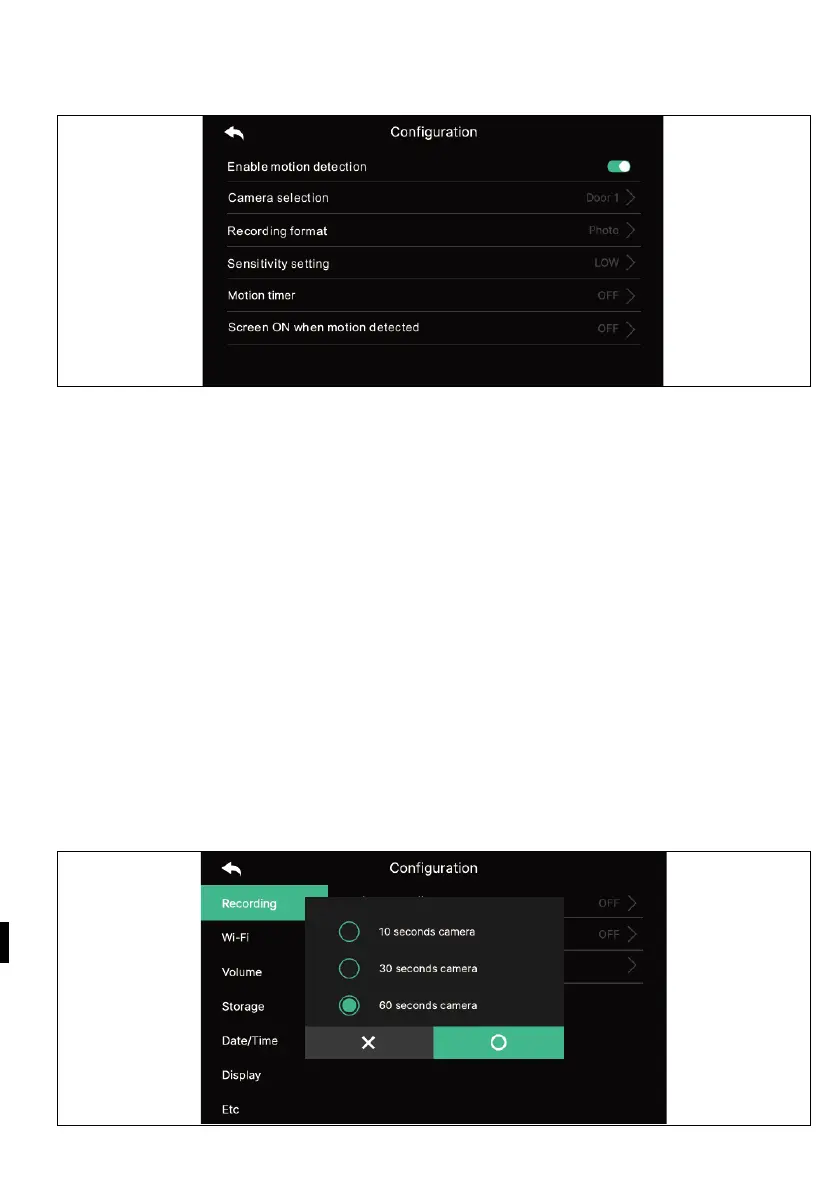
1.3) Motion detection
- Setting the motion detection of a previously set camera.
- The functions of each menu are as follows.
Motion detection: Setting the enable/disable function.
Camera selection: Choosing a camera for monitoring. (Select from Door1/2,
CCTV1/2) Storage format: Selecting the storage method. (Choose between Photo /
Video)
Sensitivity of sensing: Sensitivity setting. (Select between High/Middle/Low)
Motion Timer: Setting the activation of the timer function. (Motion Detection
Activation Time) You can set a timer, start/stop time for activation.
The LCD display is switched on when motion is detected: During video recording,
the video is displayed on the LCD screen. (for 10 seconds)
1.
4) Cyclic monitoring
- The system can cycle through all outdoor units and CCTV cameras and store
video/image. (10/30/60 sekund na kameru: Select the monitoring cycle time for
each outdoor unit or camera.)



 To Next Page