59
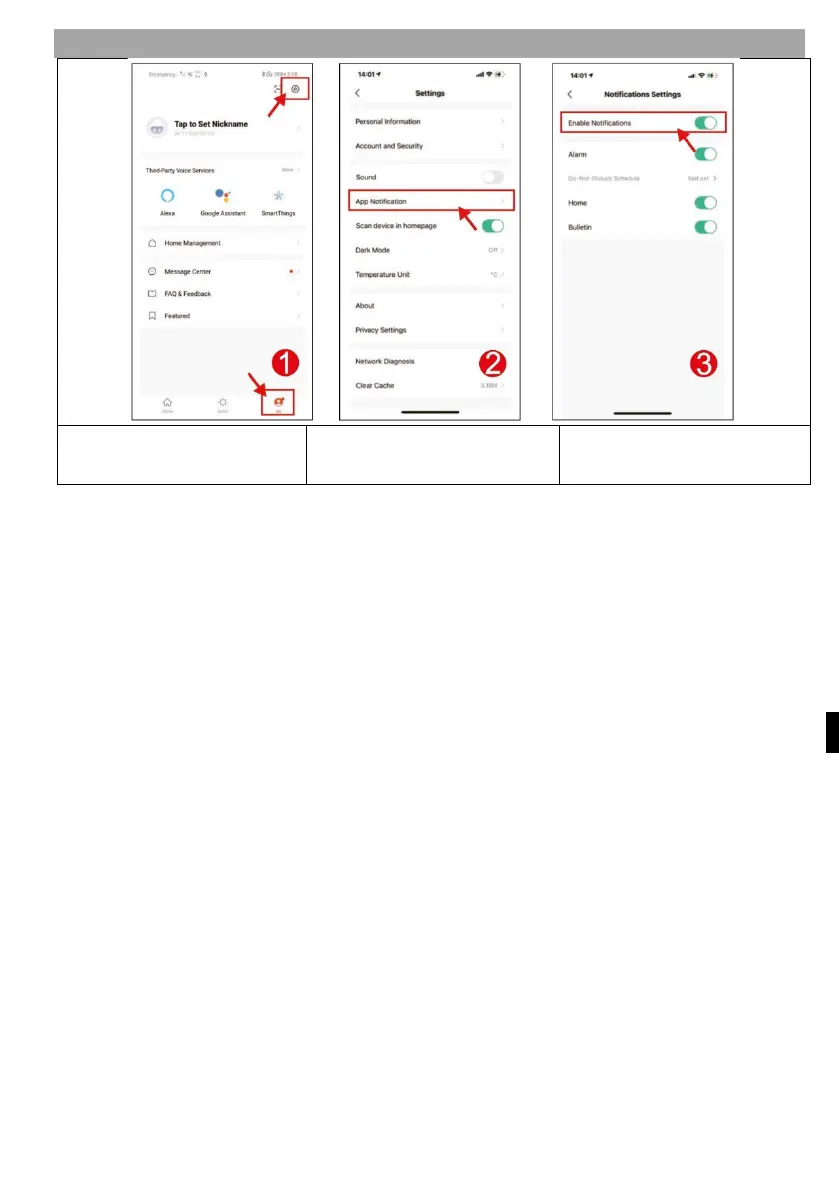
2) NOTIFICATION SETTINGS
Click on Menu Me and
then on the settings icon
Click on APP Notifications
Visitor call (doorbell)
If a visitor calls from the Bell, the Tuya app on the smartphone receives a
notification of the call, you can answer the call and the video is saved to the SD
card. If you do not answer the call, it will automatically end after 30 seconds.
R
eal-time monitoring
If you want to know the outdoor situation, you can open the app and activate the
monitoring function to see the video from outside. During monitoring, you can
control shooting, video recording, full screen display, video image quality setting,
communication with outdoor unit, lock opening, etc.
S
torage function
A micro SD card of up to 128GB can be installed on the indoor screen to store all
videos, such as motion detection video, call video, monitoring video, and all videos
can be displayed via playback or in the message center on the indoor Monitor. View
videos through the Playback app and download the videos you need. You can check
the capacity of the micro SD card in the "Display-SD card" menu of the Monitor.
Share a device
You can add friends and relatives in Manage your household. Once successfully
added, all members can use the device.



 To Next Page