EasyManua.ls Logo

Evoqua W2T388687 - User Manual

Evoqua W2T388687
28 pages
Print Icon
To Next Page IconTo Next Page
Loading...
10 Technology Drive
Lowell, Massachusetts 01851
Tel: (866) 876-3340 Fax: 978-934-9499
www.ionpure.com
IONPURE
®
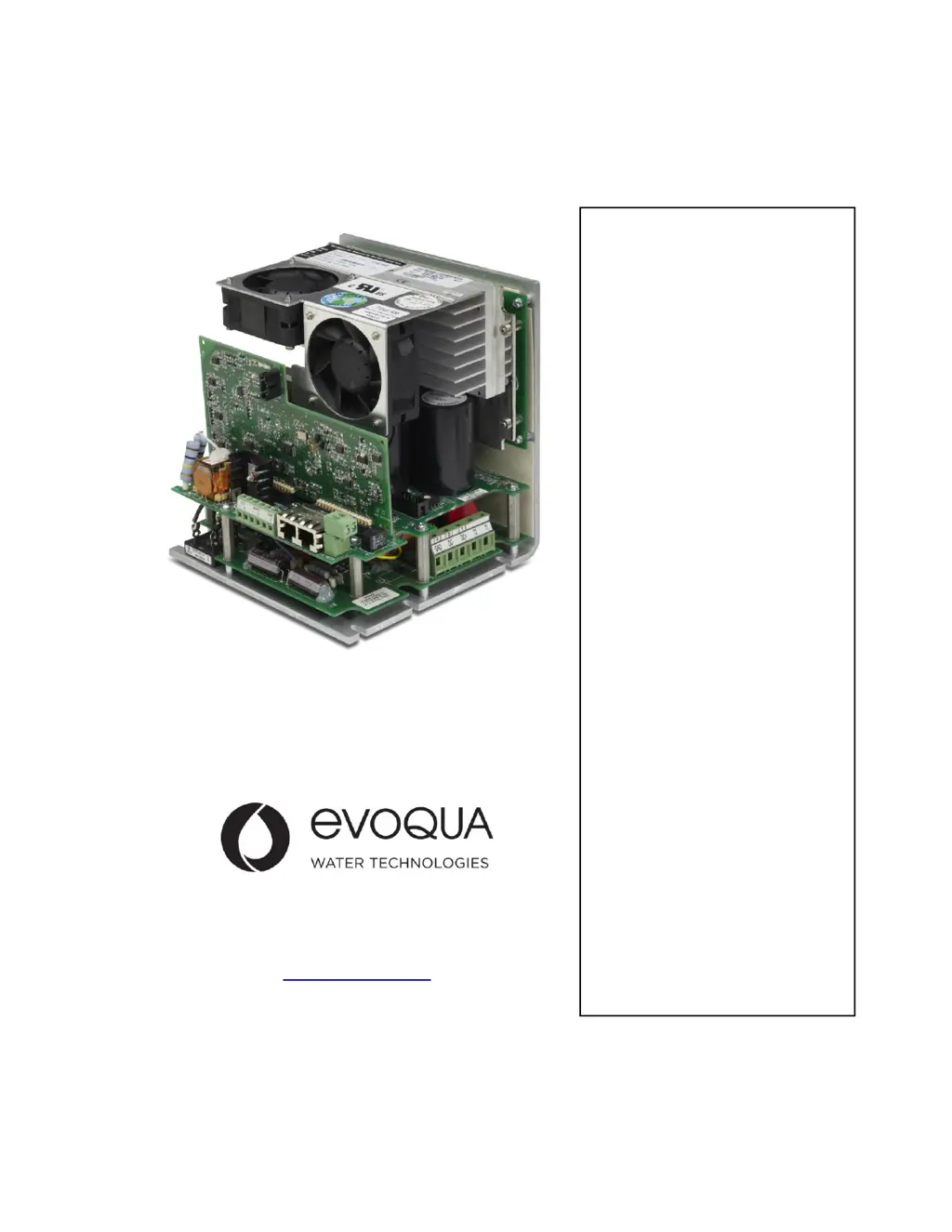
G2 DC POWER
CONTROLLER
600 VDC
13.2 Amps
Operation
&
Maintenance
Manual
IP-POWER600-G2 MAN
REV. 11
June 2014
Manual Covers Model #:
IP-POWER600-G2

Table of Contents

Questions and Answers

  • A
    Alan EricksonAug 7, 2025
    What to do if my Evoqua Control Panel displays 'ADDRESS CONFLICT'?
    • D
      David LeeAug 8, 2025
      If an Evoqua Control Panel channel displays 'ADDRESS CONFLICT', it means that two or more power controllers are set to the same SW2 position. To resolve this, set a unique ID to each power controller. Another possible cause is that the display and power controller have incompatible firmware revisions; in this case, contact your parts supplier to update the firmware.
  • A
    Adam SimsAug 12, 2025
    Why is a channel row blinking on my Evoqua Control Panel?
    • K
      Kathy GrahamAug 12, 2025
      If a channel row is blinking on your Evoqua Control Panel, it indicates that an alarm has triggered. Access the ALARMS submenu to identify the specific alarm that has been activated.
  • D
    Daniel NelsonAug 18, 2025
    How to fix asterisks on an Evoqua Control Panel channel?
    • E
      Emily CainAug 18, 2025
      If an Evoqua Control Panel channel displays asterisks, it could be due to several reasons. First, verify that the Ethernet cable is functioning correctly and is not a crossover cable. Second, ensure the power controller in that channel is energized. Third, check that the SW2 position is set to the correct channel using Table 1. Finally, the display and power controller might have incompatible firmware versions, requiring you to contact your parts supplier for a firmware update.
  • S
    Sheryl MeadowsAug 22, 2025
    How to troubleshoot an Evoqua Control Panel display that does not power on?
    • K
      Karen CareyAug 23, 2025
      If the display of your Evoqua Control Panel does not power on, there could be a couple of reasons. First, check the Ethernet cable to ensure it is working correctly and is not a crossover cable. Second, confirm that the power controller is energized.
  • S
    smithlindaAug 28, 2025
    What to do if I can’t adjust the DC output current past a certain value on my Evoqua Control Panel?
    • M
      Melissa GarciaAug 28, 2025
      If you can't adjust the DC output current past a certain value on your Evoqua Control Panel, it could be because the current range is set too low on the DC power controller. Select the adequate current range for the CEDI module. Alternatively, the power controller may have reached its maximum DC output, so verify that the input voltage to the power controller is adequate and that the resistance of the CEDI module is within specifications. Finally, the “VDC limit” might be set too low; access the SETUP submenu to adjust the “VDC limit” value.
  • S
    Sheila SerranoSep 2, 2025
    What to do if Evoqua Controller indicates input under-voltage?
    • S
      stephanie77Sep 2, 2025
      If the AC input voltage to your Evoqua Controller G2 drops below 726 V, the DC power stage will restart. However, if this happens three times within 30 minutes, the DC power stage will shut down. To restart it, you'll need to manually cycle the AC input power to the controller off and then on again.

Summary

1 Introduction

1.1 Caution and Warning Messages

Highlights essential safety information and potential hazards for users.

2 Installation

2.2 AC Supply

Covers AC input requirements, isolation transformer, over-current protection, and surge suppression.

2.3 High Voltage Connections

Guides on selecting AC input voltage and details high voltage connection procedures.

2.4 Selector Switches

Details DIP switch for current range and rotary switch for voltage metering/unit ID selection.

2.5 Low Voltage Connections

Guides analog signal wiring, DC output control, remote ON/OFF, and output status relay.

3 Operation

4 Troubleshooting

LED Troubleshooting Matrix

Matrix to identify fault conditions based on LED status (Green/Amber) and guide troubleshooting steps.

Appendix A Design Considerations

Evoqua W2T388687 Specifications

General IconGeneral
BrandEvoqua
ModelW2T388687
CategoryController
LanguageEnglish

Related product manuals