AirKey system manual version 2.7 |
06/03/2024 | Subject to technical changes and misprints
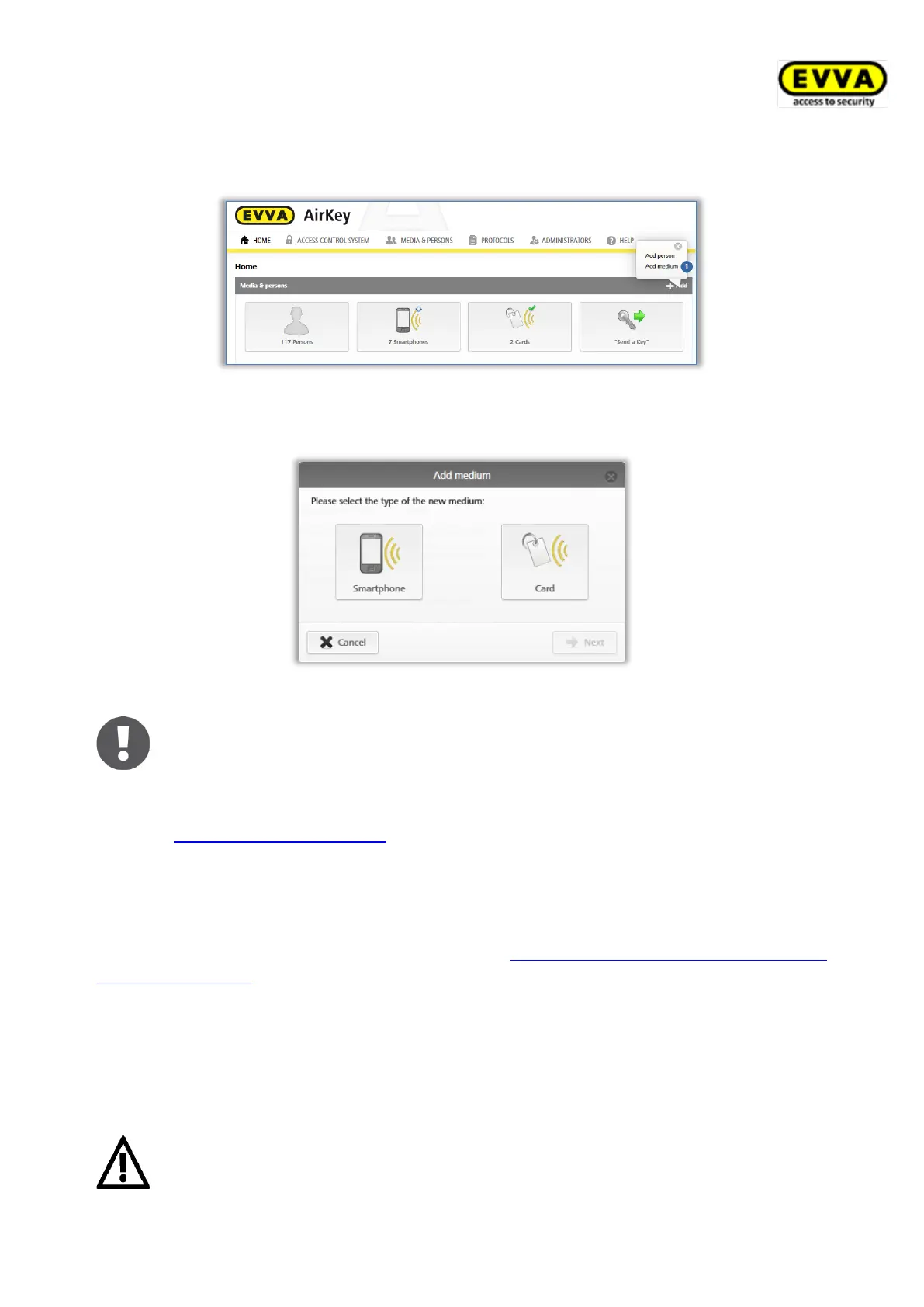
> Alternatively, browse to the Home screen and select the Smartphones or Cards tile
and then click Add medium.
Figure 172: Creating media
> Select the media type of the new medium.
Figure 173: Creating new media
The application does not distinguish between cards, key fobs, combi keys,
and wristbands. For this reason, also create key fobs, combi keys, and
wristbands as Card media types.
5.6.8 Creating smartphones: See chapter 4.8
5.6.9 Creating cards, key fobs, combi keys or wristbands
If you do not have a coding station available, you can add cards, key fobs, combi keys or
wristbands to the access control system using a smartphone with maintenance authori-
sation. For this purpose, refer to the information in Adding cards, key fobs, and combi keys
using a smartphone.
> Enter a designation and click Continue.
> Place the card, key fob, combi key or wristband on the coding station.
The detailed view of this medium automatically opens once you have successfully completed
the process.
We strongly recommend to create a sufficient number of preconfigured
media (cards, key fobs, combi keys or wristbands) featuring permanent
authorisations without an expiry date (emergency media) and keep these


 To Next Page
 Loading...