AirKey system manual version 2.7 |
06/03/2024 | Subject to technical changes and misprints
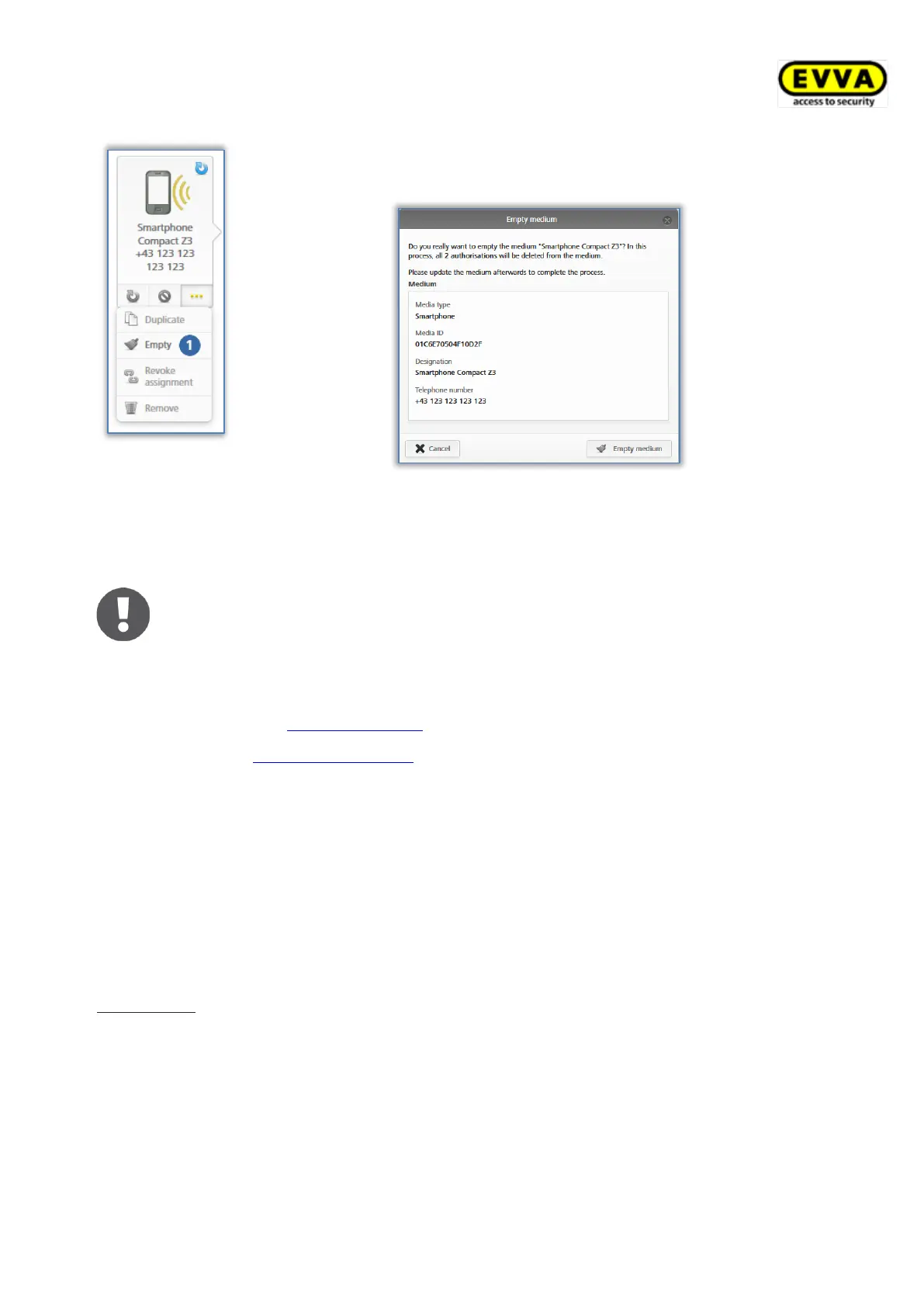
Figure 192: Emptying media
> Click More... → Empty .
> Click Empty medium to complete the process.
Figure 193: Emptying media – security prompt
All authorisations are highlighted for deletion. You must update the medium so all authori-
sations are finally deleted.
KeyCredits will not be deducted from your account for deletions. However, it
is always necessary to update the media to complete the deletion process.
Do not use this function for lost media. This function exclusively allows you
to delete the authorisation if the medium is physically available. If media is
lost, use the Deactivate media function.
Use the Delete authorisation function if you would like to delete individual
authorisations.
5.6.23 Cancelling assignments
Cancel assignments if persons no longer use the medium.
> On the Home screen, select the Smartphones or Cards tile.
> Alternatively select Media & persons → Media in the main menu.
> Select the medium from the overview list for which you would like to cancel
assignments to persons.
Alternatively
> On the Home screen, select the Persons tile.
> Alternatively select Media & persons → Persons in the main menu.
> Click the name of the person on the person list for which you would like to cancel
assignments to media.
All media assigned to a person are shown on the left, below the name.
Select the medium for which you would like to cancel assignments.


 To Next Page
 Loading...