P17
Chap 6 DSS Setting
Take an example for how to set DSS12 to Ext. Port 008
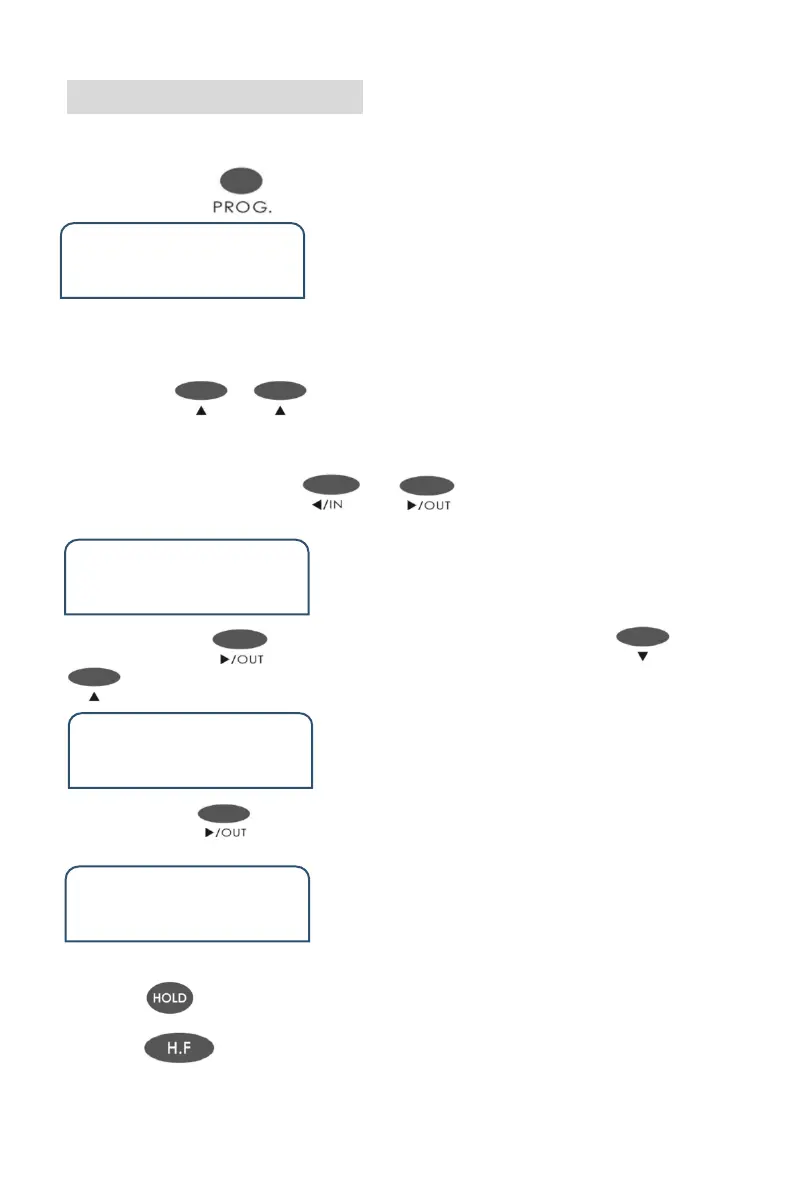
◆ Step 1 : Press three times and enter DSS status . Show as below
DSS
001 TRU 01
Remark :
001, it means the number of the DSS button (001 means it is the first DSS
button) . TRU means it was set for CO line (It has two options , TRU and EXT .
You can use or to select it .) 01 ,means it is the port number of CO
line and Extension ( and it means the first CO line port). All that means it is the
first DSS button corresponding to the first CO line port
◆ Step 1 : Pressing the key or to select the number of DSS
and input 012 Or dial the No.12 DSS on the keyphone .
DSS
012 TRU 012
◆ Step 3 :Press and go the second part TRU . You can use or
to select to EXT . Show as below
DSS
012 EXT 012
◆ Step 4:Press to go to the third part 001 and input 008 on the keyphone .
Show as below.
DSS
012 EXT 008
◆ Press to save and will hear beep tone .
◆ Press to back to the home page.


 To Next Page