P19
Chap 8 How to set multiple DSS to connect
with key phone
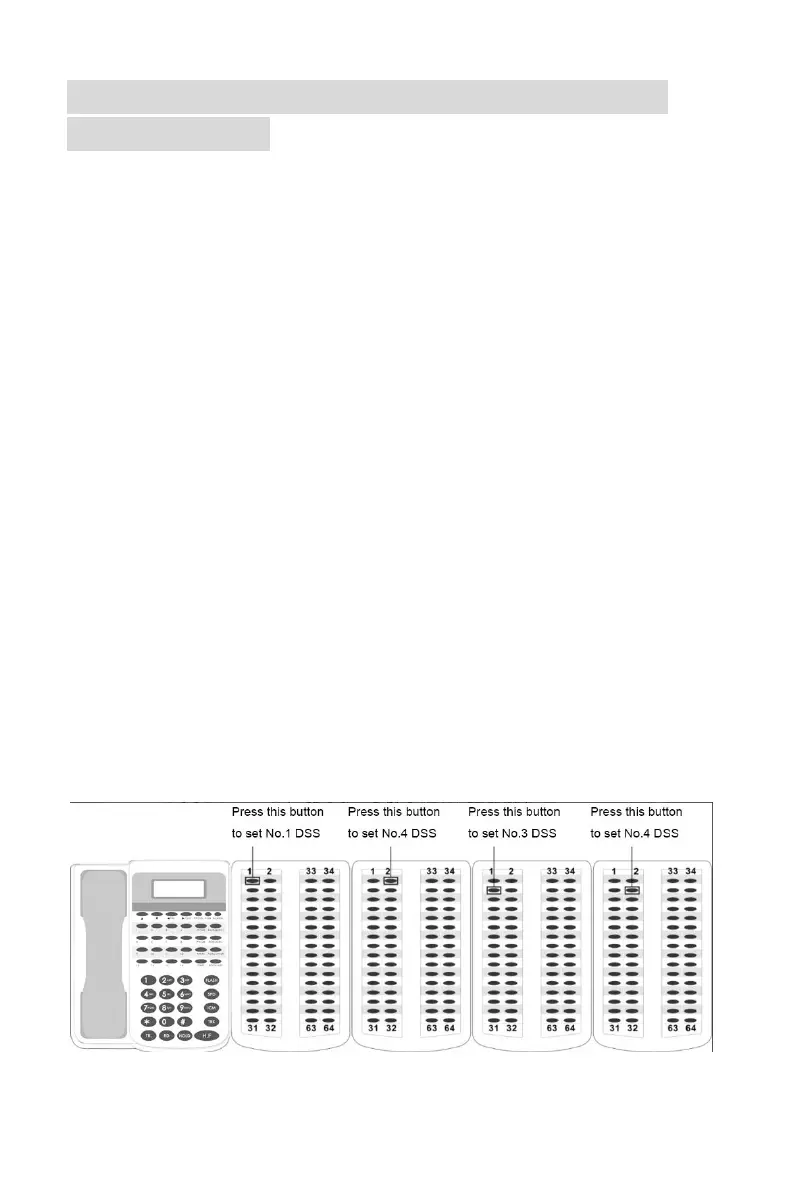
1) Setting a DSS to No.2 DSS . Programming as below
①Connect key phone with PBX
②Always-press the second button of No.DSS
③At the same time, remove the cable between No.1 DSS and key phone then
connect again .
④Don’t loosen the second,until the first and second green LED of No.2 DSS
light .
⑤Re-connect the PBX and key phone again .When the first and second green
LED of No.2 DSS light together , that means it is the No.2 DSS
2)If you want to No.3 and No.4 DSS , repeat the last step . But when setting No.3
DSS , you should always-press the third button . And when setting No.4 DSS,
you should always-press the forth button .
3)How to distinguish the DSS number .
When connect the PBX and key phone , if the DSS is No.1 DSS , the LED light of
first button will be on . If it is No.2 DSS , the first and second light will be working
together . If it is No.3 DSS , the first , second and third light will be on together . If
it is No.4 DSS , the first, second, third and forth light will be on together.


 To Previous Page