EasyManua.ls Logo

Exerpeutic 1111 - Computer Installation

Exerpeutic 1111
25 pages
Print Icon
To Next Page IconTo Next Page
To Previous Page IconTo Previous Page
Loading...
.
2 Bolts (M8x45)
2 Curve Washers (Ø8)
2 Washers (Ø8)
2 Cap Nuts (M8)
Tool:
Multi Hex Tool with
Phillips Screwdriver
ASSEMBLY
Hardware:
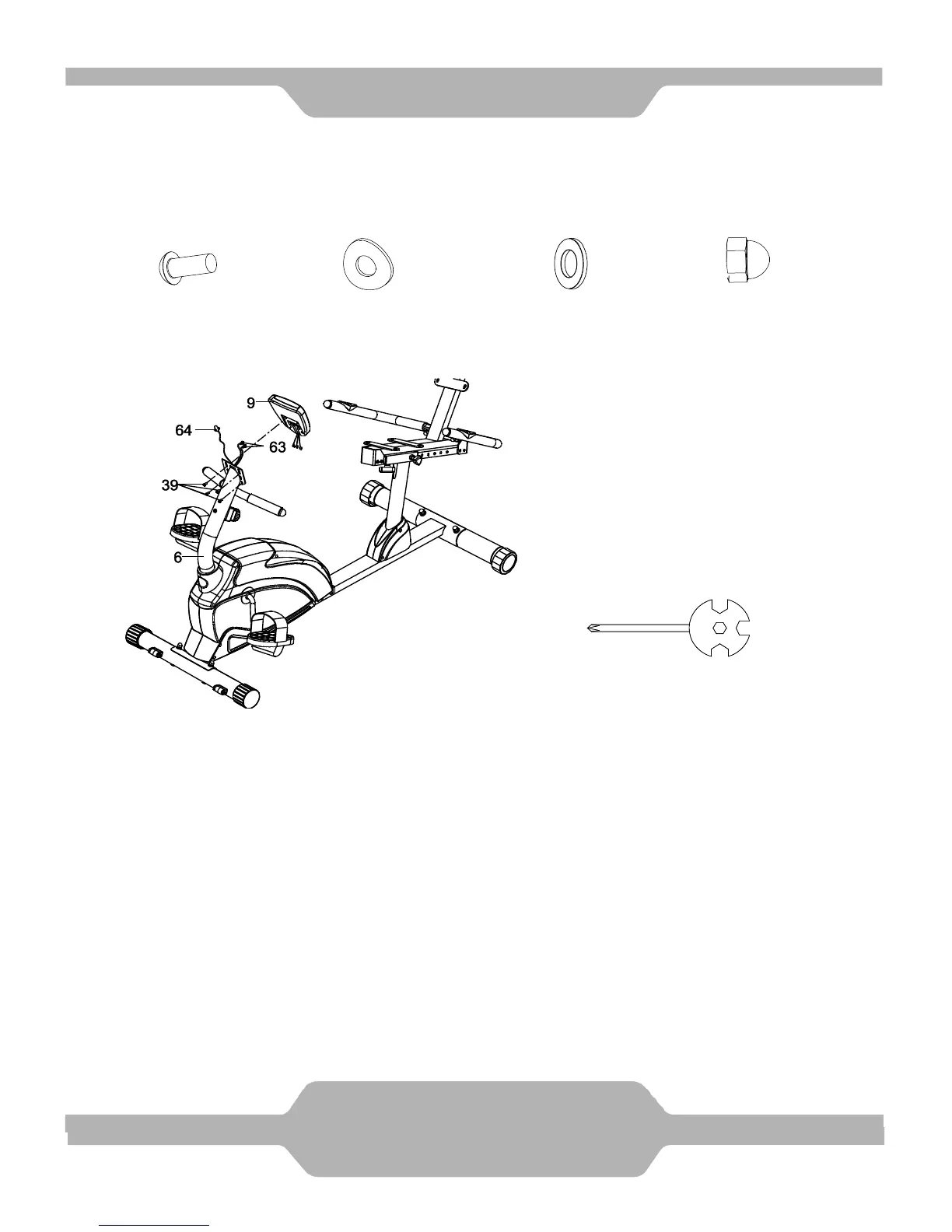
5. Computer Installation
Remove four M5x10 Bolts (39) from the Computer (9). Remove bolts with the
Multi Hex Tool with Phillips Screwdriver provided.
Connect the Extension Wires (63) and Extension Sensor Wire (64) to the wires
that come from the Computer (9). Tuck wires into the Front Handlebar Post (6).
Attach the Computer (9) onto the top end of the Front Handlebar Post (6) with four
M5x10 Bolts (39) that were removed. Tighten bolts with the Multi Hex Tool with
Phillips Screwdriver provided.

13
ASSEMBLY

Related product manuals