EasyManua.ls Logo

Exo MB40IIX - LCD Display, Power, and Media Controls

Exo MB40IIX
55 pages
Print Icon
To Next Page IconTo Next Page
To Previous Page IconTo Previous Page
Loading...
14
F
F
o
o
r
r
b
b
e
e
s
s
t
t
s
s
y
y
s
s
t
t
e
e
m
m
p
p
e
e
r
r
f
f
o
o
r
r
m
m
a
a
n
n
c
c
e
e
,
,
i
i
m
m
a
a
g
g
e
e
i
i
s
s
c
c
o
o
m
m
p
p
r
r
e
e
s
s
s
s
e
e
d
d
w
w
h
h
e
e
n
n
u
u
s
s
i
i
n
n
g
g
t
t
h
h
e
e
C
C
r
r
a
a
z
z
y
y
T
T
a
a
l
l
k
k
C
C
a
a
m
m
s
s
u
u
i
i
t
t
e
e
P
P
R
R
O
O
'
'
s
s
p
p
r
r
e
e
v
v
i
i
e
e
w
w
f
f
u
u
n
n
c
c
t
t
i
i
o
o
n
n
.
.
P
P
h
h
o
o
t
t
o
o
g
g
r
r
a
a
p
p
h
h
s
s
t
t
a
a
k
k
e
e
n
n
w
w
i
i
t
t
h
h
'
'
s
s
n
n
a
a
p
p
s
s
h
h
o
o
t
t
'
'
r
r
e
e
t
t
a
a
i
i
n
n
i
i
t
t
s
s
o
o
r
r
i
i
g
g
i
i
n
n
a
a
l
l
q
q
u
u
a
a
l
l
i
i
t
t
y
y
.
.
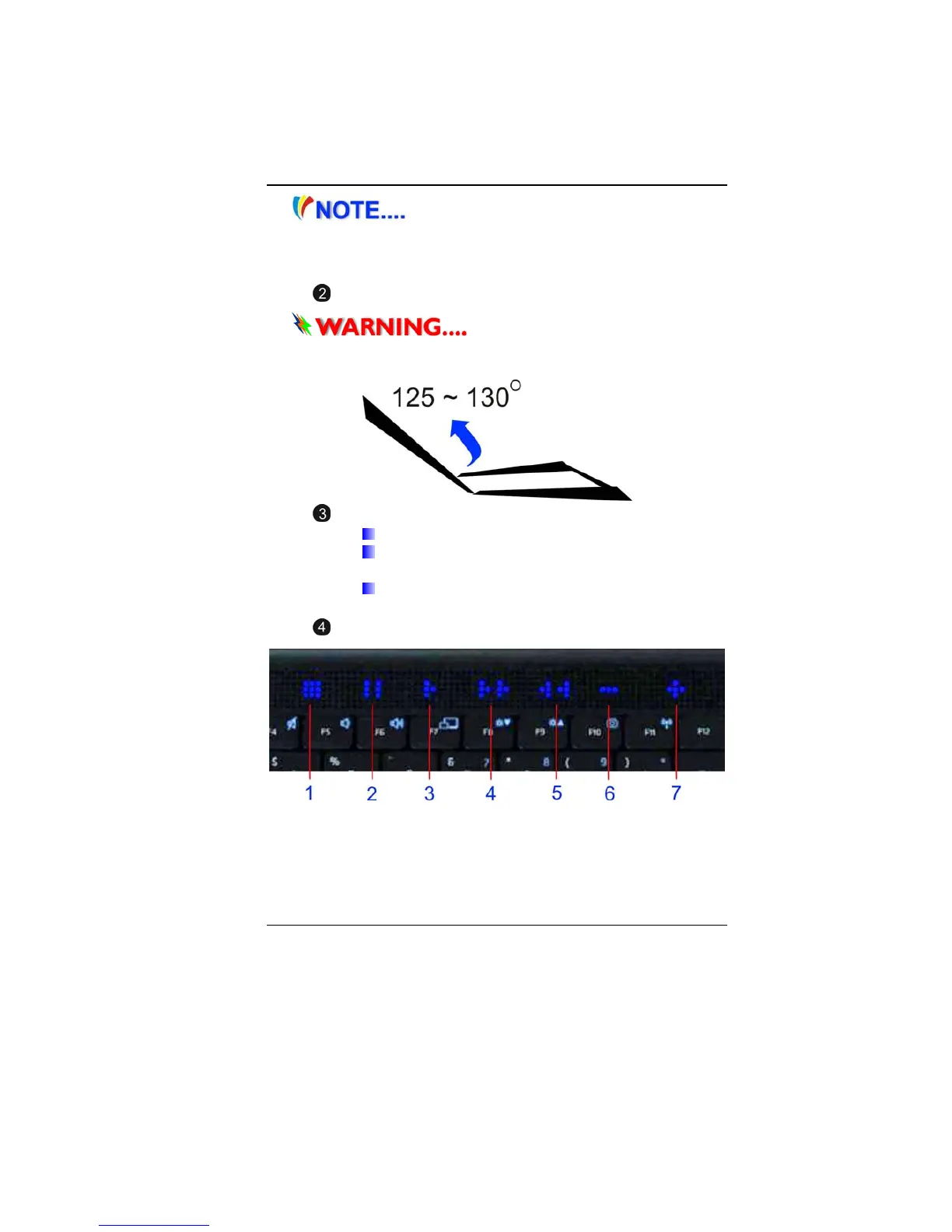
LCD Display
T
T
h
h
i
i
s
s
L
L
C
C
D
D
p
p
a
a
n
n
e
e
l
l
c
c
a
a
n
n
o
o
n
n
l
l
y
y
s
s
u
u
p
p
p
p
o
o
r
r
t
t
u
u
p
p
t
t
o
o
a
a
m
m
a
a
x
x
i
i
m
m
u
u
m
m
o
o
p
p
e
e
n
n
i
i
n
n
g
g
o
o
f
f
1
1
2
2
5
5
-
-
1
1
3
3
0
0
d
d
e
e
g
g
r
r
e
e
e
e
s
s
,
,
p
p
l
l
e
e
a
a
s
s
e
e
d
d
o
o
n
n
o
o
t
t
p
p
u
u
s
s
h
h
i
i
t
t
f
f
o
o
r
r
c
c
i
i
b
b
l
l
y
y
.
.
Power/Suspend Button
Press for 1~1.5 seconds to turn on the system.
Press and hold for at least 4 seconds to turn off
the system.
Press the power / suspend button again to return
from the suspend mode.
Multi Media Buttons
1. Stop
2. Pause
3. Play
4. Fast forward
5. Rewind

Table of Contents