13
MOBILE APP
CREATE A SCOUTEK ACCOUNT:
Go to the Google Play Store or Apple App Store, search
for “Scoutek” and install the app.
Launch Scoutek and click Sign Up to create an
account, or for an existing account enter your credentials
and click Sign In.
Once you have created a new account you will be
required to verify your email address. Click the verify
button in your email. This will launch the website in a
mobile browser. Sign into the website and now you can
close the browser and continue using the app by clicking
Continue.
REGISTER A CAMERA:
Click the Register New Camera button.
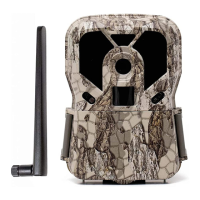
On your Render camera, make sure the batteries, SD
card, SIM card and antenna are all installed properly and
switch camera to Setup position.
On your camera, press the Menu button and change
the camera setting Wireless Network to ON.
Wait about 10 - 20 seconds, then select the camera
menu Camera Info. If the values are blank, press the
Menu button to back out, wait a few more seconds then
select Camera Info again.


 To Next Page