EasyManua.ls Logo

exone go - System Map: Front View with Display Open; Preventing Overheating

exone go
163 pages
Print Icon
To Next Page IconTo Next Page
To Previous Page IconTo Previous Page
Loading...
9
English
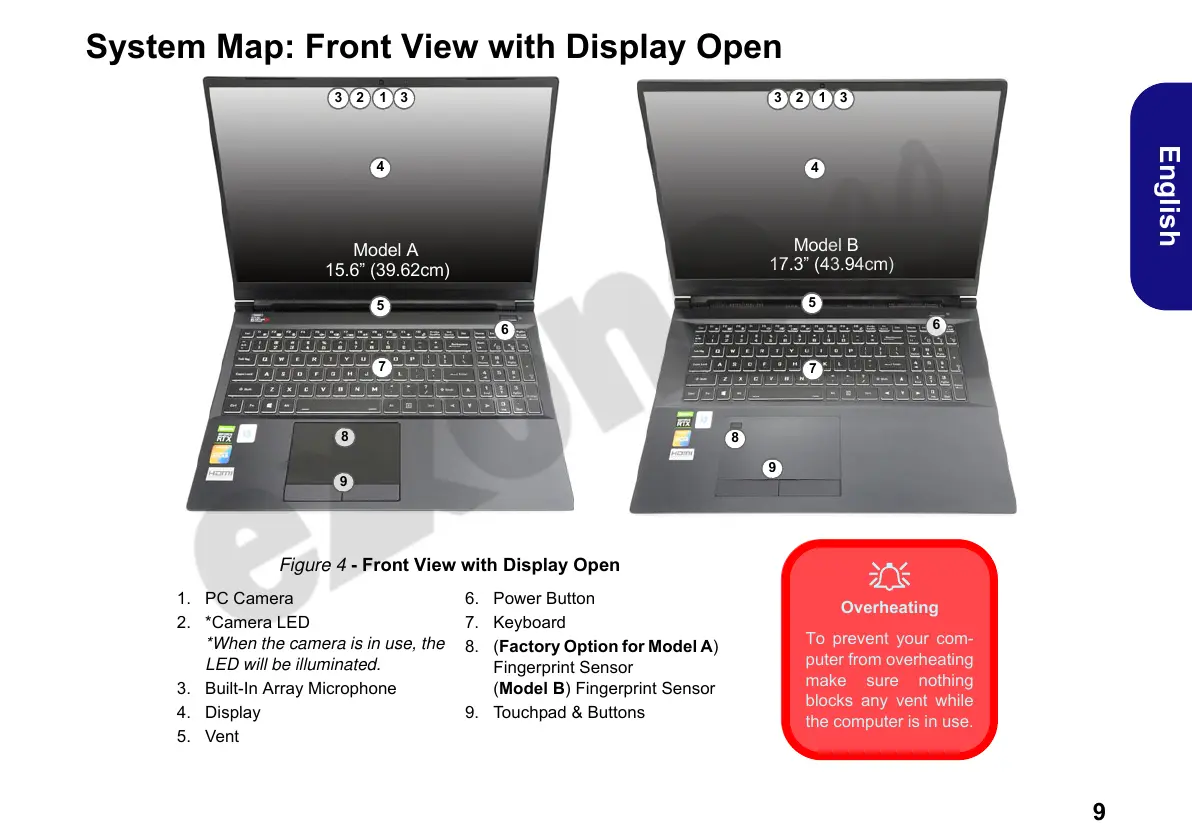
System Map: Front View with Display Open
Figure 4 - Front View with Display Open
1. PC Camera
2. *Camera LED
*When the camera is in use, the
LED will be illuminated.
3. Built-In Array Microphone
4. Display
5. Vent
6. Power Button
7. Keyboard
8. (Factory Option for Model A)
Fingerprint Sensor
(Model B) Fingerprint Sensor
9. Touchpad & Buttons
Model A
15.6” (39.62cm)
12 33
7
6
5
4
8
Model B
17.3” (43.94cm)
12 33
4
9
Overheating
To prevent your com-
puter from overheating
make sure nothing
blocks any vent while
the computer is in use.
7
6
5
8
9
PC 5070 DDDFDN book v2.book Page 9 Thursday, July 30, 2020 4:29 PM

Table of Contents

Related product manuals