Overheating
To prevent your computer from overheating make sure nothing
blocks any vent while the computer is in use.
Bottom Cover Removal Warning
Do not remove any cover(s) and/or screw(s) for the purposes of
device upgrade as this may violate the terms of your warranty.
If you need to replace/remove the SSD/RAM etc., for any reason,
please contact your distributor/supplier for further information.
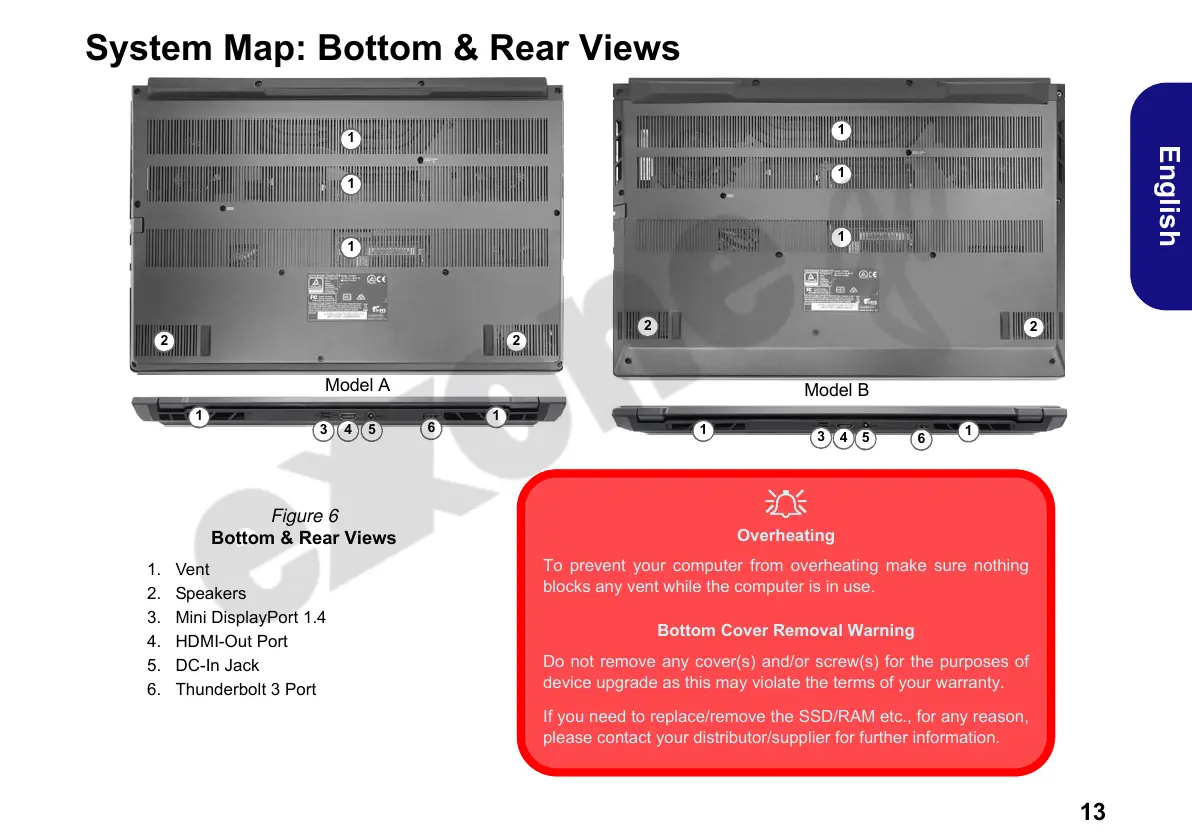
Figure 6
Bottom & Rear Views
1. Vent
2. Speakers
3. Mini DisplayPort 1.4
4. HDMI-Out Port
5. DC-In Jack
6. Thunderbolt 3 Port
Model A
6
1
2
1
2
543
1
Model B
1
6
1
2
1
2
5
4
3
1
1
1
1


 To Next Page