Need help?
Do you have a question about the Exor eX710 and is the answer not in the manual?
Provides dimensional drawings and measurements for eX705 and other eX7xx models.
Details environmental conditions, precautions, and mounting requirements for HMI device installation.
Provides critical safety instructions and warnings for HMI device installation procedures.
Outlines the steps for installing the HMI device, including fixing bracket placement and tightening.
Details serial port types (RS-232, RS-485, RS-422) and their pin configurations for communication.
Describes the status indicators for the Ethernet port, including link and activity LEDs.
Explains the types, slots, and configurations of optional plugin modules for eX Series 700 panels.
 General
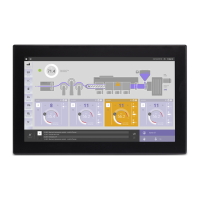
| Display Size | 10.1 inches |
|---|---|
| Resolution | 1280 x 800 pixels |
| Touch Technology | Projected Capacitive |
| Power Supply | 24 VDC |
| Storage | 4 GB eMMC |
| Communication Ports | Ethernet, USB |
| Operating System | Linux |
| IP Rating | IP66 |

 To Next Page