EasyManua.ls Logo

Explore Scientific RDP1003-CM3000 - Page 30

Explore Scientific RDP1003-CM3000
Print Icon
To Next Page IconTo Next Page
To Previous Page IconTo Previous Page
Loading...
30
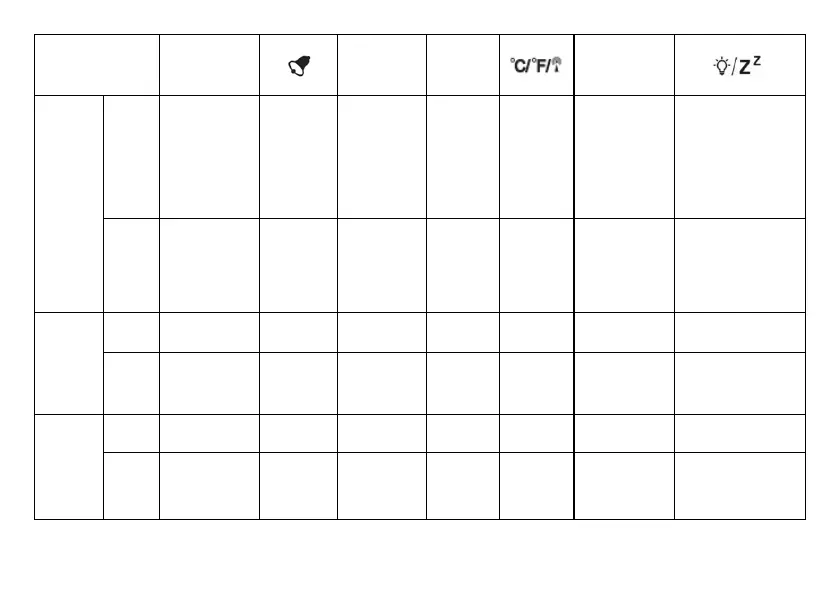
BUTTON
MODE
SET
[+] [–]
180°/360°
TIME/TEMP
Standard
mode
PRESS
Temperature,
Alarm 1,
Alarm 2,
Second time
display
Turn Alarm
on/off
Stop alarm
(ringing)
12/24 hour
format
switch (AM/
PM)
Weekday,
Calendar
week
°C/°F
Projection
180° switch
Turn on backlight
and projection for 5
seconds
(SNOOZE when
alarm is ringing)
HOLD
Enter into
setting
mode
_______
[F] Foreign
mode (Time
Zone)
Switch
weekday
languages
Initiate
RCC
receiving
Time/Tempera
-
ture switch
_______
Time
setting
mode
PRESS Conrm setting
_______
Increase Decrease
_______ _______ _______
HOLD
_______ _______
Quick
Increase
Quick
Decrease
_______ _______ _______
Alarm
setting
mode
PRESS Conrm setting
_______
Increase Decrease
_______ _______ _______
HOLD
_______ _______
Quick
Increase
Quick
Decrease
_______ _______ _______

Related product manuals