Model 407790 Ver. 1.1 7/02L
15
Automatic Datalogging
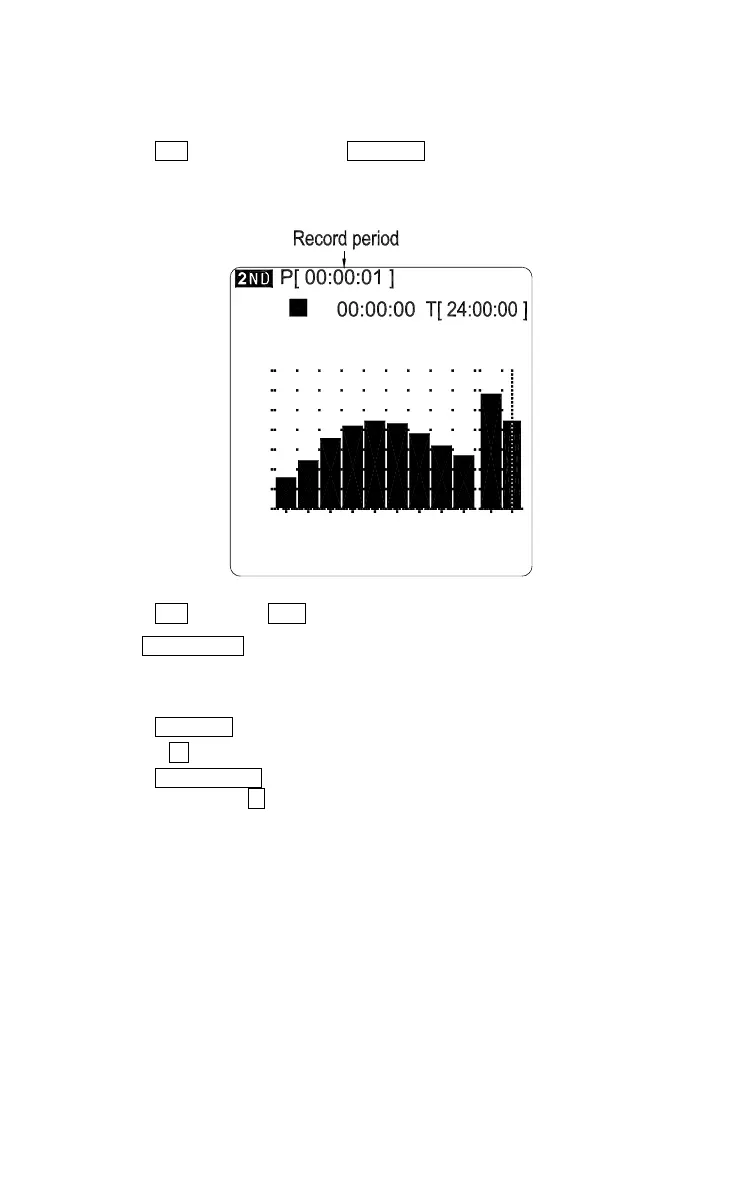
First set the datalogging sampling rate (how often a reading is stored). When in the auto
datalogging mode, parameter editing is disabled.
1. Setting the sampling rate: The default value is “0” indicating that datalogging is disabled.
Press the 2nd button, then press the MEMORY button to select the sampling rate from
the following list: 0sec (No recording)
1sec
3sec
10sec
30sec
1min
5min
8min
10min
15min
30min
1hr
8h
62.5ms. For example: with the rate set to 1
second, the display will read: P [00:00:01].
70
[ 1 / 1 OCT ] 01 / 07 / 27 14:26:39
31.5Hz
50
30
40
60
2k500125 8k L W
L
FAST
dB
90
80
100
WA 75.2 dB
2. Press the 2nd button, the 2ND annunciator will disappear from the screen.
3. Use the SLM/ 1/1/ 1/3 button to select the desired SLM, 1/1 or 1/3 octave band sound
pressure level measurement screen.
4. Set the preset measurement period (explained above in section X).
5. Press the MEMORY button to enter the memory mode; the upper portion of the LCD
will display “M [
∗∗∗∗
]”.
6. Press the START/STOP button, automatic datalogging will begin. The upper portion of
the screen will display “S Auto” and the “
” annunciator.





 To Next Page