VFL Series User Manual v2.0 10/20
8. Programming Menu 1 (User level)
• Press the SET key to access Menu 1 (User level).
• Continue to use the SET key to scroll through the menu. At the end of the menu you will
return to the normal operating screen. This applies to Menu level 1 only.
• In the menu, Use the SHIFT (<) key to select a digit for editing and then use the up/down
arrows to change a digit’s value.
• Use the SET key to continue to the normal operating screen when done editing.
• Long press the SET and SHIFT (<) keys for five (5) seconds to enter the Menu 2, 3, 4
‘Level’ selector screen and then use the up/down arrows to select a menu level.
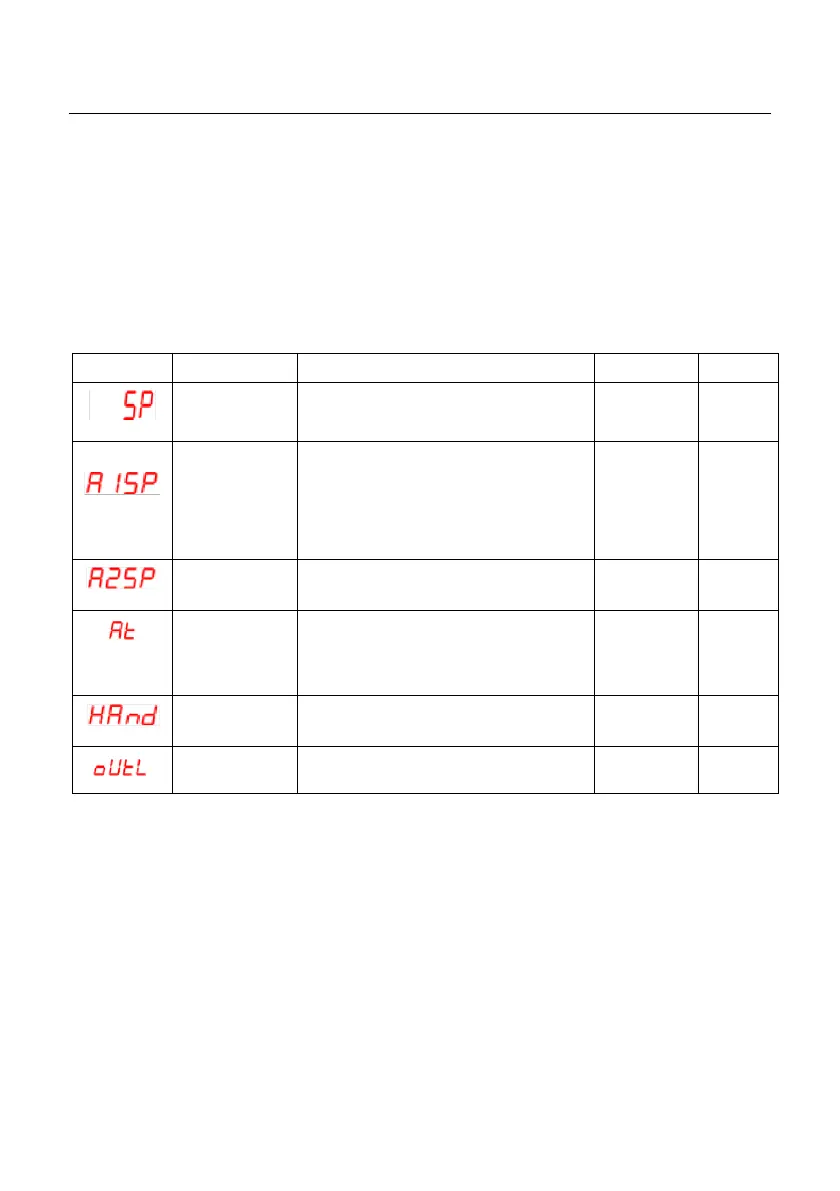
Main control setpoint. Adjustable with
up/down keys. Displayed on front panel
(SV).
Set the Alarm type using the ‘A1Fu’
parameter first, and then return here to
set the Setpoint; See Section 11.3 for
function list table. When an alarm is
configured as an ON/OFF Timer, set the
time here.
Same as Alarm 1 (using ‘A2Fu’).
Set to ‘no’ to disable. Set to ‘YES 1’
(normal mode) or ‘YES 2’ to start tuning.
‘YES 2’ is covered in the Auto Tune
section.
Set to ‘YES’ to control the output levels
manually with the arrow keys.
Control output level (%) is shown while in
the Manual control mode (see ‘Hand’).
*Note 1: Range and Default settings depend on range of the controller’s input type


 To Next Page