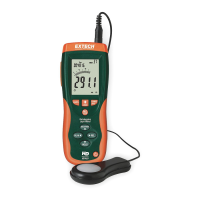
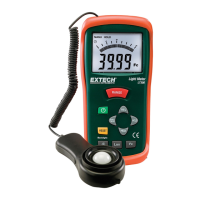
The Extech LT300 is a digital light meter designed for measuring light levels (illuminance) in both Lux and Foot-candle (Fc) units. This instrument is capable of measuring light levels up to 400,000 Lux or 40,000 Fc, making it suitable for a wide range of applications from general lighting assessments to more specialized tasks requiring precise light measurement.
Function Description
The primary function of the LT300 is to accurately measure and display light intensity. It utilizes a silicon photo-diode with a spectral response filter, designed to mimic the CIE photopic (human eye response curve), ensuring measurements are relevant to human perception of light. The device features a multi-function 3-3/4 (3999) digit LCD with a bargraph indicator, providing both a precise numerical reading and a visual representation of light level changes.
Usage Features
The LT300 offers a comprehensive set of features to enhance its usability and measurement capabilities:
- Units of Measure Selection: Users can easily switch between Lux and Foot-candle units by pressing dedicated LUX and Fc buttons, respectively.
- Range Selection: The RANGE button allows users to select the appropriate measurement range to achieve maximum resolution. If the "OL" (Over Load) indicator appears, it signifies that the light measurement is out of range, prompting the user to select a higher range.
- Backlit Display: For measurements in dimly lit environments, the LCD backlight can be activated by pressing the backlight button, improving readability.
- MAX/MIN Function: This feature enables the recording and display of the maximum and minimum light levels over a period. When activated, the meter can continuously track the highest ("MAX") or lowest ("MIN") readings. The display updates only when a new higher or lower reading is detected. Users can cycle through MAX, MIN, and flashing MAX/MIN (current reading while still recording) displays. To exit this mode, the MAX/MIN button must be pressed and held until the icons disappear.
- Data Hold: The HOLD button freezes the current displayed reading, indicated by the "MANU HOLD" icon. This is useful for recording readings without having to manually note them down immediately. While the numerical display is held, the analog bargraph continues to show real-time level changes.
- Peak Hold: The Peak Hold feature is designed to capture rapid light pulses, specifically those that rise or fall down to 10µs. By pressing and holding the PEAK button until "CAL" appears, then momentarily pressing it again, the meter enters Peak Hold mode. It will then display "PMAX" (Peak Maximum) values, holding the results until a higher pulse appears. Pressing PEAK again shows "PMIN" (Peak Minimum) values. To exit, the PEAK button is pressed and held until the "PMAX" or "PMIN" icons vanish.
- Relative Mode: This mode allows for measurements to be displayed as a difference from a stored reference value. To set a reference, the REL button is pressed when the desired measurement is on the LCD. The "REL" icon will illuminate, and all subsequent readings will be shown relative to this stored value. For example, if the reference is 100 units and the actual reading is 125 units, the display will show 25. To view the stored reference value, the REL button is pressed again, causing the "REL" icon to flash. Exiting this mode involves pressing and holding the REL button until the "REL" icon disappears.
- RESET Function: The RESET button clears all memory functions and exits from REL, HOLD, PEAK, and MAX/MIN modes. It also resets the auto power-off timer, ensuring continuous operation if needed.
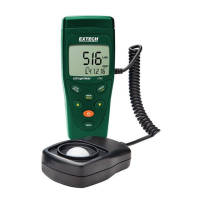
- Photo Sensor: The light sensor is permanently attached to the meter via a coiled cable, offering flexibility in positioning. It comes with a protective cap that should be removed to expose the white domed light sensor for measurements and replaced when not in use to protect the sensor.
- Ergonomic Design: The meter is encased in a protective rubber jacket, which enhances durability and provides a secure grip. The rear of the instrument includes a tilt stand and a tripod mount for convenient placement during measurements.
Maintenance Features
Proper maintenance ensures the longevity and accuracy of the Extech LT300:
- Cleaning: The white plastic sensor dome should be cleaned with a damp cloth and mild soap if necessary. Solvents, abrasives, or harsh detergents should be avoided to prevent damage to the dome.
- Storage: The meter should be stored in an area with moderate temperature and humidity, within the specified operating and storage ranges.
- Battery Replacement: The LT300 operates on a 9V battery. A low battery symbol will appear on the LCD when the battery power is failing. To replace the battery, the protective rubber jacket must first be removed, followed by unscrewing the rear (center) battery compartment cover. It is crucial to ensure the compartment cover is securely fastened and the protective jacket is properly reinstalled after battery replacement.
- Battery Disposal: Users are legally required to dispose of used batteries at appropriate collection sites, retail stores, or wherever batteries are sold, rather than in household waste.
- Device Disposal: The instrument itself should not be disposed of in household waste. End-of-life devices must be taken to a designated collection point for the disposal of electrical and electronic equipment.
- Battery Safety Reminders: Never dispose of batteries in a fire, as they may explode or leak. Always install new batteries of the same type and avoid mixing different battery types.
The Extech LT300 is designed to be a reliable and user-friendly tool for professionals and enthusiasts requiring accurate light level measurements, offering a blend of essential functions and advanced features for diverse lighting assessment needs.

 Need help?
 General



 To Next Page