TB400-en-GB_V1.3 8/16
6
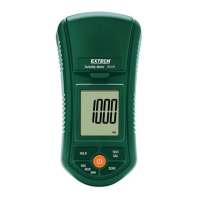
CalibrationClearProcedure
1. Thecalibrationclearprocedurewillclearallcalibrationvaluesandreturnthemeterto
defaultsettings.
2. PowerONthemeterwiththecoverclosedbutnotestingbottleinthechamber.
3. Pressthe"CAL"buttoncontinuouslyuntiltheLCDdisplays"CAL"
4. Waitonesecond;theLCD
willthendisplay:
5. Momentarilypressthe"HOLD"button.TheLCDwilldisplay:
6. Momentarilypressthe"HOLD"buttonagain.TheLCDwilldisplay:
7. MomentarilyPressthe"CAL"button.TheLCDwillflash"CAL"for10seconds:
8. Thecalibrationdatacleariscomplete.Themeter
willreturntonormaloperatingmode.
CAL
ntu
0.00
CAL ntu
CLr
CAL ntu
CAL
CLr
100
CAL ntu
w ww . . co m
information@itm.com1.800.561.8187




 To Next Page