EXTEL - WAVE 2 - 720321
en - 8
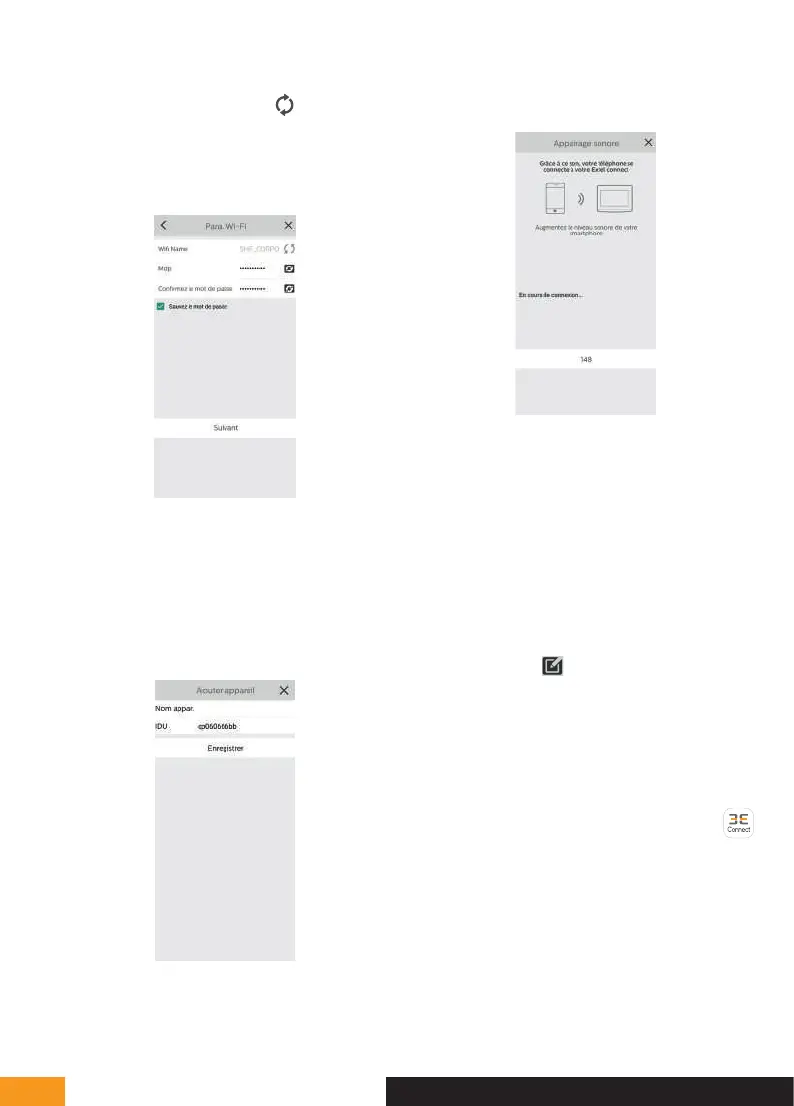
The WiFi network to which your phone is connected
appears. To change it, click on
. If no network
appears, your phone is probably on the mobile network.
When the WiFi network you want appears, enter the
WiFi password located on your internet box.
Place your phone next to the monitor microphone and
click “suivant” (next).
A Countdown will start so that the connection can
be made. Once you find the monitor, this screen will
display. Your mobile phone will emit a sound that
allows it to connect to your videophone.
Choose the name of the videophone that will appear
on the application
Your videophone is now connected to the WiFi network
and your smartphone can receive calls.
The first time you view the video stream, you will be
asked to customise your password.
Click on “Modifier mdp appareil” (Modify device
password).
The Avt box is already filled in. In the NV and Confirm
boxes, enter a password between 6 and 32 digits.
The password must not be made up of two identical
numbers in a row (ex: 202206 is not valid. 202106 is
valid). Next click on in the top right corner to save
the new password. Remember this password, as
it will be necessary to save the screen on another
smartphone.
Add a smartphone to a connected videophone
1- Download the Extel Connect application to your
smartphone from the Apple store or Play store
Note: Disable the smartphone's WiFi smart network
mode if it is activated.
D - INSTALLATION


 To Next Page