EXTEL - WAVE - 720313
en - 11
E - INSTALLATION
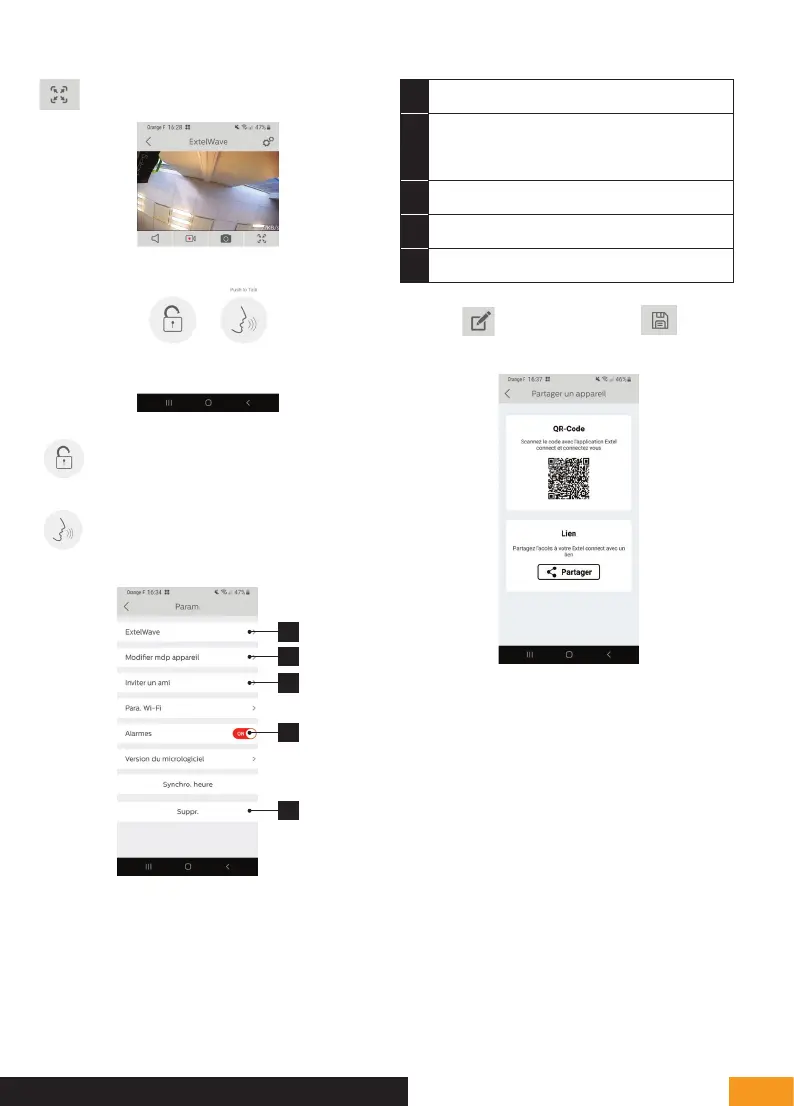
Full-screen mode
Open the electric strike plate or the gate
Press and hold to speak to
the visitor.
1
2
3
4
5
1
Used to rename your videophone
2 Used to change the opening command
password (disabled by default) and video
password
3
Invite a friend
4
Enables or disables call notifications
5
Used to delete a device from the account
Warning:
is used to modify and is used to
validate.
• QR Code: this QR code allows your
friends or family to simply connect to your
Extel Wave videophone. See chapter:
“Add a smartphone to a connected videophone”.
• Link: Share your Extel Wave videophone login details
with friends and family.
• Have your friends download the Extel Connect
application.
• Share the link using the messaging service of your
choice by pressing ‘Share’.
• Securely share your password.
• When you click on the link, your friend's Extel Connect


 To Next Page