EXTEL - WAVE - 720313
en - 7
7 - SMARTPHONE APPLICATION
Connecting a monitor to the WiFi network
1- Download the Extel Connect application onto your smartphone. From the Apple store or Play store
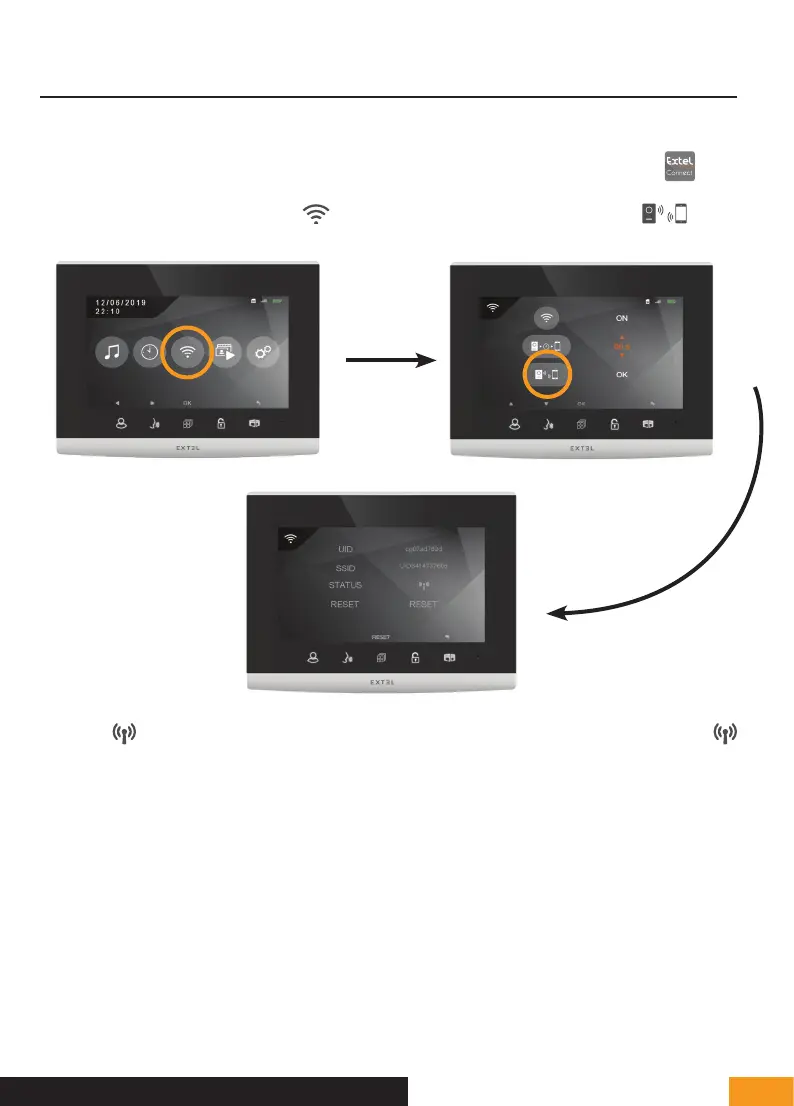
2- From the monitor, go to the WiFi menu then the pairing with your smartphone sub-menu
Note: If the icon does not appear on the third line, reset the WiFi by clicking on RESET, then wait for the
icon to appear (about 30 seconds).
The Extel Wave videophone works with all types of 2.4GHz or 5GHz WiFi. However, for optimum performance, we
recommend connecting your videophone to a 5GHz WiFi.
Before starting the pairing procedure, it is advisable to connect your smartphone to the WiFi to which you wish to
connect the videophone.
3 - From the Extel Connect application, click on + to add a device.
E - INSTALLATION


 To Next Page