EXTEL - WAVE - 720313
en - 14
F - MONITOR USER MANUAL
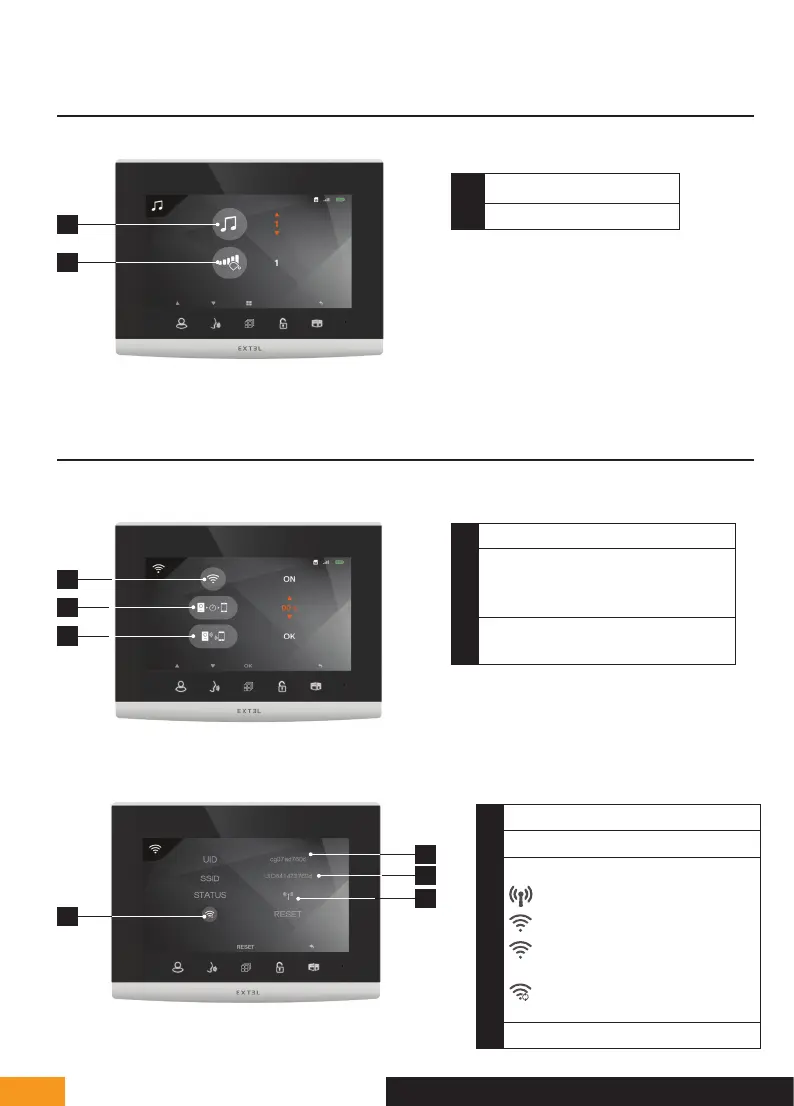
3 - SOUND ADJUSTMENT MENU
1
2
1
Doorbell melody selection
2
Ring volume
4 - WIFI SETTINGS
1 - Main menu
1
2
3
1
Turn the WiFi on or off
2
Adjusting the time between the call to
the intercom panel and the despatch of
the call to the smartphone
3
Access the pairing the videophone with
your smartphone sub-menu
2 - Smartphone pairing menu
4
1
Videophone ID
2
WiFi network connected
3
WiFi status
pairing mode
connected (if fixed icon)
connecting
(if dynamic icon)
WiFi rebooting
4
WiFi reboot
1
2
3


 To Next Page