EXTEL - WAVE - 720313
en - 13
F - MONITOR USER MANUAL
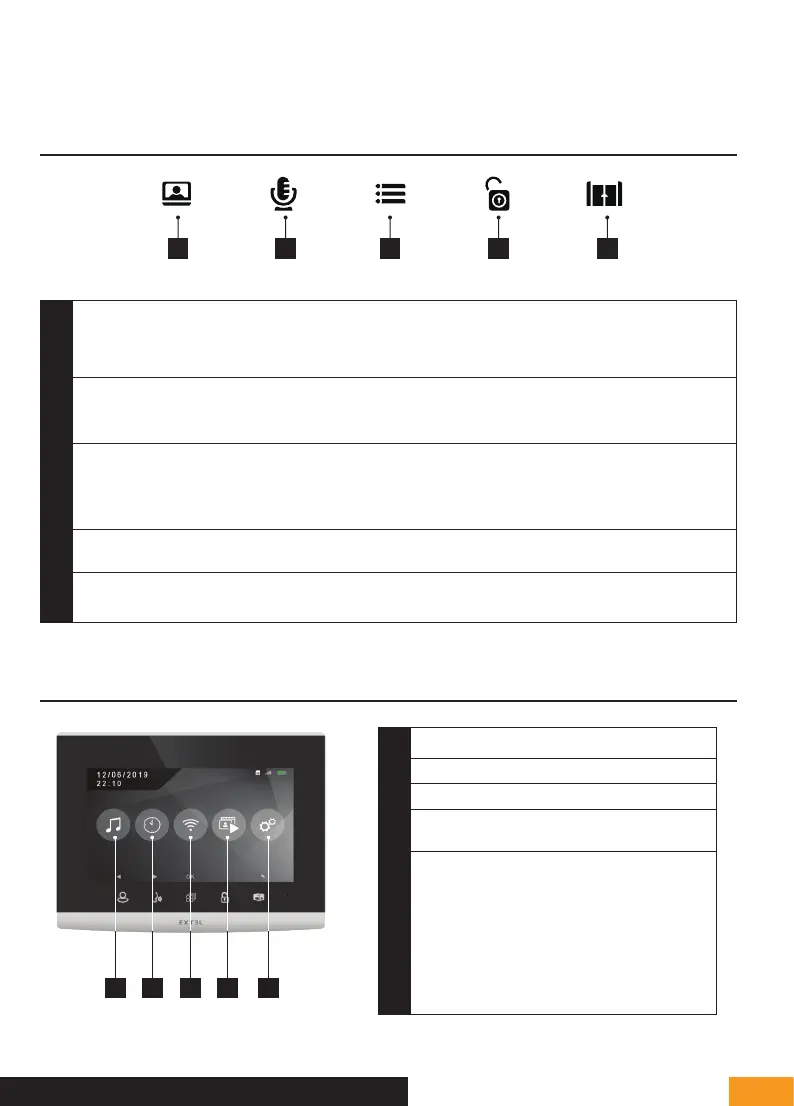
The Extel Wave videophone is controlled through touch-sensitive keys. The button functions vary depending on the menu
accessed. The icons at the bottom of the screen help guide you as to their use
1 - BUTTON FUNCTIONS
1 2 3 4 5
1
Screen off: Intercom panel preview (surveillance mode, only when the intercom panel is not battery-powered)
Menu: left arrow or up arrow
Call in progress: takes a photo
2
During communication: Starts/ends a call
In surveillance mode: initiates communication
Menu: right arrow or down arrow
3
Screen off: Enables touch keys and access to the time and then the menu by pressing again
Menu: OK (selection button).
Call in progress: Access the image settings
4
In call or surveillance mode:
Opening of the electric strike plate (only when the intercom panel is not
battery-powered)
5
In call or surveillance mode: Opens dry contact (gate motor drive)
Menu: Back/Exit (back button to parent menu)
2 - MAIN MENU
1
Sound adjustment (ring tone, volume)
2
Time and date settings
3
WiFi settings
4
Viewing video recordings
or photos
5
Advanced settings
- Silent – Do not disturb mode
- Pairing
- In your absence recording mode:
video or photo
- Erasing the memory
- Dry contact opening time
- Product reset
1 2 3 4 5


 To Next Page