c. Cable size
DISTANCE
from the camera to the
screen
INSTALLATION CABLE
to be used
COMMENTS
from 1 to 25 m
WITHOUT strike or
electrical lock
Four 6/10° wires
WITH strike or
electrical lock
Four 6/10° wires
+
Two 6/10° wires
Use an Extel electrical strike or
lock and a EXTEL WETR 14602,
230V~/12V~ transformer
WITH an automatic
gate opener
Four 6/10° wires
+
Two 6/10° wires
Connect directly the “external
control” pins of the automatic
gate opener to the pins 5-6 of the
monitor
from 25 m to 50 m
WITHOUT strike or
electrical lock
Four 1.5 mm2 wires
WITH strike or
electrical lock
Four 1.5 mm2 wires
+
Two 1.5 mm2 wires
Use an Extel electrical strike or
lock and a EXTEL WETR 14602,
230V~/12V~ transformer
WITH an automatic
gate opener
Four 1.5 mm2 wires
+
Two 1.5 mm2 wires
Connect directly the “external
control” pins of the automatic
gate opener to the pins 5-6 of the
monitor
from 50 to 100 m
WITHOUT strike or
electrical lock
Four 1.5 mm2 wires
WITH strike or
electrical lock
Four 1.5 mm2 wires
+
Two 1.5 mm2 wires
Use an Extel electrical strike or
lock and a EXTEL WETR 14602,
230V~/12V~ transformer
WITH an automatic
gate opener
Four 1.5 mm2 wires
+
Two 1.5 mm2 wires
Connect directly the “external
control” pins of the automatic
gate opener to the pins 5-6 of the
monitor
In any case, do not double the wires to increase size
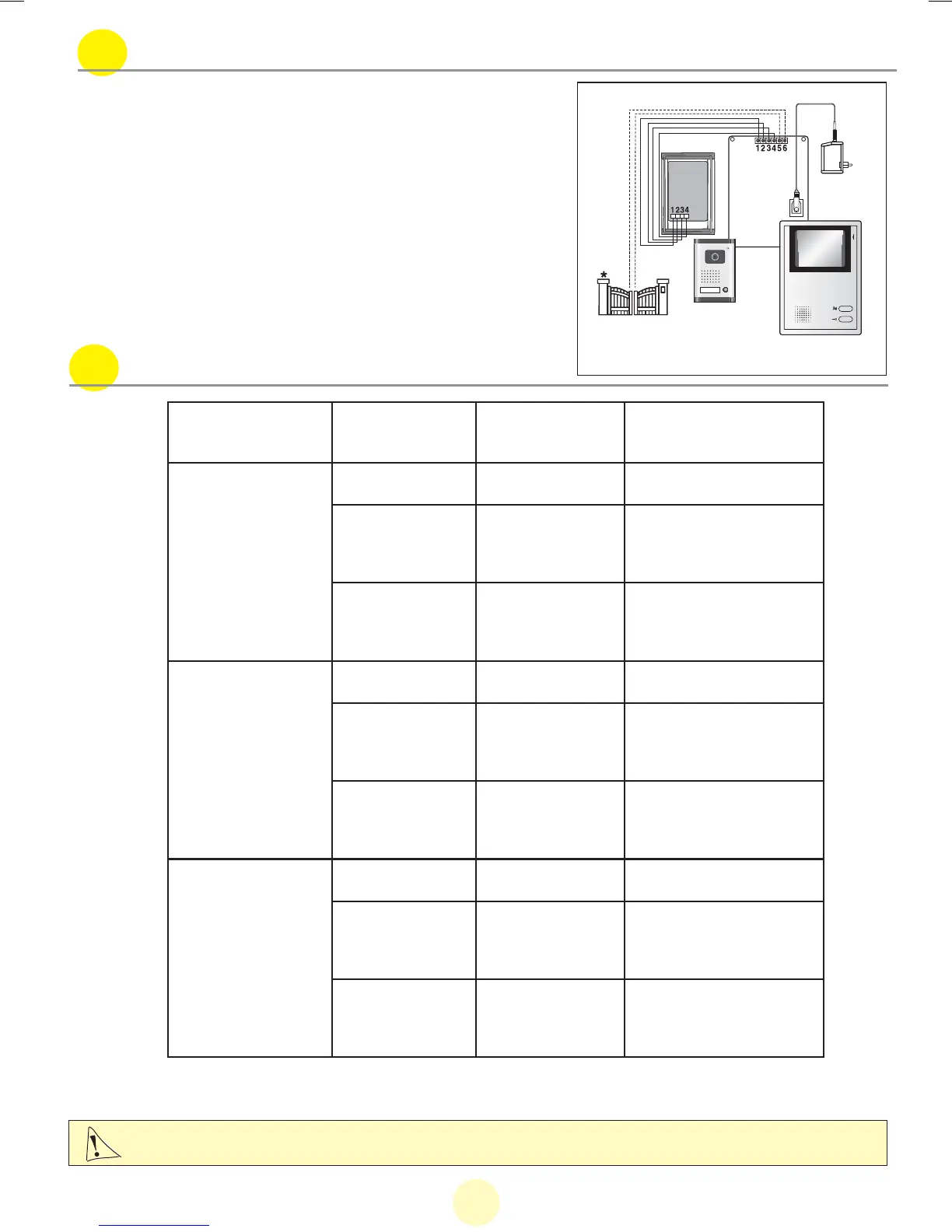
b. Wiring diagram for controlling an automatic gate opener
For controlling an automatic gate opener, directly con-
nect the “auxiliary control” pins of your automatic gate
opener to the pins 5 and 6.
* : Option
20










 To Next Page