AVT 200HD Tuner • Operation 25
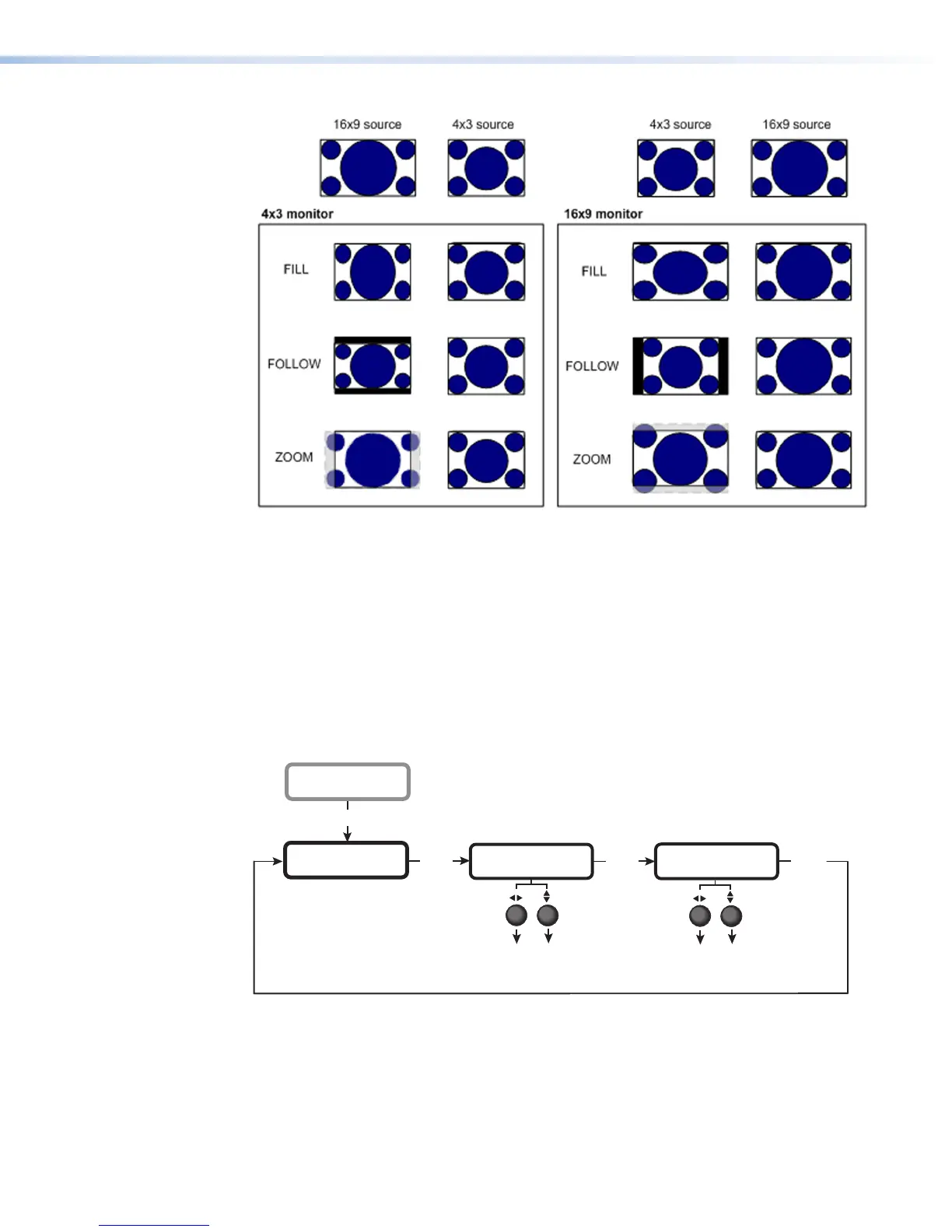
Figure 21. Display Modes for 4x3 and 16x9 Monitors
Selecting the closed caption service
The Caption submenu lets you enable closed captioning and select a service. The options are
Off (the default) or Service 1 through Service 6. Primary captioning service is provided
on Service 1 and secondary service, on Service 2. Services 3 through 6 can be used for
additional closed captioning if it is available.
Audio Configuration Menu
This menu enables you to select the digital audio output type and to specify the language
for a second audio program if the channel supports it.
AUDIO
CONFIGURATION
Next
DIGITAL OUT
AC-3
LANGUAGE
ENGLISH
Next
Menu
• AC-3 (Default)
• PCM
OUTPUT
CONFIGURATION
• ENGLISH (Default)
• SPANISH
• FRENCH
Next
Tu rn either Adjustment
knob to select a setting.
Figure 22. Audio Configuration Menu



 To Next Page