This document describes the Extronics iTAG XB BLE device, a Bluetooth Low Energy (BLE) beacon designed for tracking moving objects.
Function Description
The iTAG XB BLE is a versatile BLE beacon equipped with an accelerometer, a push button, and an LED light to indicate device status. Some models also offer over-the-air configurability. Its primary function is to track objects in motion, leveraging its built-in accelerometer and temperature sensors. The device operates through a series of configurable states: Storage, Button Pressed, Moved, and Idle, each with distinct beaconing behaviors to optimize battery life and tracking efficiency.
The device utilizes a two-stage motion detection engine to accurately determine if an asset is moving or stationary. The "Coarse Filter" handles short, unintended accelerometer interrupts, while the "Fine Filter" addresses short periods of motion start or stop. This intelligent filtering ensures reliable motion detection, preventing false positives from minor disturbances.
The iTAG XB BLE supports multiple beacon profiles, including Omni-ID Custom Beacon, Eddystone UID, Eddystone URL, Eddystone TLM, and iBeacon, allowing for flexible integration into various tracking systems. Advertisement and scan response data vary based on configuration, with options to include temperature, manufacturer data, local name, and specific beacon identifiers.
Configuration of the device is performed wirelessly using the "SenseBLE Control" PC application, which requires a TP-Link UB5A USB Dongle. This application allows users to read existing configurations, save new settings to a file, and write these configurations to the device over BLE. This over-the-air configurability simplifies deployment and management, enabling adjustments to beacon types, rates, motion detection sensitivity, and other parameters without physical access to the device.
Important Technical Specifications
Sensors:
- Accelerometer
- Temperature
Connectivity:
- Bluetooth Low Energy (BLE)
Beacon Profiles Supported:
- Omni-ID Custom Beacon
- Eddystone UID
- Eddystone URL
- Eddystone TLM
- iBeacon
Advertisement Data (Configurable GAP Records):
- Temperature Gap Record (0x16 - Thermometer Service)
- Manufacturer Data Gap Record (0xFF - Omni-ID Company ID 0x0AC0)
- Local Name Gap Record (0x08 - up to 10 characters)
- Service Data (for Eddystone TLM)
- UUID, Major, Minor (for iBeacon)
- URL Prefix and String (for Eddystone URL)
Battery Types (Model Dependent):
- iTAGXB10 (Sense Lite V2): Panasonic CR3032 (replaceable), 225 mAh
- iTAGXB20 (Sense Badge): HCB/Fanso CP304544, 1.3 Ah
- iTAGXB30 (Sense Asset): HCB/Fanso CP502440, 1.2 Ah
- iTAGXB40 (Sense Ultra): 2x replaceable Saft LS145000 3.6V, 2.6 Ah
Battery Voltage Monitoring:
- Measured every 30 seconds
- Reported in OID Custom Beacon and Eddystone TLM, or within scan response
- Device stops operation at 1.8V
Motion Detection Engine (Configurable Parameters):
- Motion Threshold: OTA programmable accelerometer threshold (0-10, 0=off, 10=most sensitive)
- Activity Window (Seconds): Length of ring buffer for event history (max 1 event/second)
- Activity Threshold (Seconds): Minimum interrupts within activity window to trigger "Active" state
- Stationary -> Moving Threshold (Seconds): Time device needs to stay active to change from stationary to moved state
- Moving -> Stationary Threshold (Seconds): Time device needs to stay stationary to change from moved to stationary state
- Moved State Time: Duration the "moved" flag persists after motion stops
Beaconing Rates (Configurable):
- Idle State: Default 5000 msec (can be configured for burst mode up to 5 packets, 100ms apart)
- Moved State: Default 200ms
- Button Pressed State: Default 100ms (connectable advertisement for 30 seconds)
Device MAC Address:
- Uses Random Static Address provided by Nordic ID (46-bit random number generated at manufacture)
Usage Features
Device States and Transitions:
- Storage State: Shipped in this state, device is asleep, BLE radio off to conserve battery.
- Wake-up Procedure: Push button for >3 seconds. Transitions to Button Pressed State, LED blinks 3 times. Beacons Omni-ID custom beacon at 100ms (non-connectable) while button is pressed, then advertises as connectable for 60 seconds for configuration.
- Power-on Self-test Mode: Short button press (<3 seconds) powers up device for 3 seconds, then reverts to storage state. LED blinks once. Beacons Omni-ID custom beacon every 100ms (non-connectable). On power cycle/battery replacement, beacons without entering storage state by default.
- Button Pressed State: Advertises Omni-ID custom beacon with Button Pressed state flag at 100ms (connectable for 30 seconds by default). Beacon type, rate, and state time are configurable.
- Idle State: Default state if no motion detected after Button Pressed state expires. Beacons with 5 types of interleaving beacons (connectable) at 5000 msec by default. Configurable for burst mode, beacon type, connectable/non-connectable, and rate. Interleaving works for beacon rates >1 second.
- Moved State: Triggered by accelerometer detection of movement. Beacons iBeacon as connectable at 200ms by default. Moved state is advertised in BLE payload. After timeout, reverts to Idle state, with moved flag persisting for 5 seconds by default. Beacon type, connectable/non-connectable, rate, and state time are configurable.
LED Status Indicator:
- Red LED indicates device status. Blinks rapidly 3 times on wake-up or state change (e.g., Button Pressed to Idle).
Configuration:
- Over-the-air configuration via "SenseBLE Control" PC application.
- Allows reading, saving, and writing configuration files to the device.
- Configurable parameters include beacon types, advertisement rates, motion detection sensitivity, and state durations.
- RSSI and Company ID filters in the PC tool help shortlist scanned devices.
Maintenance Features
Battery Replacement:
- iTAGXB10 (Sense Lite V2): Requires a CR2032 battery. Untighten four 2.5mm hexagonal head captive screws to 0.5Nm. Carefully remove case upper, PCB, and then use a flat head screwdriver to release the battery from its holder. Install new battery (Panasonic CR2032 only) noting polarity, ensuring clips secure it. Reinstall PCB, gasket (flat and correctly located), and case upper. Torque tighten screws to 0.5Nm to ensure IP68 rating.
- iTAGXB40 (Sense Ultra): Requires two Saft LS14500 batteries. Unscrew four captive screws. Lift case cover opposite hinge side. Carefully remove batteries, noting polarity. Install new batteries, ensuring they are clipped firmly. Ensure gasket is flat and correctly positioned. Close case cover and torque tighten four captive screws to 0.7Nm to ensure IP68 rating.
Important Warnings for Battery Replacement:
- Use only specified battery types.
- Replace batteries in a dry, clean environment to prevent water/debris ingress.
- Dispose of old batteries responsibly.
- Under-tightening screws can cause leaks.
- Over-tightening screws can damage brass inserts.
- Ensure two-part casing is correctly screwed back together to maintain ingress protection.
General Care and Maintenance:
- Do not attempt to open or disassemble the device.
- Do not submerge the device in deep water (> 1m).
- Do not use harsh chemicals, cleaning solvents, or strong detergents. Use only water and soap or a dry cloth for cleaning.
- Do not paint the device.
- Keep the device out of reach of small children.
Recycling and Disposal:
- Return used electronic devices, batteries, and packaging materials to dedicated collection points.
- The crossed-out wheeled-bin symbol indicates that the product should not be treated as household waste.
- Batteries do not contain Mercury (Hg), Cadmium (Cd), or Lead (Pb).

 Need help?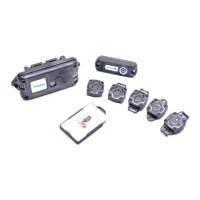

 To Next Page
 General