1, Use “safety remove” option to remove your USB drive or HDD after format from computer, DO
NOT just plug out without click “safety remove” option, otherwise you will cause problem during
recording.
2, Some HDMI video sources may have HDCP protection; you cannot get the pass through video and
record it.
3,The device(PS3) need to with HDMI Splitter to decode HDCP,if not,will can not working.
And for PS4, if not with HDMI Splitter, will need to disabled HDCP option (check the steps as below).
4, Note: Disable HDCP option is only for game play, not for blue ray DVD play
PS4 Setting:
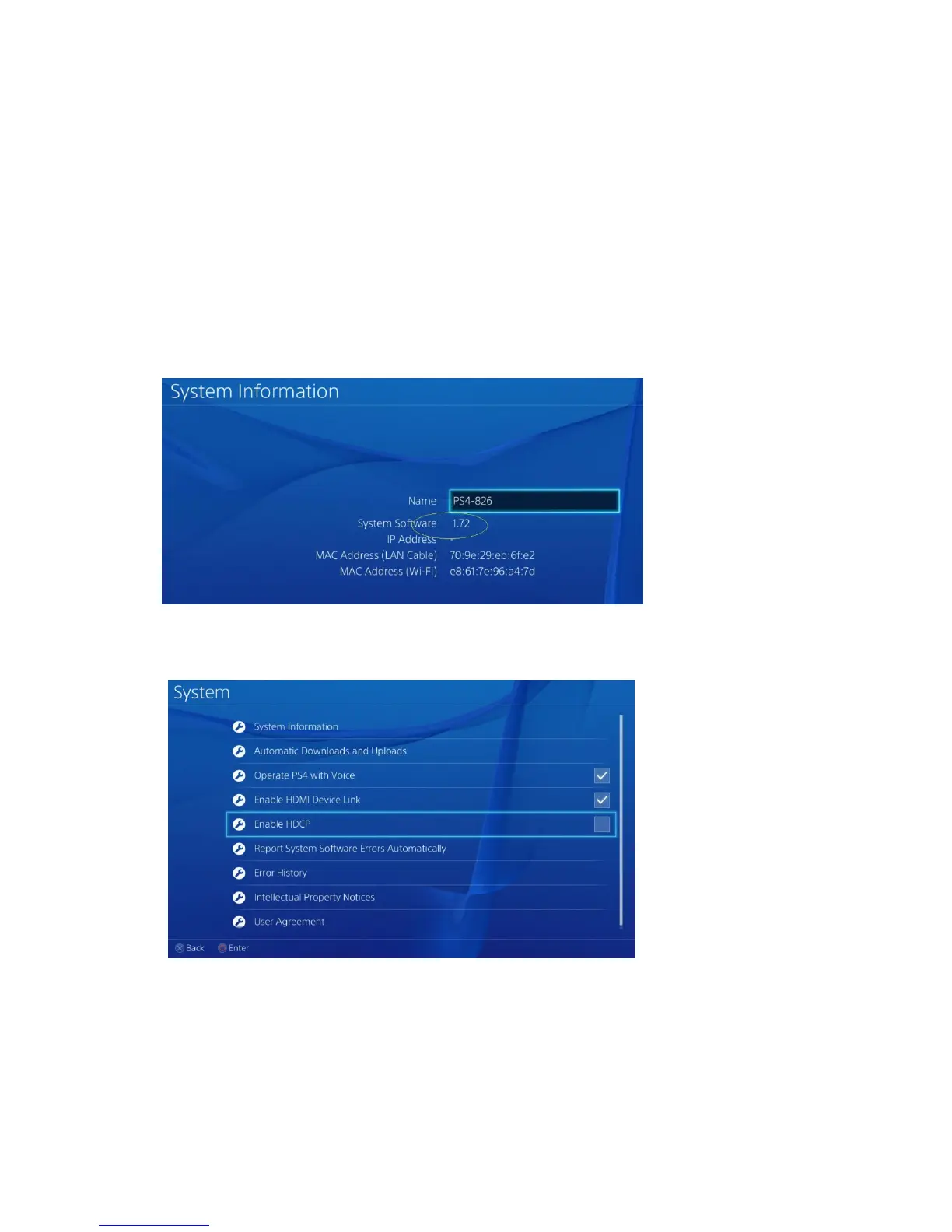
(1) It has disabled HDCP option for firmware 1.7 or later, Make sure the system is 1.7 later:
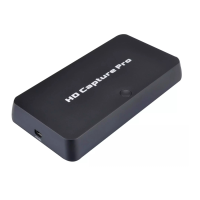
(2)Go settings---System disable “Enable HDCP” option:
Connect with YPBPR component video source (such as DVD
player, PS3. Etc):
Note: Don’t need to read the part if you bought ezcap280HB model.


 To Next Page