Home
EzCAP
PCI Card
ezcap280
Page 7
EzCAP ezcap280 - Page 7
24 pages
Manual
Save Page as PDF
To Next Page
To Next Page
To Previous Page
To Previous Page
Loading...
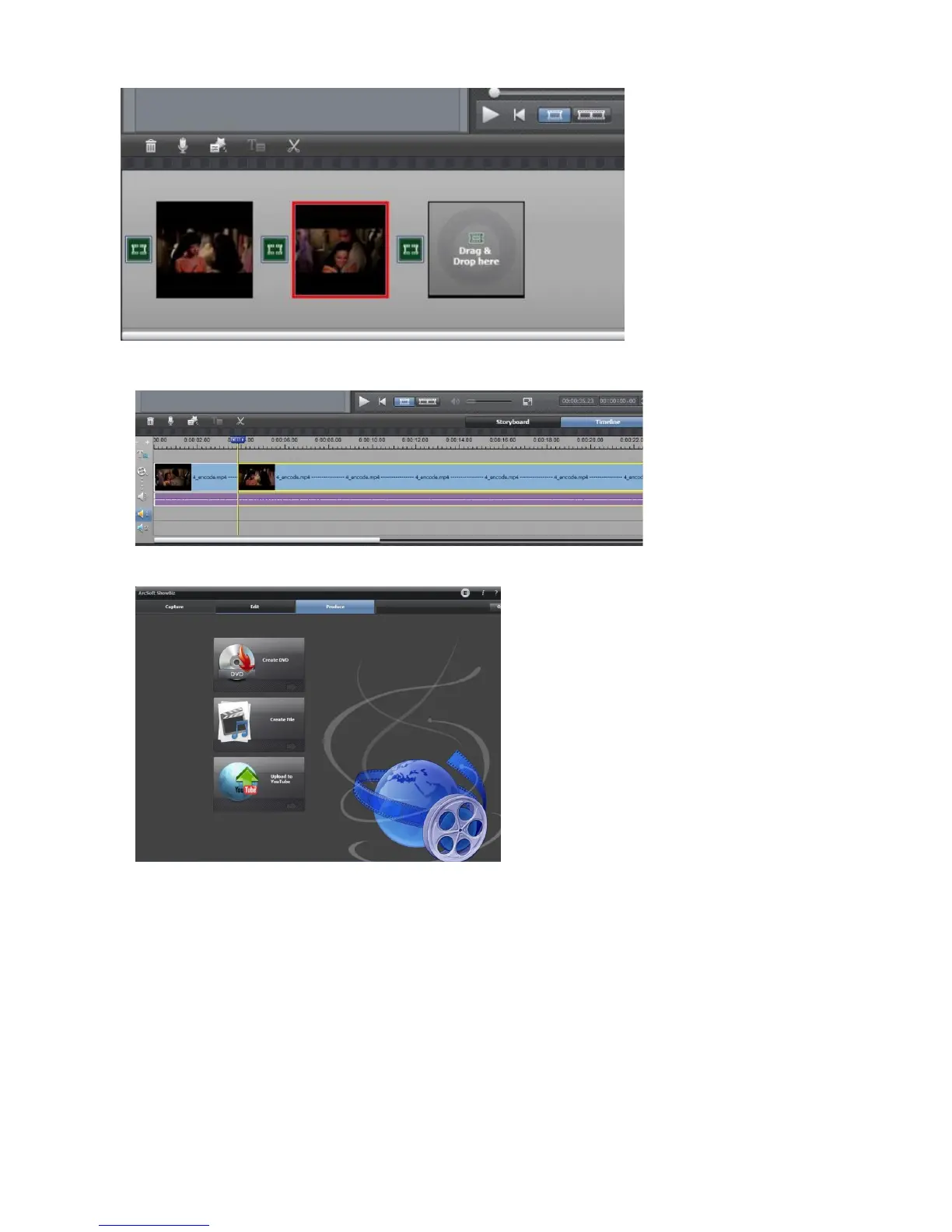
2,
Y
ou can cut a video t
o two or more:
3,
Click
“
Pro
duce
”
aft
er editing, you
can create DV
D or upload vide
o to
Y
ouTub
e:
4, Please c
lick
“
Create file
”
to create multip
le files for dif
ferent devic
es, such as apple,
PSP
, mobile
phone, etc:
6
8
Table of Contents
Main Page
Features/Ports and Buttons
1
Connections
2
Connect with HDMI Input Source
2
PS4 Setting
3
Connect with YPBPR Component Video Source
3
PS3 Setting: for the Component Input
4
Record
5
Firmware and Others
6
Edit/Convert Recorded Files
6
Specifications
8
Package Contents
8
Faq
10
Related product manuals
EzCAP ezcap295 HD Capture Pro
26 pages
EzCAP ezcap324
18 pages
EzCAP 284
49 pages
EzCAP 159
3 pages
EzCAP Live Gamer RAW
18 pages


 To Next Page