4
3 Functions
of each button
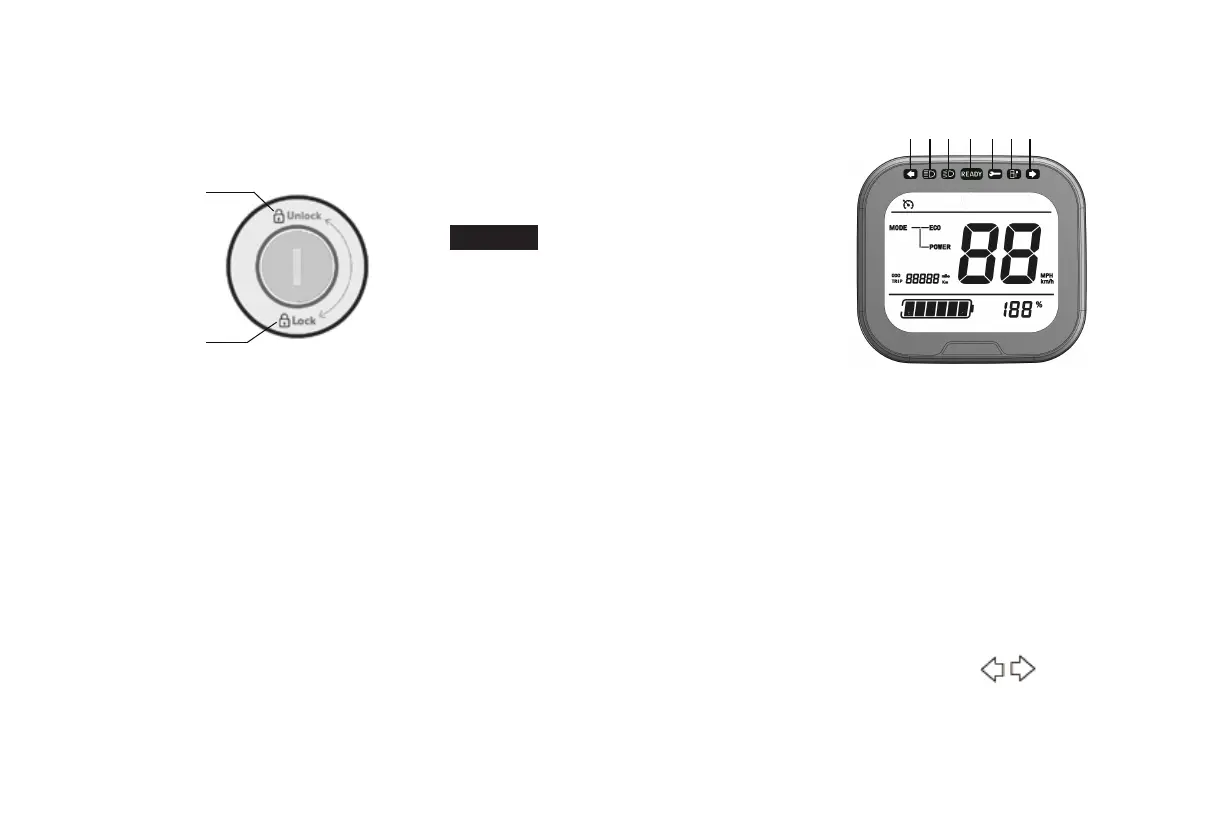
Steering lock
Unlock
Lock
Lock
In this position, the steering rudder
can be locked, the scooter cannot be
moved, the key can be removed.
To lock the steering
1.Turn the scooter steering to the left;
2.Insert the key into the steering lock;
3.Turn the
key to [Lock] position form
the position of [Unlock]
4.Remove the key.
To open the steering lock
1.Insert the key into the steering lock;
2.Turn the key to [UnLock] position
3.Remove the key
Warning
D
o not turn the key to the
[Lock] position while the scooter is
running, otherwise the scooter will be
lose control or accidents. Whether the
steering rudder is locked or not, the
key must be removed during use.
Indicator lights and warning lights
1 2 3 4 5 6 1
1.Turn signal indicator
2.High beam indicator
3.Low beam indicator
4.Ready indicator
5.fault light
6.Battery warning light
Direction indicator
W
hen pushing the turn signal switch to
the left or right,this indicator starts to
flash.


 To Next Page