About the 2000/4000 Series platform
Before you install the 2000/4000 Series platform, review helpful information about the controls and ports
located on both the front and the back of the platform.
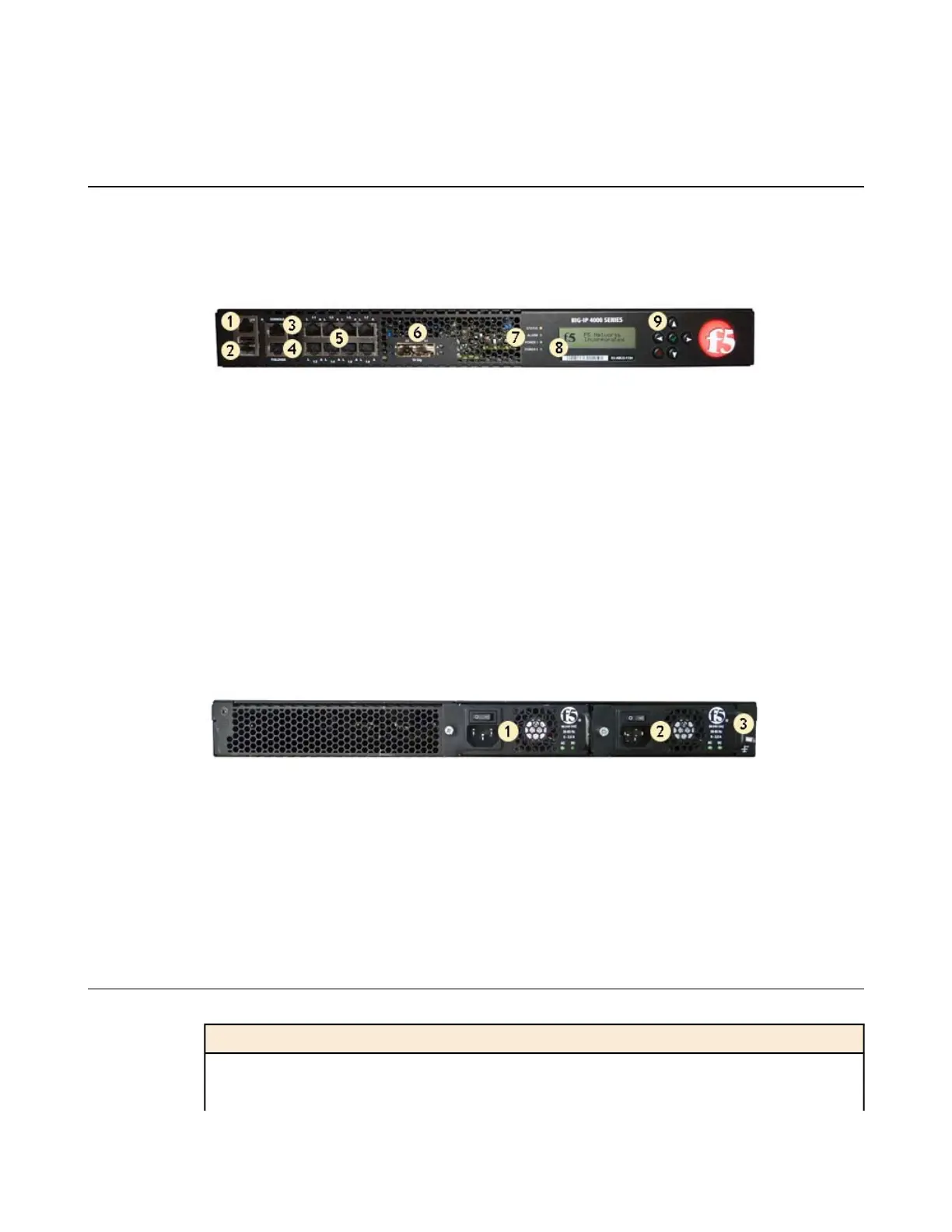
On the front of the platform, you can reset the unit using the LCD panel. You can also use the front-panel
LEDs to assess the condition of the unit. On the back of the unit, you can power off the main power.
1. Management 10/100/1000 Ethernet port
2. USB ports
3. Console serial port
4. Serial (hard-wired) failover port
5. 10/100/1000 interfaces
6. 1/10G SFP+ ports
7. Indicator LEDs
8. LCD display
9. LCD control buttons
Figure 1: Front view of the platform
The back of the platform includes one power supply by default. Optionally, you can install a second power
supply.
1. Power input panel 1 (power switch and power receptacle)
2. Power input panel 2 (power switch and power receptacle)
3. Chassis ground lug (with cover)
Figure 2: Back view of the platform
Components provided with the platform
When you unpack the platform, verify that the following components are included.
HardwareQuantity
Power cable (black), AC power only1
DC terminal block plug, DC power option only1
8
About the 2000/4000 Series Platform


 To Next Page