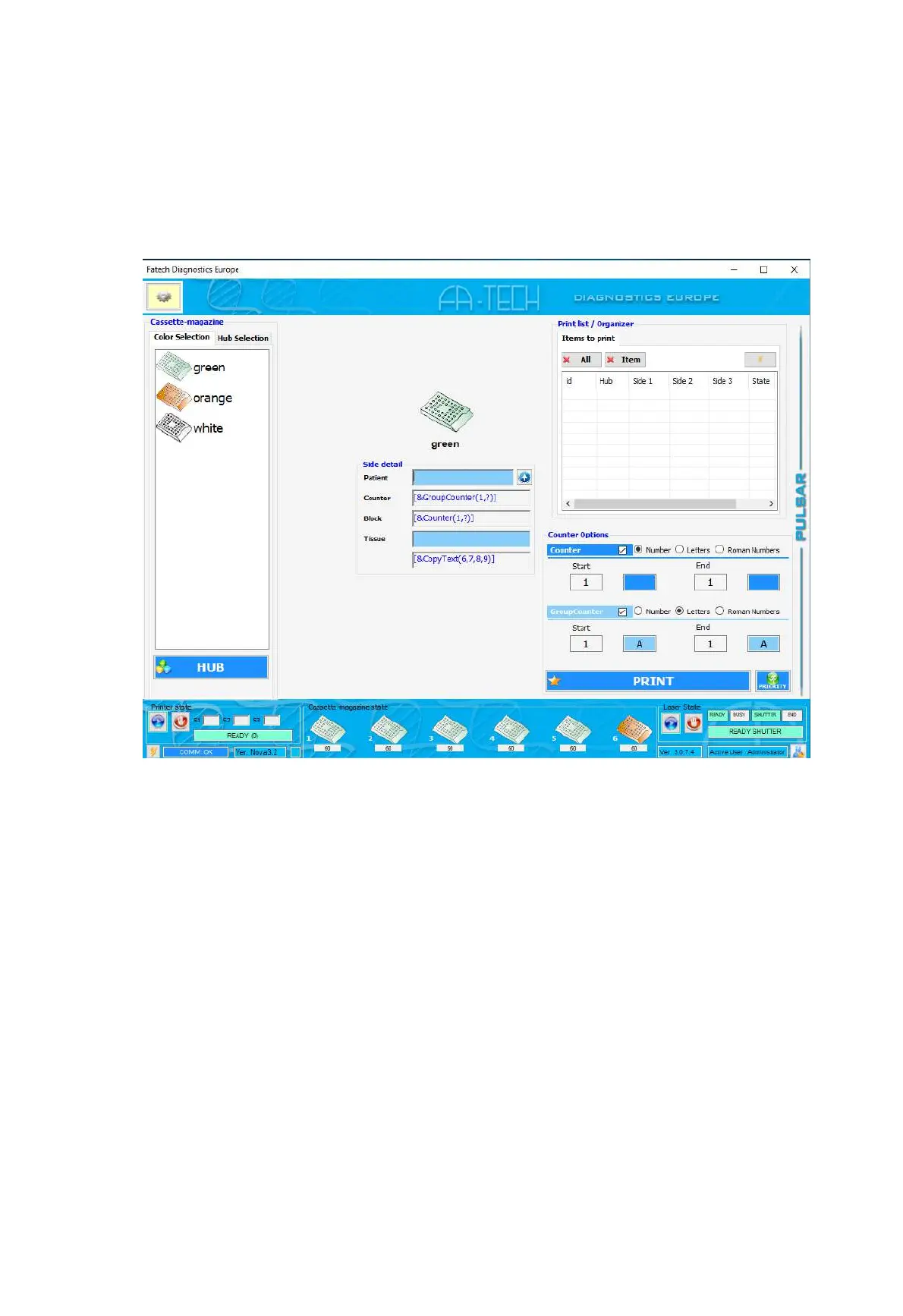
Printing Cassettes
1. First, place the cursor in the Accession field “Patient”, you can enter the data either manu-
ally or scanning in the accession number (12 characters max). The cursor should advance
to the next data field.
2. Select the cassette colour
3. Input the cassette number in Counter “End”
4. Select “Print”
Prioritizing Cassettes
When a cassette of any type is required with priority (Ex “Reprint”/“Extra cassette”) it is
possible to either press the function “Priority” or send a command through the LIS as
follows:
DT;1;
S2;#1#123456;#2#A;#3#/1;#4#L1;#5#123456 A 1 L1;
PR;1;
Adding Cassette
To add or edit cassette click on “HUB” and you will get a new screen “Modify cassette-magazine”.
If you loaded manually a stack of cassettes in a specific hub/hoppere, select it on the list and click
“Load Hub”.


 To Next Page