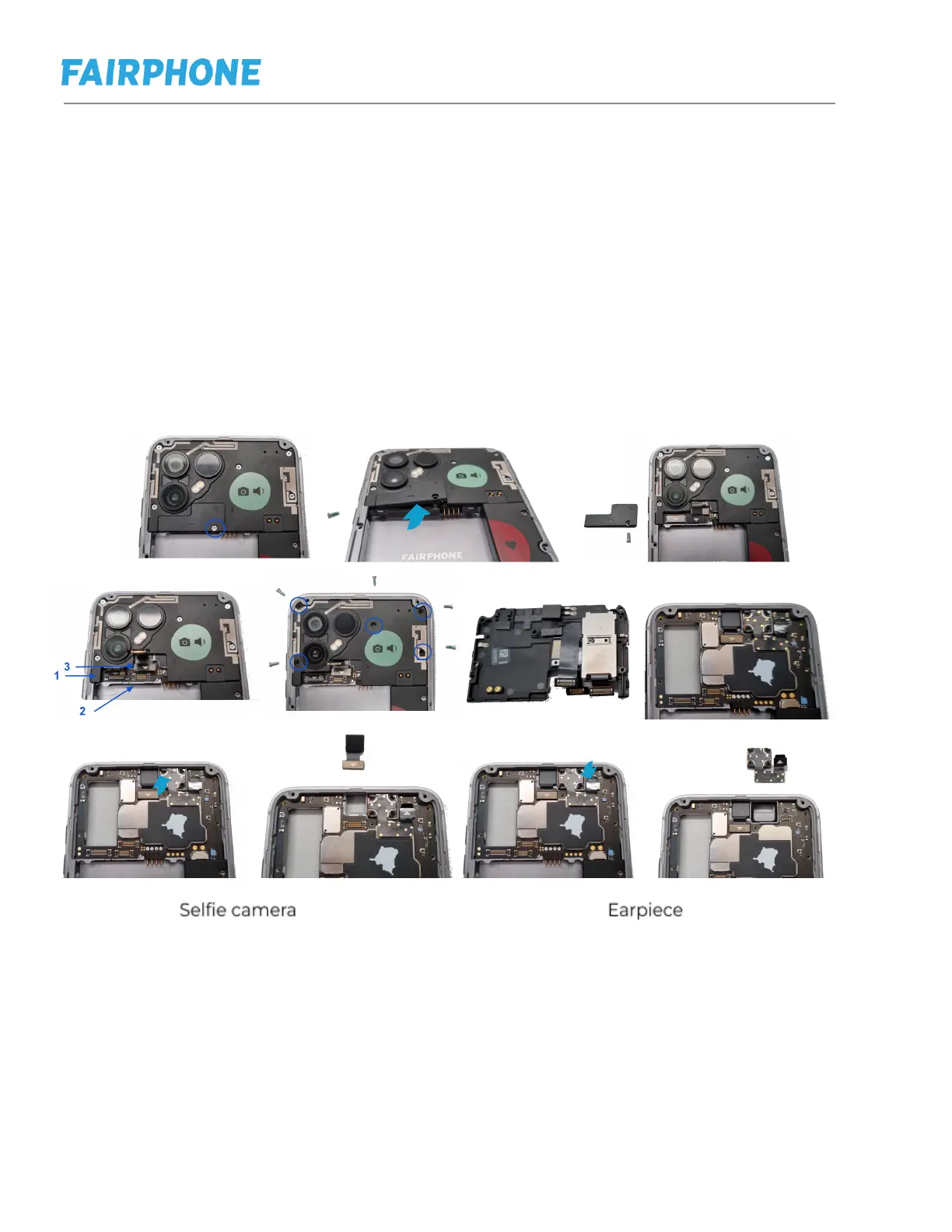
g. Replacing Rear Cameras, Selfie Camera or Earpiece
Step 1: Follow instructions to replacing Back Cover (NFC Antenna) and Battery (e)
Step 2: Remove Camera Connectors Lid Screw
Step 3: Lift up and remove Camera Connectors Lid
Step 4: Lift up 3 Connectors
Step 5: Remove 5 Rear Cameras Screws (Silver)
Additional step if you are replacing the selfie camera or the earpiece, change at
this point any of the two.
Step 6: Put new camera on the right position and click it in
Step 7: Connect back the 3 connectors (pay special attention to the first connector
is hidden behind a cable).
Step 8: Screw all the screws back
Step 9: Place the Camera Connectors Lid back, by introducing first the small lip on
the left side and then placing back the screw.


 To Next Page