15
16
After you use one phone to get your camera connected, if you would like to add your camera to
the second phone.
How to connect the camera to the second Phone?
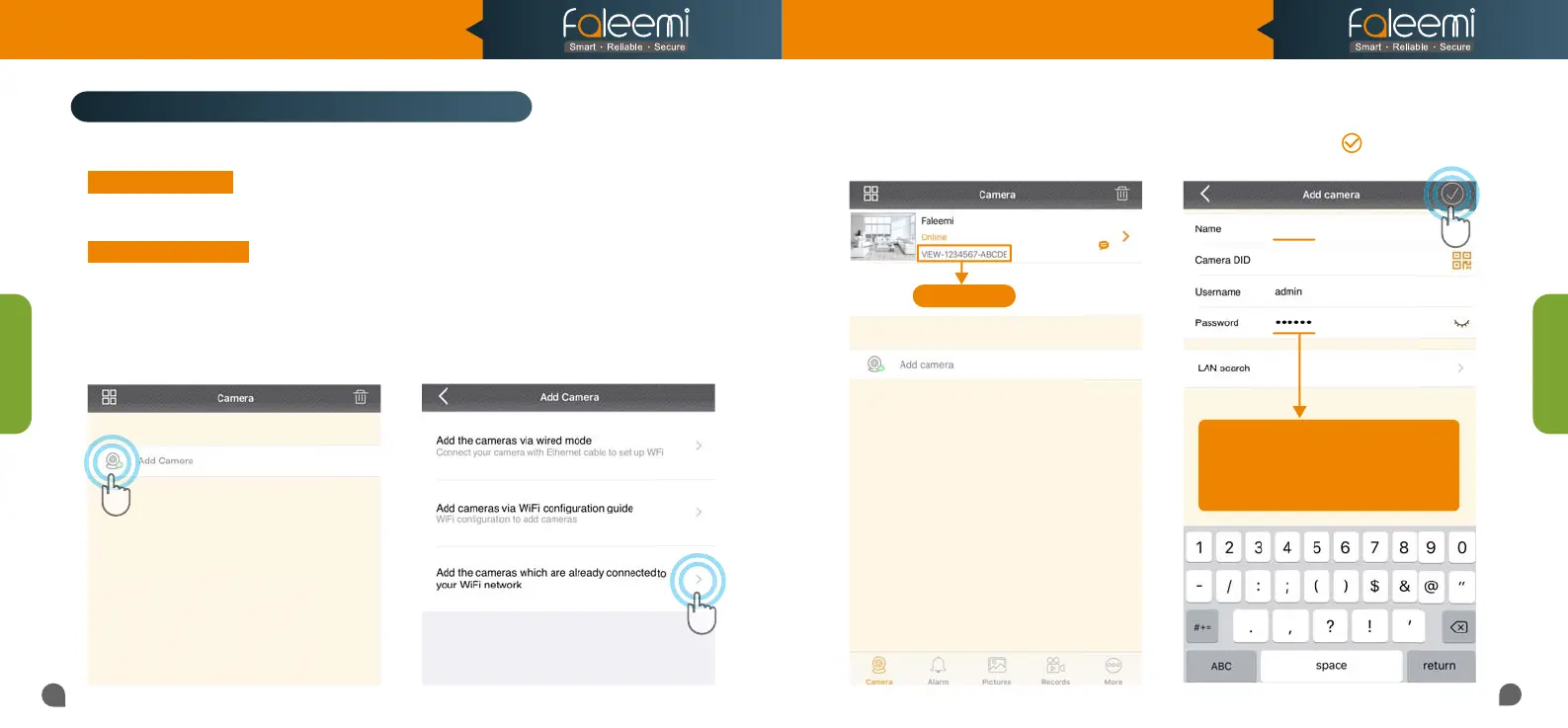
2. Open the Faleemi App,
Click on [Add Camera].
1. Download the Faleemi App to your second
phone.
3. Click on [Add the cameras which are
already connected to your WiFi network].
4. Please find your camera DID (something
like VIEW-1234567-ABCDE) in your first
phone or the label on the camera.
5. Give your camera a name, and input Camera
DID, Password, click on [ ].
It will take you to the home page.
Faleemi
VIEW-1234567-ABCDE
Camera DID
Tips:
Default
(123456), but if you changed
the password on your first phone, please
the password on your first phone, please
enter your new password here.
enter your new password here.
Option B Remotely
Option A Locally
If your second phone can be connected to the same WiFi as your camera, please follow the instruction
in
Page 5.
If your second phone can not be connected to the same WiFi, please follow below instructions.
Add Camera
Add Camera
Model: FSC776B/W
Quick Start Guide
HD Pan/Tilt Wireless Network Camera



 To Next Page